
1. Rhagymadrodd
The Lenco BT-210 Light is a versatile Bluetooth stereo speaker designed for portable audio playback. It features integrated LED lighting, which can be controlled via a dedicated application, and offers multiple connectivity options including Bluetooth, AUX-in, and USB. This manual provides essential information for the safe and efficient use of your speaker.
2. Gwybodaeth Diogelwch
- Darllenwch yr holl gyfarwyddiadau yn ofalus cyn defnyddio'r ddyfais.
- Cadwch y llawlyfr hwn er mwyn cyfeirio ato yn y dyfodol.
- Peidiwch ag amlygu'r ddyfais i law, lleithder na thymheredd eithafol.
- Avoid placing the device near heat sources such as radiators, heat registers, stoves, or other apparatus (including amplifyddion) sy'n cynhyrchu gwres.
- Defnyddiwch atodiadau/ategolion a nodir gan y gwneuthurwr yn unig.
- Datgysylltwch y ddyfais yn ystod stormydd mellt neu pan na chaiff ei defnyddio am gyfnodau hir.
- Peidiwch â rhwystro unrhyw agoriadau awyru. Gosodwch yn unol â chyfarwyddiadau'r gwneuthurwr.
- Amddiffynnwch y llinyn pŵer rhag cael ei gerdded ymlaen neu ei binsio, yn enwedig wrth blygiau, cynwysyddion cyfleustra, a'r pwynt lle maent yn gadael y cyfarpar.
3. Cynnwys Pecyn
Gwiriwch fod yr holl eitemau yn bresennol ac mewn cyflwr da:
- Lenco BT-210 Light Bluetooth Stereo Speaker
- Cebl Codi Tâl USB
- AUX-in Cable (3.5mm)
- Llawlyfr Defnyddiwr
4. Cynnyrch Drosview
Familiarize yourself with the various parts of your Lenco BT-210 Light speaker.
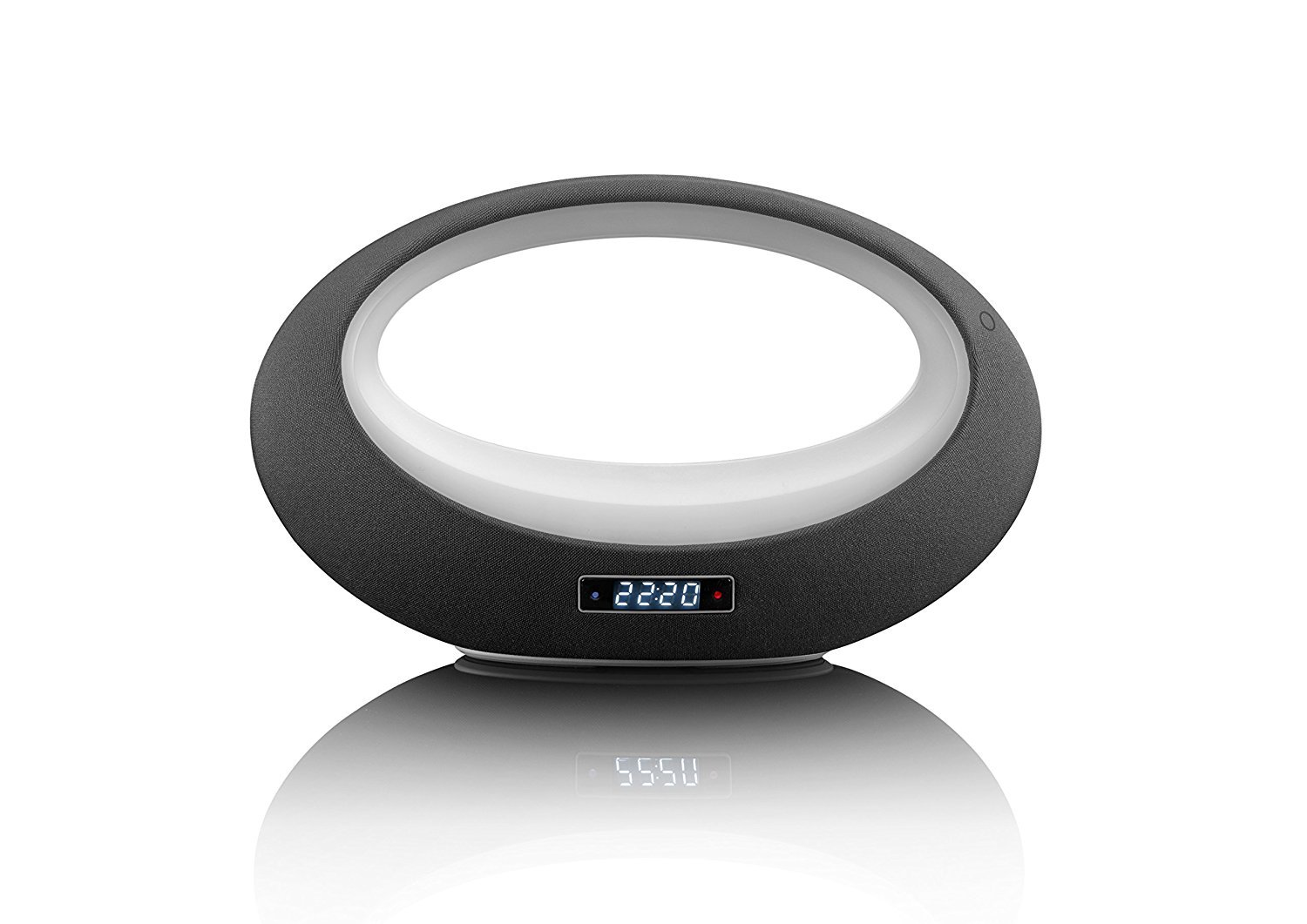
Ffigur 1: Blaen view of the Lenco BT-210 Light speaker, showing the central LED light ring and the digital display.

Ffigur 2: Yn ol view of the Lenco BT-210 Light speaker, illustrating the various input ports and control buttons.
Rheolaethau a Phyrth:
- Botwm Pŵer: Yn troi'r siaradwr ymlaen neu i ffwrdd.
- Cyfrol i fyny/i lawr: Yn addasu'r lefel allbwn sain.
- Botwm Chwarae/Seibiant: Yn rheoli chwarae cyfryngau.
- Botwm Modd: Switches between Bluetooth, AUX, and USB input modes.
- Botwm Rheoli Golau LED: Cycles through LED light modes or turns them off.
- Mewnbwn DC 5V: Ar gyfer gwefru'r batri mewnol.
- AUX-in Port (3.5mm): Ar gyfer cysylltu dyfeisiau sain allanol trwy gebl.
- Porth USB: Ar gyfer chwarae sain o ddyfeisiau storio USB.
5. Gosod
5.1 Gwefru'r Siaradwr
- Connect the supplied USB charging cable to the DC 5V input port on the speaker.
- Cysylltwch ben arall y cebl USB ag addasydd pŵer USB cydnaws (heb ei gynnwys) neu borthladd USB cyfrifiadur.
- Bydd y golau dangosydd gwefru yn goleuo. Caniatewch tua 3-4 awr ar gyfer gwefr lawn.
- Unwaith y bydd wedi'i wefru'n llawn, gall y golau dangosydd newid neu ddiffodd. Datgysylltwch y cebl gwefru.
5.2 Pweru Ymlaen/Diffodd
- I Bweru Ymlaen: Press and hold the Power button for a few seconds until the display lights up and you hear an audible prompt.
- I Bweru i ffwrdd: Pwyswch a daliwch y botwm Pŵer eto nes bod yr arddangosfa'n diffodd.
6. Cyfarwyddiadau Gweithredu
6.1 Pâr Bluetooth
- Ensure the speaker is powered on and in Bluetooth mode. If not, press the Mode button until 'Bluetooth' or a similar indicator appears on the display. The LED light will flash, indicating it's in pairing mode.
- Ar eich ffôn clyfar, tabled, neu ddyfais arall sydd â Bluetooth, galluogwch Bluetooth a chwiliwch am ddyfeisiau sydd ar gael.
- Select "Lenco BT-210 Light" from the list of devices.
- Once paired, the speaker will emit a confirmation sound, and the LED light will stop flashing. You can now play audio from your device through the speaker.
6.2 Modd AUX-mewnbwn
- Connect one end of the 3.5mm AUX-in cable to the AUX-in port on the speaker.
- Cysylltwch ben arall y cebl â'r jac clustffonau neu allbwn sain eich dyfais sain allanol.
- Press the Mode button on the speaker until 'AUX' or a similar indicator appears on the display.
- Chwaraewch sain o'ch dyfais allanol. Addaswch y gyfrol ar y siaradwr a'ch dyfais.
Chwarae USB 6.3
- Mewnosodwch yriant fflach USB sy'n cynnwys sain MP3 files i mewn i'r porthladd USB ar y siaradwr.
- Press the Mode button on the speaker until 'USB' or a similar indicator appears on the display.
- The speaker will automatically begin playing audio files from the USB drive. Use the Play/Pause and Volume buttons to control playback.
6.4 Rheoli Golau LED
The integrated LED lighting can be controlled directly from the speaker or via a dedicated application (if available). Press the LED Light Control button to cycle through different light modes or to turn the lights off. Refer to the product's official website or app store for information on the companion application for advanced control.
6.5 Rheoli Cyfaint
Use the Volume Up (+) and Volume Down (-) buttons on the speaker to adjust the playback volume. For Bluetooth and AUX modes, you may also need to adjust the volume on your connected device.
7. cynnal
- Glanhau: Use a soft, dry cloth to clean the exterior of the speaker. Do not use liquid cleaners or abrasive materials.
- Storio: Pan nad yw'n cael ei ddefnyddio am gyfnodau hir, storiwch y siaradwr mewn lle oer, sych i ffwrdd o olau haul uniongyrchol a thymheredd eithafol.
- Gofal Batri: Er mwyn ymestyn oes y batri, osgoi rhyddhau'r batri'n llwyr yn aml. Gwefrwch y siaradwr yn rheolaidd, hyd yn oed os nad yw'n cael ei ddefnyddio.
8. Datrys Problemau
| Problem | Achos Posibl | Ateb |
|---|---|---|
| Nid yw'r siaradwr yn troi ymlaen. | Mae batri wedi'i ddisbyddu. | Gwefrwch y siaradwr gan ddefnyddio'r cebl USB a gyflenwir. |
| Dim sain. | Volume is too low or muted. Incorrect input mode. | Increase volume on speaker and connected device. Press the Mode button to select the correct input. |
| Mae paru Bluetooth yn methu. | Speaker not in pairing mode. Device too far. Interference. | Ensure speaker is in Bluetooth pairing mode. Move devices closer. Turn off other Bluetooth devices. |
| AUX-in not working. | Cable not connected properly. Incorrect mode. | Check cable connections. Ensure speaker is in AUX mode. |
| Nid yw chwarae USB yn gweithio. | USB drive not formatted correctly or unsupported file mathau. | Ensure USB drive is formatted to FAT32 and contains MP3 files. |
9. manylebau
| Nodwedd | Manyleb |
|---|---|
| Brand | Lenco |
| Model | BT-210 Light |
| Lliw | Anthracite/Gwyn |
| Dimensiynau Cynnyrch (D x W x H) | 18.3D x 29.4W x 11.5U cm |
| Speaker Output Power (Max) | 6 Wat |
| Allbwn Wattage | 3 Wat |
| Cyftage | 3.7 Folt |
| Mewnbwn Voltage | 5 Volt DC (VDC) |
| Ffynhonnell Pwer | Batri |
| Math Batri | Lithiwm-polymer |
| Bywyd Batri Cyfartalog | 10 Awr |
| Technoleg Cysylltedd | Bluetooth, AUX, USB |
| Technoleg Cyfathrebu Di-wifr | Bluetooth |
| Modd Allbwn Sain | Stereo |
| Dyfeisiau Cydnaws | Chwaraewr MP3 |
| Nodweddion Arbennig | Bluetooth, Portable, LED Light |
| Dull Rheoli | Remote Control (implied by app control) |
| Math Mowntio | Mynydd Pen bwrdd |
10. Gwybodaeth Gwarant
Lenco products are designed and manufactured to the highest quality standards. This product is covered by a limited warranty against defects in materials and workmanship. The warranty period and terms may vary by region. Please refer to the official Lenco website or your local retailer for specific warranty details and registration information.
11. Cefnogaeth
For technical support, troubleshooting assistance, or further information about your Lenco BT-210 Light speaker, please visit the official Lenco website or contact their customer service department. Contact details can typically be found on the Lenco websafle neu yn y pecyn cynnyrch.
Websafle: www.lenco.com