
Amazon Basics BSK30BK
Amazon Basics Portable Wireless, 2.1 Bluetooth Speaker (Model BSK30BK)
Llawlyfr Cyfarwyddiadau
Rhagymadrodd
Diolch am brynuasing the Amazon Basics Portable Wireless, 2.1 Bluetooth Speaker. This manual provides important information regarding the setup, operation, maintenance, and troubleshooting of your new speaker. Please read it thoroughly before use and retain it for future reference.
Cynnyrch Drosview
The Amazon Basics Portable Wireless, 2.1 Bluetooth Speaker offers high-quality sound with a portable design. It features Bluetooth connectivity for wireless audio streaming, a 3.5mm aux-in jack for wired connections, and a built-in microphone for hands-free calling.
Cynnwys Pecyn
- Amazon Basics Portable Wireless, 2.1 Bluetooth Speaker
- Cebl Codi Tâl USB
- Llawlyfr Cyfarwyddiadau
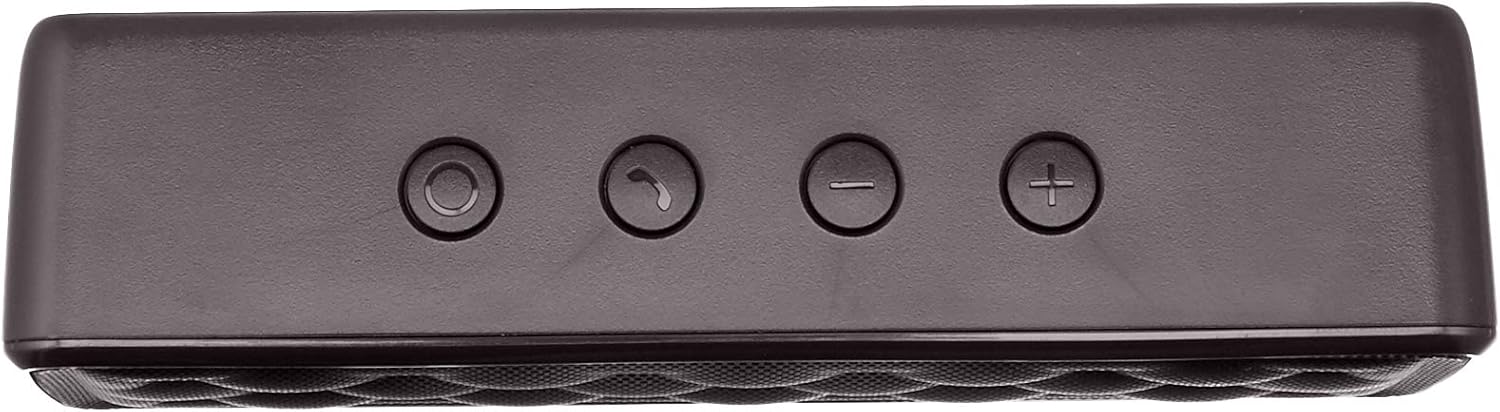
Cydrannau Siaradwr


Gosod
1. Codi Tâl ar y Llefarydd
Before first use, fully charge the speaker. Connect the supplied USB charging cable to the Micro USB port on the speaker and the other end to a USB power source (e.g., computer USB port, USB wall adapter). The charging indicator light will illuminate during charging and turn off when fully charged. A full charge takes approximately 3 hours.
2. Pweru Ymlaen / I ffwrdd
To power on the speaker, slide the ON/OFF switch located on the rear panel to the "ON" position. To power off, slide the switch to the "OFF" position.
Cyfarwyddiadau Gweithredu
Pâr Bluetooth
- Ensure the speaker is powered on and within 33 feet (10 meters) of your Bluetooth-enabled device.
- The speaker will automatically enter pairing mode, indicated by a flashing blue LED light.
- Ar eich dyfais, ewch i osodiadau Bluetooth a chwiliwch am y dyfeisiau sydd ar gael.
- Select "Amazon Basics Speaker" from the list.
- Once paired, the blue LED light will stop flashing and remain solid. You can now stream audio wirelessly.
Note: If pairing fails, turn off the speaker and your device's Bluetooth, then repeat the steps. The speaker will attempt to reconnect to the last paired device automatically when powered on.
Chwarae Sain
- Rheoli cyfaint: Use the '+' and '-' buttons on the top panel of the speaker to adjust the volume. You can also control the volume from your connected device.
- Chwarae/Seibiant: Use the controls on your connected device to play or pause audio.
Galwad Di-Ddwylo
When connected via Bluetooth, the speaker's built-in microphone allows for hands-free calling.
- Ateb / Diwedd Galwad: Press the Call/Bluetooth button once to answer an incoming call or end an ongoing call.
- Gwrthod Galwad: Press and hold the Call/Bluetooth button for 2 seconds to reject an incoming call.
- Ail-ddeialu: Double-press the Call/Bluetooth button to redial the last number.
Modd Mewnbwn AUX
To connect non-Bluetooth audio devices, use the 3.5mm AUX input jack on the rear panel. Connect one end of a 3.5mm audio cable (not included) to the speaker's AUX port and the other end to your audio device's headphone jack. The speaker will automatically switch to AUX mode when a cable is inserted.

Cynnal a chadw
- Glanhewch y siaradwr gyda lliain meddal, sych. Peidiwch â defnyddio glanhawyr sgraffiniol na thoddyddion.
- Osgowch amlygu'r siaradwr i dymheredd eithafol, lleithder, neu olau haul uniongyrchol.
- Peidiwch â throchi'r siaradwr mewn dŵr. Nid yw'n dal dŵr.
- Storiwch y siaradwr mewn lle oer, sych pan nad yw'n cael ei ddefnyddio am gyfnodau hir.
Datrys problemau
| Problem | Achos Posibl | Ateb |
|---|---|---|
| Nid yw'r siaradwr yn troi ymlaen. | Mae batri wedi'i ddisbyddu. | Gwefrwch y siaradwr gan ddefnyddio'r cebl USB a gyflenwir. |
| Methu paru drwy Bluetooth. | Mae Bluetooth i ffwrdd ar eich dyfais; mae'r siaradwr allan o gyrraedd; mae'r siaradwr eisoes wedi'i baru â dyfais arall. | Ensure Bluetooth is enabled on your device. Move the speaker closer to your device (within 33 feet). Disconnect from other devices or restart the speaker to enter pairing mode. |
| Dim sain na chyfaint isel. | Volume is too low on speaker or device; incorrect input mode. | Increase volume on both the speaker and your connected device. Ensure the correct input mode (Bluetooth or AUX) is active. |
| Afluniad sain. | Volume is too high; speaker is too far from the device. | Reduce the volume on the speaker and/or your device. Move the speaker closer to your device. |
Manylebau
| Enw Model | BSK30BK |
| Technoleg Cysylltedd | Bluetooth, Cynorthwyol |
| Di-wifr Range | Hyd at 33 troedfedd (10 metr) |
| Pŵer Allbwn Siaradwr | 2 x 2.5 Wat (cyfanswm o 5 Wat) |
| Bywyd Batri | Hyd at 8 awr (ar wefr lawn) |
| Amser Codi Tâl | Tua 3 awr |
| Dimensiynau (L x W x H) | 6.3" x 1.5" x 2.6" (16 cm x 3.8 cm x 6.6 cm) |
| Pwysau | 8.1 owns (0.23 kg) |
| Meicroffon adeiledig | Oes |
| Dal dwr | Nac ydw |
Gwybodaeth Gwarant
This product is covered by a Limited Warranty. For detailed information regarding warranty terms and conditions, please refer to the documentation included with your purchase or visit the Amazon Basics official websafle.
Cefnogaeth i Gwsmeriaid
For further assistance, troubleshooting, or product information, please visit the Amazon Basics support page or contact customer service through your Amazon account.
Gwybodaeth Ddiogelwch Bwysig
- Peidiwch â dadosod, atgyweirio nac addasu'r cynnyrch.
- Keep the product away from water and high humidity.
- Osgowch amlygiad hirfaith i olau haul uniongyrchol neu wres eithafol.
- Peidiwch â gollwng y cynnyrch na'i roi dan effeithiau cryf.
- Gwaredu'r cynnyrch a'i fatri yn gyfrifol yn unol â rheoliadau lleol.
Fideos Cynnyrch
No official instructional videos from the seller are available for this product at this time.
Ask a question about this manual
Ask about setup, troubleshooting, compatibility, parts, safety, or missing instructions. Manuals+ will review the question and use this page’s manual context to help answer it.