
Cyfarwyddiadau Diogelwch Pwysig
DARLLENWCH YR HOLL GYFARWYDDIADAU YN OFALUS CYN DEFNYDDIO.
- Datgysylltwch y ffan o'r soced pŵer bob amser cyn glanhau, cynnal a chadw neu symud.
- Peidiwch â rhoi bysedd nac unrhyw wrthrychau eraill drwy'r gril pan fydd y ffan yn gweithredu.
- Peidiwch â gweithredu unrhyw wyntyll gyda chortyn neu blwg wedi'i ddifrodi. Taflwch wyntyll neu dychwelwch i gyfleuster gwasanaeth awdurdodedig i'w archwilio a/neu ei atgyweirio.
- Peidiwch â rhedeg llinyn o dan garped. Peidiwch â gorchuddio llinyn â rygiau taflu, rhedwyr, neu orchuddion tebyg. Trefnwch y llinyn i ffwrdd o'r ardal draffig a lle na fydd yn cael ei faglu.
- Peidiwch â defnyddio'r gwyntyll yn wlyb neu damp lleoliadau fel ystafelloedd ymolchi neu fannau golchi dillad.
- Bwriedir y ffan hon ar gyfer defnydd dan do yn unig. Peidiwch â'i defnyddio yn yr awyr agored.
- Keep the fan away from curtains, drapes, or any objects that may get caught in the fan blades.
- Supervise children when the fan is in use.
Cynnyrch Drosview
The Optimus 18-inch High Velocity Industrial Floor Fan is designed to provide powerful air circulation in various indoor environments. Its robust construction and high-velocity motor make it suitable for workshops, garages, and large rooms.
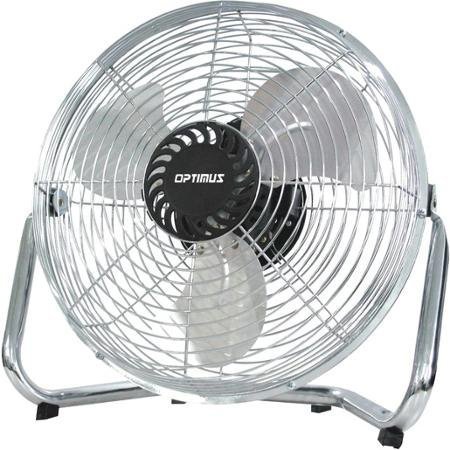
Image: Optimus 18-inch High Velocity Industrial Floor Fan. This image shows the fan with its silver metallic finish and sturdy floor stand.
Nodweddion Allweddol:
- 18-inch diameter for wide air distribution.
- Industrial-grade high velocity airflow.
- Durable metallic finish.
- Floor standing design for stable placement.
- Multiple power levels for adjustable airflow.
Cyfarwyddiadau Gosod
- Dadbacio'r Fan: Carefully remove the fan and all components from the packaging. Retain packaging for future storage or transport.
- Assemble the Floor Stand:
- Attach the fan head to the floor stand using the provided screws and tools. Ensure all connections are secure.
- Verify the fan head can pivot smoothly on the stand.
- Lleoliad: Place the fan on a firm, level surface. Ensure there is adequate space around the fan for proper air circulation and to prevent obstruction of the air intake/output. Keep the fan at least 3 feet away from walls or furniture.
- Cysylltiad Pwer: Ensure the fan is in the "OFF" position before plugging it into a standard 120V AC electrical outlet.
Cyfarwyddiadau Gweithredu
This fan features push-button controls for easy operation. A remote control may also be included for convenience.
- Pŵer ymlaen / i ffwrdd: Locate the power button on the control panel. Press the button once to turn the fan ON. Press it again to turn the fan OFF.
- Addasu Cyflymder Fan: The fan has 4 power levels. After turning the fan ON, repeatedly press the speed control button to cycle through the available speed settings (Low, Medium, High, Max). The fan will operate at the selected speed.
- Addasu cyfeiriad llif aer: The fan head can be tilted manually to direct airflow upwards or downwards. Gently tilt the fan head to the desired angle. Do not force the fan head beyond its intended range of motion.
Cynnal a chadw
Regular cleaning and maintenance will ensure optimal performance and extend the life of your fan.
- Glanhau'r Fan:
- Always unplug the fan from the power source before cleaning.
- Defnyddiwch feddal, damp cloth to wipe the exterior surfaces of the fan. Do not use abrasive cleaners or harsh chemicals, as these may damage the finish.
- To clean the fan blades, carefully remove the front grille (if detachable, refer to assembly instructions for details). Wipe the blades with a soft cloth. Ensure the grille is securely reattached before operating the fan.
- Gwnewch yn siŵr bod yr holl rannau'n hollol sych cyn plygio'r ffan yn ôl i mewn.
- Storio: When not in use for extended periods, store the fan in a cool, dry place. It is recommended to store it in its original packaging to protect it from dust and damage.
Datrys problemau
| Problem | Achos Posibl | Ateb |
|---|---|---|
| Nid yw'r ffan yn troi ymlaen. | Heb ei blygio i mewn; allfa bŵer ddim yn gweithio; switsh y ffan i ffwrdd. | Ensure fan is securely plugged into a working outlet. Check household fuse/circuit breaker. Press the power button to turn the fan on. |
| Llif aer isel. | Fan speed set too low; obstructed intake/output; dirty blades. | Increase fan speed. Clear any obstructions. Clean fan blades and grilles as per maintenance instructions. |
| Sŵn neu ratlo anarferol. | Rhannau rhydd; ffan heb fod ar arwyneb gwastad; gwrthrych tramor yn y llafnau. | Unplug the fan and check for any loose screws or components. Place the fan on a stable, level surface. Carefully inspect for and remove any foreign objects. |
Manylebau
| Nodwedd | Manylyn |
|---|---|
| Brand | Optimus |
| Enw Model | Cyflymder Uchel |
| Rhif Model yr Eitem | 306c1b92-f36b-4ccc-ac62-2ad33d5c9efb |
| Diamedr | 18 modfedd |
| Lliw | Arian |
| Arddull | Diwydiannol |
| Ffynhonnell Pwer | Trydan Corded |
| Nifer y Lefelau Pwer | 4 |
| Dull Rheoli | Rheoli Botwm |
| Defnydd Dan Do / Awyr Agored | Dan do |
| Cydrannau wedi'u Cynnwys | Floor Stand, Remote Control |
| Manyleb wedi'i Chwrdd | OSHA |
Gwarant a Chefnogaeth
Optimus products are manufactured to high-quality standards. This product is covered by a limited warranty against defects in materials and workmanship from the date of purchase. Please refer to the warranty card included with your product for specific terms and conditions.
For technical support, troubleshooting assistance, or warranty claims, please contact Optimus customer service. Contact information can typically be found on the product packaging or the official Optimus websafle.
Cadwch eich prawf prynu at ddibenion gwarant.