
1. Rhagymadrodd
This manual provides essential information for the installation, operation, and maintenance of the Siemens Logo 8 PLC (Programmable Logic Controller), model 6ED1052-1MD00-0BA8. The Logo 8 is a compact, easy-to-use logic module designed for small automation projects, offering integrated Ethernet, a web server, and data logging capabilities.
Please read this manual thoroughly before operating the device to ensure safe and efficient use.
2. Gwybodaeth Diogelwch
RHYBUDD: Electrical shock hazard. Only qualified personnel should install, operate, or service this equipment. Disconnect all power before working on the device.
- Sicrhewch sylfaen gywir i atal peryglon trydanol.
- Peidiwch â gweithredu'r ddyfais mewn gwlyb neu damp amodau.
- Gwirio cywir cyftage a sgoriau cerrynt cyn cysylltu pŵer.
- Protect the device from excessive heat, dust, and vibration.
3. Cynnyrch Drosview
The Siemens Logo 8 PLC is a versatile logic module featuring an integrated display, control buttons, and various input/output options. It supports 12/24V DC power supply and includes 8 digital inputs (4 of which can be used as analog inputs) and 4 relay outputs.

Ffigur 3.1: Ongl view of the Siemens Logo 8 PLC, showing the display, control buttons, and various connection terminals.
Key features include an Ethernet port for network communication, a built-in web server for remote access, and a standard micro SD card slot for data logging and program storage. The device is designed for easy integration into existing systems and is compatible with LOGO! Soft Comfort V8 software.

Ffigur 3.2: Blaen view of the Siemens Logo 8 PLC, highlighting the integrated display and navigation buttons for direct device interaction.
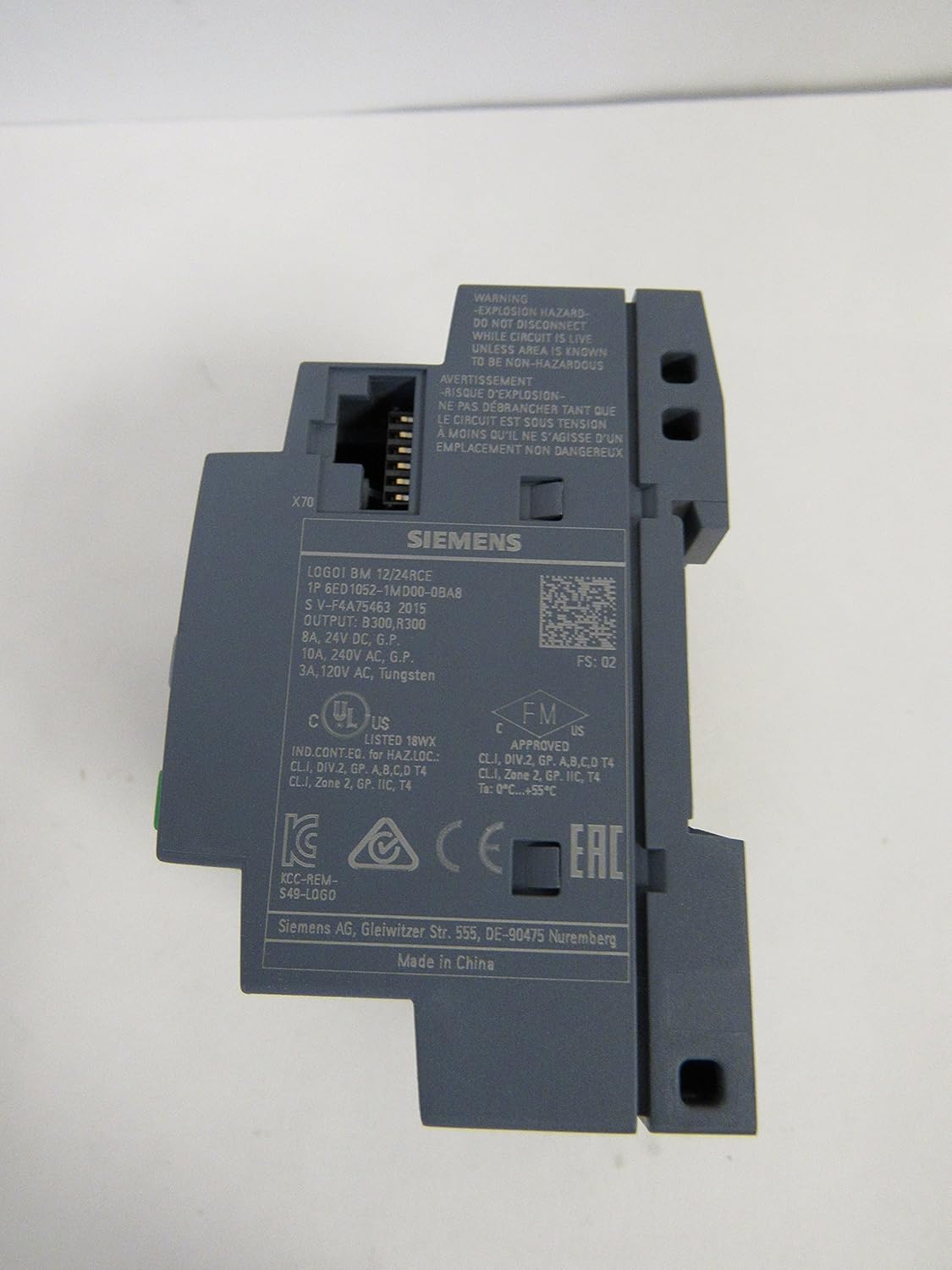
Ffigur 3.3: Ochr view of the Siemens Logo 8 PLC, showing product labels, certifications, and the Ethernet port (X70).

Figure 3.4: The packaging box for the Siemens Logo 8 PLC, displaying product information such as "Logic Module" and model details.
4. Gosod
4.1 Mowntio
The Logo 8 PLC is designed for DIN rail mounting. Snap the device onto a standard 35mm DIN rail in a control cabinet. Ensure adequate ventilation space around the unit.
4.2 Gwifrau
Connect the power supply (12/24V DC) to the L+ and M terminals. Connect digital inputs (I1-I8) and analog inputs (AI1-AI4) as required. Connect relay outputs (Q1-Q4) to your loads, observing maximum current ratings.
- Cyflenwad Pŵer: Connect 12/24V DC to L+ and M terminals.
- Mewnbynnau Digidol: Connect sensors or switches to I1-I8. Note that I1, I2, I7, I8 can also function as analog inputs.
- Mewnbynnau Analog: Use I1, I2, I7, I8 for 0-10V analog signals.
- Allbynnau Ras Gyfnewid: Connect loads to Q1-Q4. Ensure loads do not exceed 10A per relay.
- Ethernet: Connect an RJ45 cable to the Ethernet port for network communication.
5. Gweithredu
5.1 Pŵer Cychwynnol
Once wired, apply power. The integrated display will show the Siemens Logo! boot screen, followed by the main menu or the running program status.
5.2 Rhaglennu
The Logo 8 PLC is programmed using Siemens LOGO! Soft Comfort V8 software. Connect the PLC to your PC via an Ethernet cable. The software allows you to create, simulate, and download ladder logic or function block diagrams to the PLC.
5.3 Web Server Functionality
Mae'r adeiledig yn web server allows for remote monitoring and control of the PLC via a standard web browser. Access the web server by entering the PLC's IP address in your browser. Configuration of the web server is done through LOGO! Soft Comfort.
5.4 Logio Data
The Logo 8 supports data logging to a standard micro SD card inserted into the dedicated slot. Configure data logging parameters (e.g., variables to log, logging interval) within LOGO! Soft Comfort.
6. cynnal
The Siemens Logo 8 PLC requires minimal maintenance. Regular checks can help ensure long-term reliable operation.
- Glanhau: Keep the device clean and free of dust. Use a soft, dry cloth for cleaning. Do not use liquid cleaners or solvents.
- Amodau Amgylcheddol: Sicrhewch fod yr amgylchedd gweithredu yn aros o fewn yr ystodau tymheredd a lleithder penodedig.
- Diweddariadau Cadarnwedd: Gwiriwch gefnogaeth Siemens yn rheolaidd website for firmware updates for your Logo 8 model.
- Uniondeb Cysylltiad: Archwiliwch gysylltiadau gwifrau o bryd i'w gilydd am dyndra ac arwyddion o gyrydiad.
7. Datrys Problemau
This section provides solutions to common issues you might encounter with your Siemens Logo 8 PLC.
| Problem | Achos Posibl | Ateb |
|---|---|---|
| PLC does not power on. | Dim cyflenwad pŵer; Gwifrau anghywir; Ffiws wedi chwythu. | Check power source; Verify L+ and M connections; Check external fuse. |
| Mewnbynnau ddim yn ymateb. | Incorrect wiring; Sensor fault; Program logic error. | Verify input wiring; Test sensor functionality; Check program logic in LOGO! Soft Comfort. |
| Allbynnau ddim yn actifadu. | Incorrect wiring; Load fault; Program logic error; Overload. | Verify output wiring; Test load; Check program logic; Check for overload on relay outputs. |
| Cannot connect via Ethernet. | Incorrect IP address; Network cable issue; Firewall blocking. | Verify PLC IP address and PC network settings; Check Ethernet cable; Disable PC firewall temporarily. |
| SD card not recognized. | Incorrectly inserted SD card; Incompatible SD card; Corrupted card. | Reinsert SD card correctly; Use a compatible micro SD card (FAT32 format); Try formatting the card (data loss). |
8. manylebau
| Priodoledd | Gwerth |
|---|---|
| Rhif Model | 6ED1052-1MD00-0BA8 |
| Cyflenwad Pŵer | 12/24V DC |
| Mewnbynnau Digidol (DI) | 8 (4 can be Analog Inputs) |
| Mewnbynnau Analog (AI) | 4 (0-10V, shared with DI) |
| Allbynnau Digidol (DO) | 4 (Relay, 10A) |
| Cof | 400 blocks expandable |
| Cyfathrebu | Ethernet, Built-in Web Gweinydd |
| Logio Data | Standard Micro SD Card |
| Dimensiynau (tua) | 9.3 x 7.9 x 6.8 cm |
| Pwysau Eitem | 4.54 g |
| Gwneuthurwr | Siemens |
9. Gwarant a Chefnogaeth
For warranty information, technical support, or service inquiries regarding your Siemens Logo 8 PLC, please contact Siemens customer support directly or visit their official website. Ensure you have your product model number (6ED1052-1MD00-0BA8) and serial number available when contacting support.
Swyddogol Siemens Websafle: www.siemens.com


