
Rhagymadrodd
The Master & Dynamic MW60 Wireless Bluetooth Foldable Headphones are designed to deliver a high-quality audio experience with effective sound isolation. They feature 45mm neodymium drivers for clear audio reproduction across various music genres. Equipped with Bluetooth 4.1, these headphones offer wireless connectivity and up to 16 hours of battery life. Constructed with lightweight stainless steel and aluminum, and featuring leather ear pads, the MW60 headphones are designed for comfort and durability, with a foldable design for portability.
Beth Sydd yn y Bocs
- Master & Dynamic MW60 Wireless Headphones
- Cebl sain (3.5mm)
- Addasydd Sain
- Micro USB i Gebl Codi Tâl USB
- Carry Case for Headphones
- Carry Pouch for Accessories
Cynnyrch Drosview
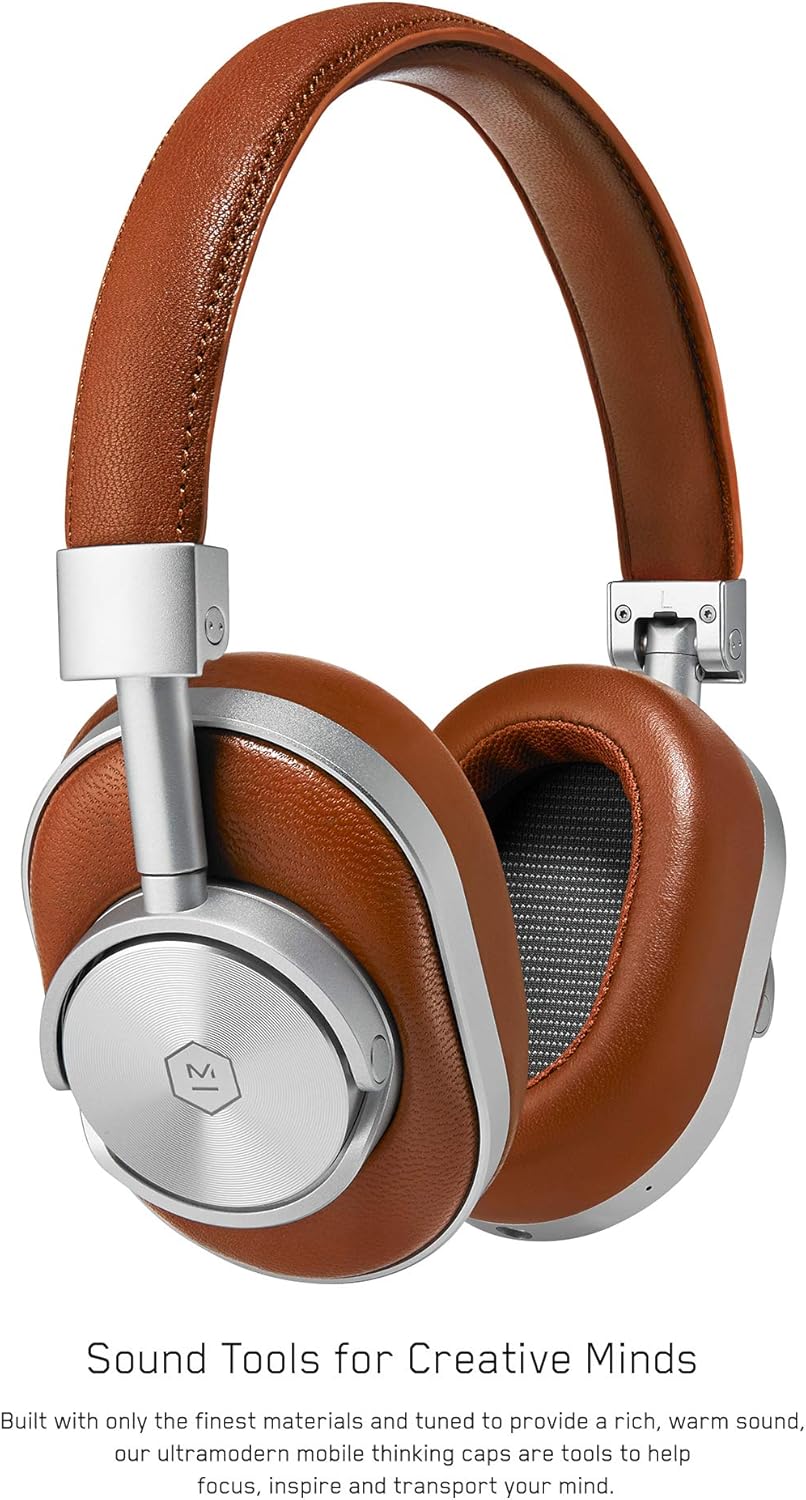
Ffigur 1: Blaen view of the Master & Dynamic MW60 Wireless Headphones. This image displays the over-ear design with silver metal accents and brown leather earcups and headband.

Ffigur 2: Close-up of the right earcup showing the control buttons and ports. Visible controls include volume up/down, a multi-function button, and the power/pairing switch. A 3.5mm audio jack and micro USB charging port are also present.
Rheolaethau a Phyrth
- Power/Pairing Switch: Located on the earcup, used to turn the headphones on/off and initiate Bluetooth pairing.
- Botwm Aml-swyddogaeth: Controls playback (play/pause), call management, and voice assistant activation.
- Botymau Cyfrol i Fyny / Lawr: Adjusts audio volume. Can also be used for track skipping (hold for next/previous track).
- Jac Sain 3.5mm: For wired connection using the included audio cable.
- Porthladd Micro USB: Ar gyfer gwefru'r batri mewnol.
- Meicroffon: Integrated for hands-free calls.
Gosod
Codi Tâl ar y Clustffonau
- Connect the Micro USB end of the charging cable to the Micro USB port on the headphone earcup.
- Connect the USB-A end of the charging cable to a powered USB port (e.g., computer, wall adapter).
- Bydd y golau dangosydd yn dangos statws gwefru. Mae gwefr lawn fel arfer yn cymryd tua 2 awr.
Pâr Bluetooth
- Gwnewch yn siŵr bod y clustffonau wedi'u gwefru'n llawn.
- Slide the Power/Pairing switch to the ON position.
- To enter pairing mode, slide and hold the Power/Pairing switch to the far right (pairing icon) until the indicator light begins to flash.
- Ar eich dyfais (ffôn clyfar, tabled, cyfrifiadur), galluogwch Bluetooth a chwiliwch am ddyfeisiau sydd ar gael.
- Select "MW60" from the list of detected devices.
- Once paired, the indicator light will turn solid blue or white, depending on the model.
Cyfarwyddiadau Gweithredu
Swyddogaethau Sylfaenol
- Pŵer ymlaen / i ffwrdd: Slide the Power/Pairing switch to the ON or OFF position.
- Chwarae/Seibiant: Pwyswch y botwm Aml-swyddogaeth unwaith.
- Rheoli cyfaint: Press the Volume Up (+) or Volume Down (-) buttons.
- Trac Nesaf: Pwyswch a daliwch y botwm Cyfaint i Fyny (+).
- Trac Blaenorol: Pwyswch a daliwch y botwm Cyfaint i Lawr (-).
Rheoli Galwadau
- Ateb / Diwedd Galwad: Pwyswch y botwm Aml-swyddogaeth unwaith.
- Gwrthod Galwad: Pwyswch a dal y botwm Aml-swyddogaeth.
- Ysgogi Cynorthwyydd Llais: Dwbl-wasgu'r botwm Aml-swyddogaeth.
Cysylltiad Wired
To use the headphones with a wired connection, plug the included 3.5mm audio cable into the audio jack on the earcup and the other end into your audio source. The headphones will automatically switch to wired mode, conserving battery life.
Cynnal a chadw
Glanhau
- Sychwch y clustffonau gyda lliain meddal, sych.
- Peidiwch â defnyddio cemegau llym neu ddeunyddiau sgraffiniol.
- For leather parts, use a specialized leather cleaner if necessary, following product instructions.
Storio

Ffigur 3: The MW60 headphones folded into a compact form, demonstrating their portability and ease of storage in the included carry case.
- When not in use, fold the headphones and store them in the provided carry case to protect them from dust and damage.
- Ceisiwch osgoi storio mewn tymheredd eithafol neu leithder uchel.
Datrys problemau
| Problem | Ateb Posibl |
|---|---|
| Nid yw clustffonau'n troi ymlaen | Ensure the headphones are fully charged. Connect to a power source using the Micro USB cable. |
| Methu paru drwy Bluetooth | Ensure headphones are in pairing mode (flashing indicator light). Turn off and on Bluetooth on your device. Try forgetting the device on your phone and re-pairing. Ensure no other devices are actively connected. |
| Intermittent audio or connection drops | Ensure your device is within the Bluetooth range. Avoid physical obstructions between the headphones and your device. Minimize interference from other wireless devices. |
| Dim sain yn y modd gwifrau | Ensure the 3.5mm audio cable is securely connected to both the headphones and the audio source. Check the volume levels on both the headphones and the audio source. |
| Earcups detach easily | Ensure earcups are properly aligned and securely attached to the magnetic mounts. |
Manylebau
| Nodwedd | Manylyn |
|---|---|
| Enw Model | MW60S2 |
| Technoleg Cysylltedd | Di-wifr (Bluetooth 4.1) |
| Math Gyrrwr Sain | 45mm Neodymium Dynamic Drivers |
| Bywyd Batri | Hyd at 16 awr |
| Defnyddiau | Aluminum, Stainless Steel, Leather |
| Pwysau Eitem | 3 bunt (tua 1.36 kg) |
| Dimensiynau Cynnyrch | 10 x 3.75 x 8 modfedd (25.4 x 9.5 x 20.3 cm) |
| rhwystriant | 32 Ohms |
| Rheoli Sŵn | Ynysu Sain (Goddefol) |
| Clustffonau Jack | 3.5 mm Jack |
Gwarant a Chefnogaeth
Warranty information for your Master & Dynamic MW60 Wireless Headphones is typically provided with your purchase. Please refer to the documentation included in your product packaging for specific warranty terms and conditions.
For technical support, service, or further inquiries, please contact Master & Dynamic customer service directly. Contact details can usually be found on the manufacturer's official websafle neu yn nogfennaeth eich cynnyrch.