
1. Rhagymadrodd
This manual provides detailed instructions for the installation, operation, and maintenance of your Reolink RLC-410WS 4MP Super HD Dual-Band Wi-Fi Wireless Security IP Camera. Please read this manual thoroughly before using the product to ensure correct usage and optimal performance.
2. Cynnyrch Drosview
2.1 Cydrannau'r Camera
Familiarize yourself with the main components of your RLC-410WS camera:

Delwedd 2.1: Reolink RLC-410WS Camera Component Diagram. This image illustrates the various parts of the camera including the antenna, lens, IR LEDs, daylight sensor, and connection ports for power, network, and the reset button.
- Antena: Ar gyfer cysylltedd Wi-Fi.
- Cas Alwminiwm Metel: Tai gwydn ar gyfer defnydd awyr agored.
- High Definition F=4.0mm Lens: Yn dal fideo Super HD 4MP.
- 36 PCS IR LEDs: Provides infrared illumination for night vision up to 100ft.
- Synhwyrydd Golau Dydd: Yn canfod golau amgylchynol i newid rhwng moddau dydd a nos.
- Botwm Ailosod: Fe'i defnyddir i adfer gosodiadau diofyn ffatri.
- Pwerdy: For connecting the 12V DC power adapter.
- Network Cable Port: For initial setup and optional wired Ethernet connection.
2.2 Nodweddion Allweddol
- 4MP Super HD Video: Records clear video at 1440p resolution, supporting 1080p and 720p.
- Gweledigaeth Nos 100 troedfedd: Equipped with IR LEDs for clear surveillance in low-light conditions.
- Wi-Fi Band Deuol: Supports 2.4GHz and 5GHz Wi-Fi for flexible and stable wireless connection.
- Rhybuddion Canfod Cynnig: Sends real-time email alerts with photos or 30-second video clips, and push notifications to mobile phones.
- Storio Lleol: Built-in 16GB Micro SD card for recording and storing up to 400 motion-activated events.
- Mynediad o Bell: Monitor your home from anywhere using the Reolink Client software (PC/Mac) or Reolink App (iPhone/Android).
- 80-Gradd Viewing Angle: Yn darparu maes eang o view.
- IP67 Gwrth-dywydd: Designed for outdoor use in various weather conditions.
3. Beth sydd yn y Bocs
Gwiriwch fod yr holl eitemau yn bresennol yn eich pecyn:

Delwedd 3.1: Package Contents. This image displays the camera, antenna, power adapter, extension cable, network cable, software CD, quick start guide, surveillance sign, mounting template, and screws.
- Reolink RLC-410WS Camera
- Addasydd Pŵer
- Cebl Estyniad Pŵer
- Cebl Rhwydwaith (1 metr)
- Antena
- Canllaw Cychwyn Cyflym
- Templed Twll Mowntio
- Sgriwiau a Phlygiau Wal
- Arwydd Gwyliadwriaeth
- CD (Manual/Software)
4. Gosod a Gosod
4.1 Ffurfweddiad Cychwynnol
- Connect Power and Ethernet: Connect the camera to the power adapter and then to your router using the provided Ethernet cable.
- Lawrlwythwch Ap/Cleient Reolink: Download the Reolink App from the App Store or Google Play, or the Reolink Client software from the official Reolink website for PC/Mac.
- Ychwanegu Camera: Open the app/client, click the "+" icon to add the camera. The app/client should automatically detect the camera on your local network.
- Gosod Cyfrinair: Crëwch gyfrinair cryf ar gyfer eich camera.
- Ffurfweddu Wi-Fi: Once connected via Ethernet, navigate to the camera settings in the app/client to configure Wi-Fi. Select your 2.4GHz or 5GHz network and enter the password. Ensure a strong Wi-Fi signal at the installation location. Note: Wi-Fi settings can typically only be changed while the camera is connected via Ethernet.
- Cysylltiad Prawf: After configuring Wi-Fi, test the connection. Once successful, you can disconnect the Ethernet cable.
4.2 Mowntio'r Camera
Consider the following when mounting your camera:
- Lleoliad: Dewiswch leoliad sy'n darparu'r hyn a ddymunir viewongl ing ac mae o fewn cyrraedd eich rhwydwaith Wi-Fi.
- Power Cable Routing: The power cable requires a hole of approximately 3/4 inch (19mm) to pass through a wall due to the Ethernet socket and reset switch on the breakout cable. Plan your cable routing carefully.
- Addasiad Braced: The mounting bracket allows for three-dimensional adjustment. Loosen the small Allen screws to adjust the camera angle, then tighten them securely.
- Diogelu dŵr: For outdoor installations, ensure the breakout cable connections (power, network, reset button) are protected from water. Consider using a waterproof junction box.

Delwedd 4.1: Camera Dimensions. This image provides the physical measurements of the RLC-410WS camera, useful for planning installation.
5. Gweithredu'r Camera
5.1 Mynediad i'r Camera
You can access your Reolink RLC-410WS camera using various platforms:

Delwedd 5.1: Reolink Software Platform. This image illustrates how the Reolink camera can be accessed and managed from various devices, including Mac, Windows, iPhone, and Android.
- Reolink App: Available for iOS (iPhone/iPad) and Android devices. Provides live view, chwarae yn ôl, a rheoli gosodiadau.
- Reolink Client: Desktop software for Windows and macOS. Offers comprehensive control, multi-camera viewing, and recording options.
- Web Porwr: Access the camera directly via its IP address using a web browser (features may be limited compared to the app/client).
5.2 Motion Detection and Recording
The RLC-410WS camera features customizable motion detection:
- Addasiad Sensitifrwydd: Adjust motion detection sensitivity to minimize false alarms.
- Parthau Canfod: Diffiniwch ardaloedd penodol o fewn y camera view to monitor for motion, ignoring irrelevant areas.
- Mwgwd Preifatrwydd: Mask out sensitive areas from being recorded or viewgol.
- Rhybuddion: Receive instant push notifications on your phone, email alerts with snapshots or video clips, and upload recordings to an FTP server.
- Storio Lleol: Motion-activated events are recorded to the built-in 16GB Micro SD card for later playback.
5.3 Ansawdd Fideo a Gweledigaeth Nos
The camera provides high-quality video day and night:
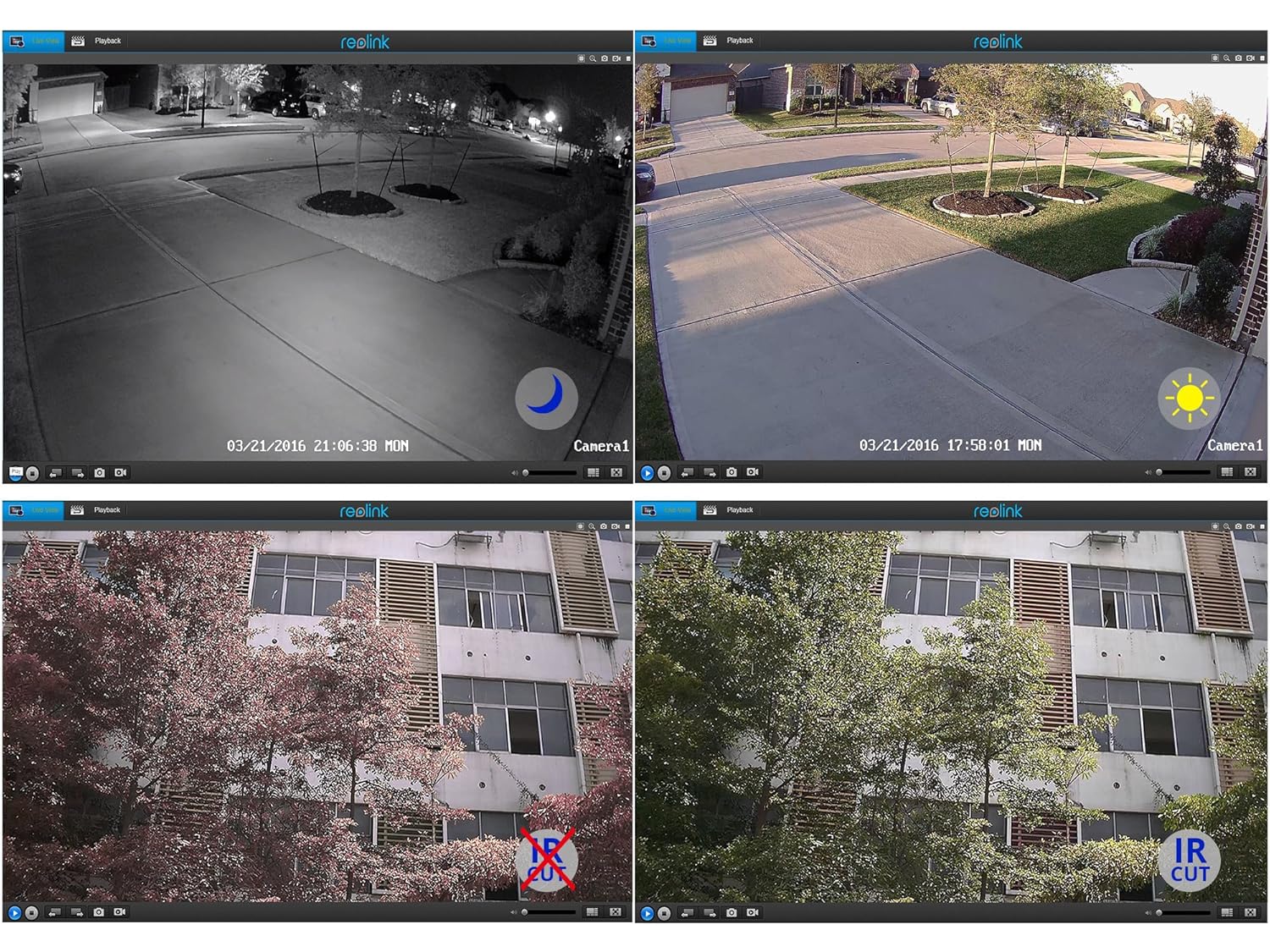
Delwedd 5.2: Day and Night Vision Comparison. This image demonstrates the camera's ability to capture clear video in both daylight and low-light conditions using its infrared capabilities.
- 4MP Uwch HD: Yn darparu fideo clir a chrynotage.
- Gweledigaeth Nos Isgoch: Automatically switches to night mode in low light, providing clear black and white video up to 100 feet.
- Hidlo IR Cut: Ensures accurate color reproduction during the day and enhanced infrared sensitivity at night.
6. manylebau
Detailed technical specifications for the Reolink RLC-410WS camera:
| Nodwedd | Manyleb |
|---|---|
| Model | RLC-410WS |
| Datrysiad Fideo Effeithiol | 4 MP (1440p) |
| Viewongl ing | 80 Gradd |
| Ystod Golwg Nos | 100 Traed |
| Cyfradd Ffrâm | 25 ffrâm yr eiliad |
| Cyfathrebu Di-wifr | Wi-Fi (2.4/5Ghz Dual Band) |
| Storio | Built-in 16GB Micro SD Card |
| Ffynhonnell Pwer | 12 folt DC |
| Sgôr Diogelu Rhyngwladol | IP67 |
| Dimensiynau (L x W x H) | 18.8 x 6.6 x 6.6 centimetr |
| Pwysau Eitem | 454 g (1 pwys) |
| Dull Rheoli | Ap |
| Math Mowntio | Wal Mount |

Delwedd 6.1: Reolink Model Feature Comparison. This table highlights the features available across various Reolink camera models, including PoE, Wi-Fi, Micro SD storage, optical zoom, and pan/tilt capabilities.
7. Datrys Problemau
This section addresses common issues you might encounter with your RLC-410WS camera.
7.1 Problemau Cysylltedd Wi-Fi
- Dim Cysylltiad Wi-Fi:
- Ensure the camera is initially configured via Ethernet before setting up Wi-Fi.
- Gwiriwch fod eich cyfrinair Wi-Fi yn gywir.
- Perform a firmware update. Outdated firmware can cause connectivity problems.
- Ensure the camera is within range of your Wi-Fi router and has a strong signal. Signal strength can drop quickly with distance.
- If changing Wi-Fi settings, ensure the camera is connected via Ethernet, run a connection test, and save changes.
- Frequent Disconnects:
- Check Wi-Fi signal strength at the camera's location. Consider using a Wi-Fi extender if the signal is weak.
- Ensure your router's 2.4GHz and 5GHz channels are not overly congested.
- Update camera firmware to the latest version.
7.2 Camera Not Responding After Settings Change/Firmware Update
- If the camera becomes unresponsive after a settings change or firmware update, try power cycling the camera (unplug and re-plug the power adapter).
- If power cycling does not work, reconnect the camera via Ethernet. This often restores connectivity and allows further troubleshooting or re-configuration.
- If the issue persists, perform a factory reset using the reset button on the breakout cable. Note: This will erase all settings.
7.3 False Motion Detection Alerts
- Addaswch sensitifrwydd canfod symudiadau yng ngosodiadau'r camera.
- Define specific motion detection zones to exclude areas with frequent irrelevant movement (e.g., trees swaying, busy roads).
- In night vision mode, insects flying close to the IR illuminators can trigger alerts. Consider adjusting sensitivity or, if possible, using an external IR illuminator placed away from the camera.
8. cynnal
- Glanhau: Glanhewch lens a thai'r camera yn rheolaidd gyda lliain meddal, damp lliain i sicrhau ansawdd delwedd glir. Osgowch lanhawyr sgraffiniol.
- Diweddariadau Cadarnwedd: Periodically check the official Reolink website for firmware updates. Keeping your camera's firmware up-to-date ensures optimal performance, security, and access to new features.
- Archwiliad cebl: Periodically inspect all cables and connections for wear or damage, especially in outdoor installations. Ensure waterproof seals are intact.
- Rheoli Cerdyn SD: While the camera manages the 16GB SD card, it's good practice to occasionally check its status via the app/client.
9. Gwarant a Chefnogaeth
For warranty information, please refer to the warranty card included in your product package or visit the official Reolink website. Reolink provides dedicated customer support.
- Cymorth Technegol: For technical assistance, troubleshooting, or any product-related queries, please contact Reolink support via their official website. Email support is typically provided with responses within 24 hours.
- Lawrlwythiadau Firmware: Latest firmware versions and software clients can be downloaded from the Reolink support page.