
Rhagymadrodd
Thank you for choosing the SKMEI 1049 Solar Power Men's Waterproof Quartz Analog Digital Sports Wrist Watch. This manual provides detailed instructions on how to set up, operate, and maintain your watch to ensure optimal performance and longevity. Your watch combines precise Japan quartz and digital movements, offering both analog and digital time displays, solar power capabilities, and robust water resistance.

Blaen view of the SKMEI 1049 Solar Power Watch, showcasing its blue and black design with both analog hands and a digital display. The solar panel is visible on the watch face.
Watch Components and Button Functions
Ymgyfarwyddwch â botymau ac elfennau arddangos yr oriawr:
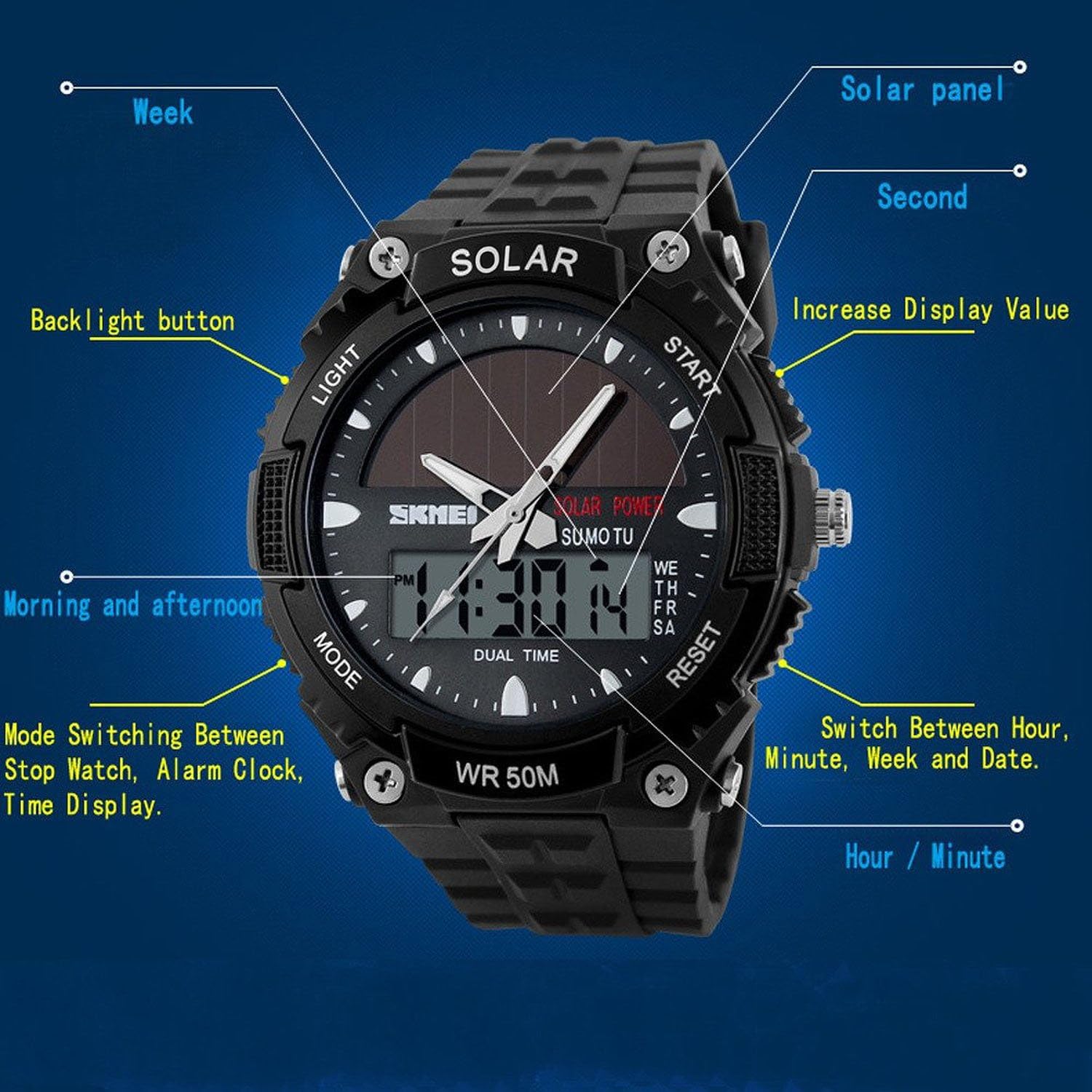
Diagram illustrating the various components and button functions of the SKMEI 1049 watch. Labels include "Light" (top left), "Mode" (bottom left), "Start" (top right), "Reset" (bottom right), "Solar panel", "Second", "Increase Display Value", "Switch Between Hour, Minute, Week and Date", "Hour / Minute", "Mode Switching Between Stop Watch, Alarm Clock, Time Display", "Morning and afternoon", and "Backlight button".
- Botwm GOLEUNI (Chwith Uchaf): Yn actifadu'r golau cefn EL ar gyfer gwelededd mewn amodau golau isel.
- Botwm MODD (Chwith Gwaelod): Cycles through different modes: Time Display, Alarm Clock, Stopwatch, and Dual Time.
- Botwm DECHRAU (Dde Uchaf): Used to start/stop functions in Stopwatch mode, and to adjust values during setting modes (e.g., increase display value).
- Botwm AILOSOD (Gwaelod ar y Dde): Used to reset functions in Stopwatch mode, and to switch between different setting parameters (e.g., hour, minute, week, date).
Gosod
Initial Solar Charging
Your SKMEI 1049 watch is equipped with a solar panel to charge its internal battery. For optimal performance, ensure the watch is exposed to light regularly. Upon first use or after prolonged storage in darkness, place the watch under direct sunlight or a strong artificial light source for several hours to fully charge.
Gosod Amser a Dyddiad
- In Time Display mode, press and hold the AILOSOD botwm nes bod yr eiliadau'n dechrau fflachio. Mae hyn yn dangos eich bod chi yn y modd gosod.
- Gwasgwch y MODD button to cycle through the setting parameters: Seconds → Hour → Minute → Year → Month → Day.
- Defnyddiwch y DECHRAU button to adjust the flashing value. Pressing it will increase the value.
- Unwaith y bydd yr holl osodiadau'n gywir, pwyswch y AILOSOD botwm eto i adael y modd gosod.
- The analog hands will automatically synchronize with the digital time after setting. If they do not, manually adjust them by pulling out the crown on the right side of the watch and rotating it. Push the crown back in when finished.
Cyfarwyddiadau Gweithredu
Newid Dulliau
Gwasgwch y MODD button repeatedly to cycle through the following modes:
- Modd Arddangos Amser: Shows current time (digital and analog), day of the week, and date.
- Modd Larwm: Allows setting and activating/deactivating the daily alarm.
- Chronograph (Stopwatch) Mode: Wedi'i ddefnyddio i fesur yr amser a aeth heibio.
- Modd Amser Deuol: Allows setting and viewing a second time zone.
Defnyddio'r Larwm
- From Time Display mode, press MODD unwaith i fynd i mewn i Modd Larwm.
- Pwyswch a dal y AILOSOD botwm nes bod awr y larwm yn fflachio.
- Defnyddiwch y DECHRAU botwm i addasu'r awr.
- Gwasgwch MODD to select the minute, then use DECHRAU i addasu.
- Gwasgwch AILOSOD i adael y modd gosod.
- I actifadu/dadactifadu'r larwm, pwyswch y DECHRAU button while in Alarm Mode (without holding AILOSOD). An alarm icon will appear/disappear on the display.
Defnyddio'r Cronograff (Stopwats)
- From Time Display mode, press MODD twice to enter Chronograph Mode. The display will show "00:00:00".
- Gwasgwch y DECHRAU botwm i ddechrau amseru.
- Gwasgwch y DECHRAU botwm eto i oedi'r amseru.
- Gwasgwch y AILOSOD botwm i ailosod y stopwats i "00:00:00".
- I ailddechrau amseru ar ôl oedi, pwyswch DECHRAU.
Using Dual Time
- From Time Display mode, press MODD three times to enter Dual Time Mode.
- Pwyswch a dal y AILOSOD button until the hour flashes.
- Defnyddiwch y DECHRAU botwm i addasu'r awr.
- Gwasgwch MODD to select the minute, then use DECHRAU i addasu.
- Gwasgwch AILOSOD i adael y modd gosod.
Defnyddio'r Backlight
Gwasgwch y GOLAU button (top left) at any time to illuminate the digital display with an EL backlight for a few seconds.
Cynnal a chadw
Gwrthiant Dŵr (50M)
Your SKMEI 1049 watch is rated for 50 meters (5ATM) water resistance. This means it is suitable for daily use, hand washing, rain, and short periods of swimming in shallow water. IMPORTANT: Do not press any buttons while the watch is submerged in water, as this can compromise the water resistance and lead to damage. Avoid hot water or steam, as temperature changes can affect seals.
Solar Power Care
To maintain the watch's solar power efficiency, ensure the watch face (solar panel) is regularly exposed to light. Avoid prolonged storage in dark places. If the watch stops or the display dims, expose it to bright light for several hours to recharge.
Glanhau
Sychwch gas a band yr oriawr gyda lliain meddal, sych. Ar gyfer baw ystyfnig, defnyddiwch ychydig o lliain sych.amp cloth can be used, followed by drying. Avoid using chemical cleaners or abrasive materials, which can damage the watch's finish or components.
Datrys problemau
- Watch not displaying time or functions: The battery may be low. Expose the watch to bright light for several hours to recharge the solar battery.
- Amser/dyddiad anghywir: Re-enter setting mode and adjust the time and date as per the "Setting Time and Date" section.
- Analog hands not matching digital time: Manually adjust the analog hands using the crown on the side of the watch.
- Botymau ddim yn ymateb: Ensure the watch is not submerged in water. If the issue persists, a full solar charge might be needed, or contact support.
Manylebau

Diagram showing key product parameters for the SKMEI 1049 watch, including dimensions and materials.
| Nodwedd | Manylyn |
|---|---|
| Brand | SKMEI |
| Rhif Model | 1049 |
| Symudiad | Japan Quartz & Digital (Electronic) |
| Math Arddangos | Analog a Digidol |
| Deunydd Achos | Plastig ABS |
| Deunydd Band | High Quality PU (Resin) |
| Back Cover Material | Dur Di-staen Gwydn |
| Arwyneb Drych | High Transparency Resin |
| Diamedr deialu | 44mm |
| Trwch Achos | 15mm |
| Hyd Band | 240mm |
| Max Wrist Perimeter | 220mm |
| Min Wrist Perimeter | 150mm |
| Gwrthiant Dŵr | 50M (5ATM) - Daily water resistance, no button pressing underwater. |
| Swyddogaethau | Solar Power, LED Backlight, Alarm, Chronograph, Multiple Time Zone (Dual Time), Shock Resistant, Luminous, Date, Week. |
Gwarant a Chefnogaeth
SKMEI products are designed for durability and performance. For any issues not covered in this manual, please refer to your purchase documentation for specific warranty details or contact the retailer from whom you purchased the watch. Keep your proof of purchase for any warranty claims.
For general inquiries or technical support, please visit the official SKMEI website or contact their customer service channels as provided with your product packaging.