
1. Rhagymadrodd
This manual provides detailed instructions for installing, configuring, and maintaining your GIGABYTE GA-B150M-D3H Micro ATX motherboard. The GA-B150M-D3H is designed to support 6th Generation Intel Core Processors and features Dual Channel DDR4 memory, PCIe Gen3 x4 M.2 connector, SATA Express, and 8-channel HD audio with Audio Noise Guard.
Please read this manual thoroughly before beginning installation to ensure proper setup and operation.
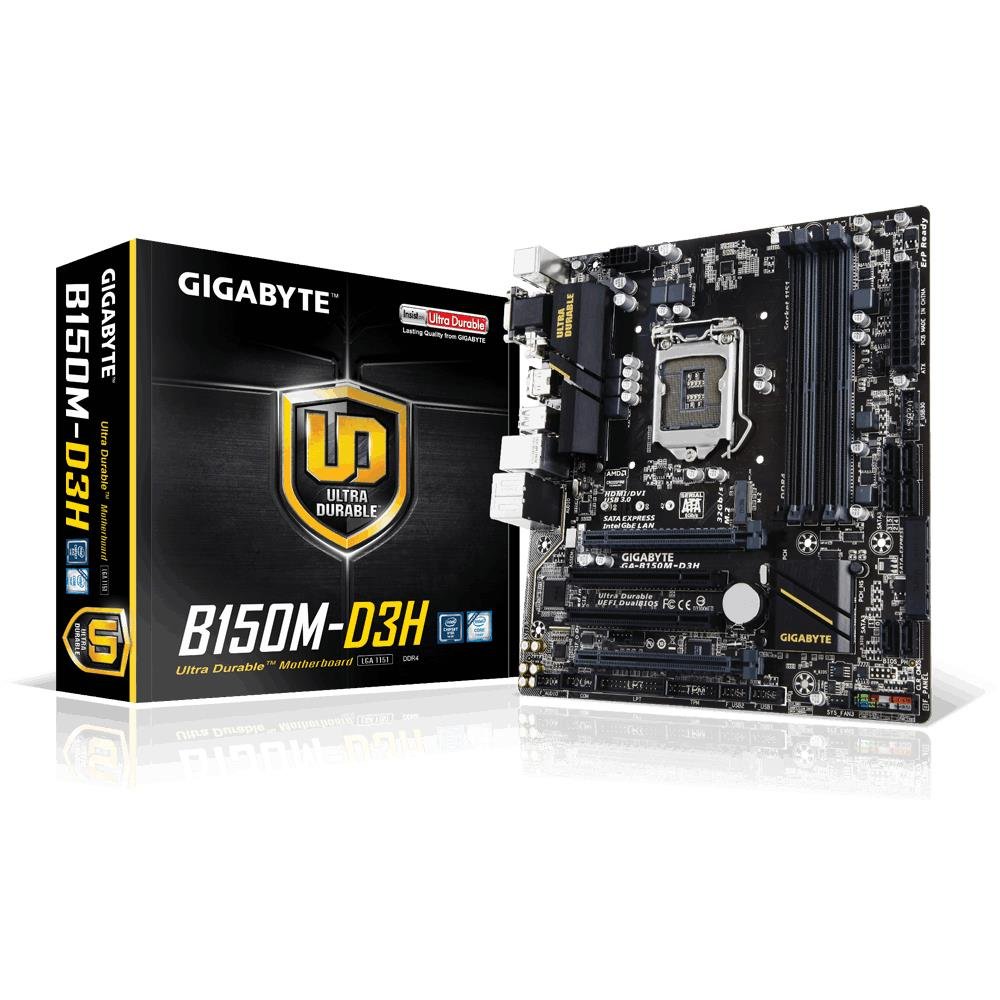
Image 1.1: GIGABYTE GA-B150M-D3H Micro ATX Motherboard. This image displays the overall layout of the motherboard, highlighting its compact Micro ATX form factor and various component slots.
2. Gwybodaeth Diogelwch
Observe the following safety precautions to prevent damage to the motherboard and injury to yourself:
- Datgysylltwch y llinyn pŵer o'r soced wal bob amser cyn cyffwrdd ag unrhyw gydrannau.
- Gwisgwch strap arddwrn gwrth-statig neu cyffwrddwch â gwrthrych metel wedi'i seilio'n aml i ollwng trydan statig.
- Daliwch y famfwrdd wrth ei ymylon i osgoi cyffwrdd â chydrannau sensitif.
- Cadwch y famfwrdd i ffwrdd o leithder a thymheredd eithafol.
- Ensure proper ventilation within the computer case to prevent overheating.
3. Cynnwys Pecyn
Gwiriwch fod yr holl eitemau yn bresennol ym mhecyn eich mamfwrdd:
- GIGABYTE GA-B150M-D3H Motherboard
- Llawlyfr Defnyddiwr
- Shield I / O
- Ceblau SATA
- Driver CD/DVD
Nodyn: Gall y cynnwys amrywio ychydig yn dibynnu ar y rhanbarth neu'r fersiwn ddiweddaraf.
4. Cynllun Motherboard
Familiarize yourself with the various components and connectors on the GA-B150M-D3H motherboard.
Image 4.1: GIGABYTE GA-B150M-D3H Motherboard Layout. This image provides a visual reference for the location of key components such as the CPU socket, DIMM slots, PCIe slots, SATA ports, and M.2 connector.
Cydrannau Allweddol:
- LGA 1151 CPU Socket: For 6th Generation Intel Core Processors.
- DDR4 DIMM Slots (4): Supports Dual Channel DDR4 memory up to 2133 MHz.
- Slotiau PCIe: Includes PCIe Gen3 x16 for graphics cards and PCIe x1 slots for expansion.
- M.2 Connector: Supports PCIe NVMe & SATA SSDs with up to 32Gb/s data transfer.
- SATA Express Connector: For up to 16Gb/s data transfer.
- Porthladdoedd SATA 6Gb/s: For connecting traditional SATA storage devices.
- 24-Pin ATX Power Connector: Prif fewnbwn pŵer.
- 8-Pin ATX 12V Power Connector: CPU power input.
- Penawdau Panel Blaen: For power button, reset button, LED indicators, and USB ports.
- Cysylltwyr Sain: 8-channel HD Audio with high quality capacitors and Audio Noise Guard.
5. Gosod a Gosod
Dilynwch y camau hyn i osod eich mamfwrdd a'ch cydrannau'n iawn.
5.1. Gosod y CPU
- Locate the LGA 1151 CPU socket.
- Agorwch lifer soced y CPU a chodwch y plât llwyth.
- Aliniwch y CPU yn ofalus gyda'r soced, gan sicrhau bod y triongl aur ar y CPU yn cyd-fynd â'r triongl ar y soced. Peidiwch â gorfodi'r CPU i mewn i'r soced.
- Lower the load plate and secure it with the lever.
5.2. Gosod yr Oerydd CPU
Refer to your CPU cooler's instruction manual for specific installation steps. Ensure thermal paste is applied correctly between the CPU and cooler base.
5.3. Gosod Cof (RAM)
- Agorwch y clipiau ar ddau ben y slotiau DIMM DDR4.
- Aliniwch y modiwl cof â'r slot, gan sicrhau bod y rhic ar y modiwl yn cyd-fynd â'r allwedd yn y slot.
- Pwyswch i lawr yn gadarn ar ddau ben y modiwl cof nes bod y clipiau'n clicio i'w lle.
- For dual-channel performance, install memory modules in matching colored slots (e.g., DIMM1 and DIMM2).
5.4. Gosod Cardiau Ehangu
- Remove the metal bracket from the desired PCIe slot on your computer case.
- Align the expansion card with the PCIe slot and press down firmly until it is seated correctly.
- Secure the card with a screw to the computer case.
5.5. Connecting Storage Devices
- Dyfeisiau SATA: Connect one end of the SATA data cable to a SATA 6Gb/s port on the motherboard and the other end to your hard drive or SSD. Connect the SATA power cable from your power supply to the device.
- M.2 SSD: Insert the M.2 SSD into the M.2 slot at an angle, then gently push it down and secure it with the provided screw.
- SATA Express: If using a SATA Express device, connect it to the designated SATA Express connector.
5.6. Cysylltu Cysylltwyr y Panel Blaen
Connect the cables from your computer case's front panel (power button, reset button, HDD LED, power LED, front USB, front audio) to the corresponding headers on the motherboard. Refer to the motherboard layout diagram for exact locations and pin assignments.
5.7. Cysylltu'r Cyflenwad Pŵer
- Connect the 24-pin ATX main power connector from your power supply to the 24-pin power socket on the motherboard.
- Connect the 8-pin ATX 12V CPU power connector to the 8-pin socket near the CPU.
- Gwnewch yn siŵr bod yr holl gysylltiadau pŵer yn ddiogel.
6. Cyfarwyddiadau Gweithredu
6.1. Cychwyn Cyntaf
After assembling all components, connect your monitor, keyboard, and mouse. Power on the system. The system should display the GIGABYTE splash screen and then enter the BIOS/UEFI setup or attempt to boot from a connected storage device.
6.2. Gosod BIOS/UEFI
I fynd i mewn i'r gosodiad BIOS/UEFI, pwyswch y DEL key repeatedly during the boot process when the GIGABYTE logo appears. Here you can configure system settings, boot order, and monitor hardware status. The GA-B150M-D3H features GIGABYTE UEFI Dual BIOS for enhanced reliability.
6.3. Gosod Gyrwyr
After installing your operating system, install the necessary drivers for the motherboard components. These can be found on the included driver CD/DVD or downloaded from the official GIGABYTE website. Key drivers include chipset, audio (Realtek ALC892 codec), LAN, and any integrated graphics drivers.
6.4. Gosod System Weithredu
Insert your operating system installation media (USB drive or DVD) and configure the boot order in the BIOS/UEFI to boot from it. Follow the on-screen instructions to install your preferred operating system (e.g., Windows 8.1, Windows 10).
7. cynnal
7.1. Glanhau
Regularly clean the interior of your computer case to prevent dust buildup, which can lead to overheating. Use compressed air to remove dust from fans, heatsinks, and motherboard components. Ensure the system is powered off and unplugged before cleaning.
7.2. Diweddariadau BIOS
GIGABYTE periodically releases BIOS updates to improve system stability, compatibility, and performance. Visit the official GIGABYTE website for your motherboard model (GA-B150M-D3H) to check for the latest BIOS version and follow the provided instructions for updating. Exercise caution during BIOS updates, as an interruption can render the motherboard inoperable.
8. Datrys Problemau
Mae'r adran hon yn mynd i'r afael â phroblemau cyffredin y gallech ddod ar eu traws.
8.1. No Power / System Does Not Turn On
- Check if the power supply is connected correctly to the motherboard (24-pin and 8-pin connectors).
- Gwnewch yn siŵr bod y switsh cyflenwad pŵer yn y safle ON.
- Verify that the front panel power button cable is correctly connected to the motherboard header.
- Profwch y cyflenwad pŵer gyda system arall neu brofwr cyflenwad pŵer.
8.2. Dim Allbwn Arddangos
- Ensure the monitor is connected to the correct graphics output (either integrated graphics on the motherboard or a dedicated graphics card).
- Ail-osodwch y cerdyn graffeg a'r modiwlau cof.
- Try booting with only one memory module installed.
- Gwiriwch a yw'r monitor wedi'i droi ymlaen ac wedi'i osod i'r ffynhonnell fewnbwn gywir.
8.3. Ansefydlogrwydd System / Damweiniau
- Gwiriwch dymheredd y CPU a'r GPU i sicrhau eu bod o fewn terfynau gweithredu diogel.
- Verify that all drivers are installed and up to date.
- Rhedeg offer diagnostig cof i wirio am RAM diffygiol.
- Ensure the power supply provides sufficient and stable power to all components.
9. manylebau
Detailed technical specifications for the GIGABYTE GA-B150M-D3H motherboard:
| Nodwedd | Manyleb |
|---|---|
| Enw Model | GA-B150M-D3H |
| Ffactor Ffurf | Micro ATX (24.4cm x 22.5cm) |
| Soced CPU | LGA 1151 |
| Proseswyr Cydnaws | 6th Generation Intel Core Processors |
| Chipset | Intel B150 Express Chipset |
| Technoleg Cof | DDR4 |
| Slotiau Cof | 4 x DDR4 DIMM sockets (Dual Channel) |
| Capasiti Cof Uchaf | 16 GB |
| Cyflymder Cloc Cof | 2133 MHz |
| Slotiau PCIe | 1 x PCI Express x16, 1 x Total PCIe Ports |
| Rhyngwynebau Storio | PCIe Gen3 x4 M.2, SATA Express, SATA 6Gb/s |
| Codec Sain | Realtek ALC892 codec, 8-channel HD Audio |
| Porthladdoedd USB | Total 8 USB Ports (including USB 2.0) |
| Prif Gysylltydd Pwer | 24-Pin ATX |
| Cysylltydd Pŵer CPU | 8-Pin ATX 12V |
| Nodweddion Unigryw | GIGABYTE UEFI Dual BIOS, Audio Noise Guard with LED Trace Path Lighting, App Center (Easy Tune, Cloud Station) |
10. Gwarant a Chefnogaeth
For warranty information, please refer to the warranty card included in your product package or visit the official GIGABYTE websafle. Gall telerau ac amodau'r warant amrywio yn ôl rhanbarth.
For technical support, driver downloads, BIOS updates, and further product information, please visit the GIGABYTE official support websafle:
https://www.gigabyte.com/Support
When contacting support, please have your motherboard model (GA-B150M-D3H) and serial number ready.