
XUNZEL INLI150RU
XUNZEL 150W Power Inverter with USB User Manual
Brand: XUNZEL | Model: INLI150RU
1. Rhagymadrodd
Diolch am brynuasing the XUNZEL 150W Power Inverter with USB. This device converts 12V DC power from your vehicle's battery into 230V AC power at 50Hz, allowing you to power various electronic devices on the go. It is designed to be compact, lightweight, and easy to install, featuring both an AC outlet and a USB port for versatile use.
Gwybodaeth Ddiogelwch Bwysig
- Darllenwch yr holl gyfarwyddiadau cyn gweithredu'r gwrthdröydd.
- Do not expose the inverter to rain, moisture, or extreme temperatures.
- Ensure proper ventilation around the inverter during operation to prevent overheating.
- Do not connect the inverter to AC distribution wiring.
- Cadwch allan o gyrraedd plant.
- Always disconnect the inverter from the power source when not in use or before cleaning.
- This inverter is designed for 12V DC input only. Do not attempt to connect it to a 24V system or higher.
2. Cynnyrch Drosview
The XUNZEL 150W Power Inverter is a compact and efficient solution for powering your devices. It features a modified sine wave output and includes essential safety protections.
Nodweddion Allweddol:
- 150W continuous power output, 300W peak power.
- Converts 12V DC to 230V AC (modified sine wave).
- Integrated AC outlet with child protection.
- Porthladd gwefru USB adeiledig.
- High-quality DC cables with cigarette lighter plug for easy use.
- Comprehensive protection against overvoltage, undervoltage, a gorlwytho.
- Compact and round design for portability.
Diagram Cynnyrch
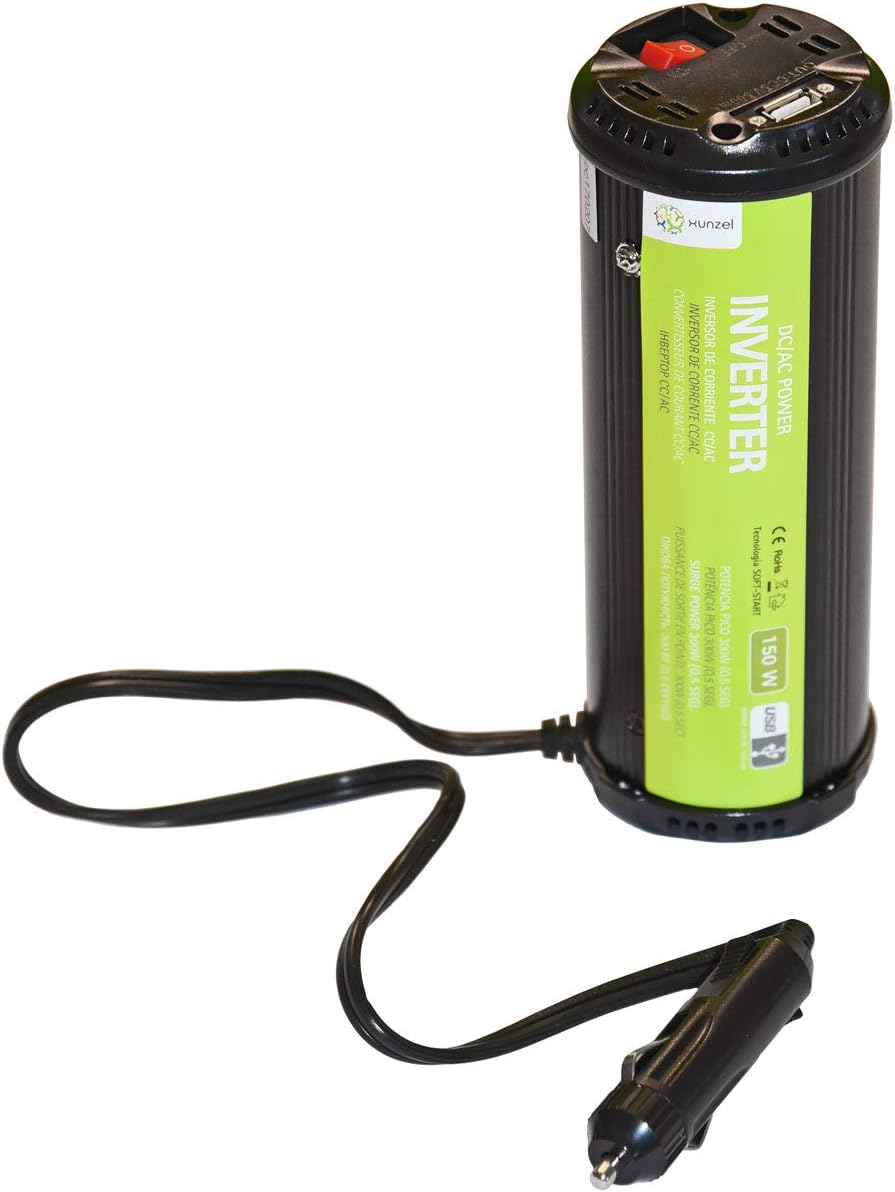
Figure 2.1: XUNZEL 150W Power Inverter. This image displays the XUNZEL 150W Power Inverter. The cylindrical black unit features a green label indicating 'DC/AC POWER INVERTER 150W USB'. The top of the unit has a red power switch, an AC outlet, and a USB port. A cable with a cigarette lighter plug extends from the base of the inverter.
3. Gosod a Gosod
- Cysondeb Cerbyd: Ensure your vehicle has a 12V DC cigarette lighter socket. This inverter is not compatible with 24V systems.
- Lleoliad: Place the inverter on a stable, flat surface in a well-ventilated area. Avoid placing it near heat sources, flammable materials, or in direct sunlight.
- Cysylltiad: Insert the cigarette lighter plug of the inverter firmly into your vehicle's 12V accessory socket. Ensure a secure connection.
- Pŵer Ymlaen: Once connected, press the red power switch on the inverter to turn it on. The LED indicator will illuminate, signifying that the inverter is ready for use.
- Cysylltiad Dyfais: You can now plug your AC-powered devices (up to 150W continuous) into the AC outlet or your USB-powered devices into the USB port.
Nodyn: For optimal performance and safety, ensure the total power consumption of your connected devices does not exceed the inverter's continuous power rating of 150W.
4. Cyfarwyddiadau Gweithredu
Troi Ymlaen/Diffodd
- To turn on the inverter, press the red power switch. The LED indicator will light up.
- To turn off the inverter, press the red power switch again. The LED indicator will turn off.
Using the AC Outlet
- Ensure the inverter is turned on.
- Plug your AC-powered device into the 230V AC outlet on the inverter.
- Verify that the device's power consumption does not exceed 150W. For devices with motors or compressors, consider their startup (peak) power requirements, which should not exceed 300W.
Defnyddio'r Porth USB
- Ensure the inverter is turned on.
- Connect your USB-powered device (e.g., smartphone, tablet) to the USB port using a compatible USB cable.
- The USB port provides standard 5V DC output for charging.
Pwysig: Some sensitive electronic devices may not operate correctly with a modified sine wave inverter. If your device malfunctions, discontinue use.
5. Cynnal a Chadw a Gofal
- Glanhau: Disconnect the inverter from all power sources before cleaning. Use a soft, dry cloth to wipe the exterior. Do not use liquid cleaners or solvents.
- Awyru: Gwiriwch yn rheolaidd fod yr agoriadau awyru yn glir o lwch a malurion i sicrhau llif aer priodol ac atal gorboethi.
- Storio: When not in use, store the inverter in a cool, dry place, away from direct sunlight and moisture.
- Archwiliad cebl: Periodically inspect the power cable and plug for any signs of damage. Do not use the inverter if the cable or plug is damaged.
6. Datrys Problemau
If you experience issues with your XUNZEL Power Inverter, refer to the following common problems and solutions:
| Problem | Achos Posibl | Ateb |
|---|---|---|
| Dim allbwn pŵer / Gwrthdröydd ddim yn troi ymlaen |
|
|
| Overload protection activated (inverter shuts down) |
|
|
| Device not working correctly with inverter |
|
|
7. Manylebau Technegol
| Paramedr | Gwerth |
|---|---|
| Rhif Model | INLI150RU |
| Mewnbwn Voltage | DC 12V |
| Allbwn Voltage | AC 230V |
| Amlder Allbwn | 50Hz |
| Grym Parhaus | 150W |
| Pŵer Brig | 300W (0.5 seconds) |
| Allbwn USB | 5V DC (standard USB) |
| Dimensiynau (L x W x H) | 7 x 19.2 x 7 cm |
| Pwysau | 550 g |
| Amddiffyniadau | Overvoltage, Undervoltage, Overload, Short-circuit |
8. Gwarant a Chefnogaeth
This XUNZEL product is designed for reliability and performance. For warranty information, technical support, or service inquiries, please refer to the warranty card included with your purchase or contact your retailer or the manufacturer directly.
Cadwch eich prawf prynu ar gyfer unrhyw hawliadau gwarant.
Ask a question about this manual
Ask about setup, troubleshooting, compatibility, parts, safety, or missing instructions. Manuals+ will review the question and use this page’s manual context to help answer it.