
1. Rhagymadrodd
Thank you for choosing the TFA 35.1133.01 Sun Funk Weather Station. This device provides accurate indoor and outdoor temperature readings, along with a weather forecast based on atmospheric pressure changes. This manual will guide you through the setup, operation, and maintenance of your weather station to ensure optimal performance and longevity.
2. Gwybodaeth Diogelwch
- Read this instruction manual carefully before using the device.
- Cadwch y llawlyfr hwn er mwyn cyfeirio ato yn y dyfodol.
- Peidiwch â gwneud y ddyfais yn agored i dymereddau eithafol, dirgryniadau neu siociau.
- Osgoi golau haul uniongyrchol a lleithder.
- Peidiwch â throchi'r ddyfais mewn dŵr.
- Use only specified batteries. Ensure correct polarity.
- Tynnwch fatris gwag allan ar unwaith i atal gollyngiadau.
- Do not attempt to repair the device yourself. Contact qualified personnel for service.
- Cadwch y ddyfais a'r batris allan o gyrraedd plant.
3. Cynnwys Pecyn
Gwiriwch fod yr holl gydrannau yn bresennol ac yn ddi-ddifrod:
- TFA 35.1133.01 Main Weather Station Unit
- Synhwyrydd Awyr Agored Di-wifr
- Llawlyfr Cyfarwyddiadau
- Note: Batteries (4 x AAA) are typically required and may not be included.
4. Cynnyrch Drosview
The TFA 35.1133.01 Sun Funk Weather Station consists of a main display unit and a wireless outdoor sensor. The main unit displays indoor temperature, outdoor temperature, and a weather forecast. The outdoor sensor transmits temperature data wirelessly to the main unit.
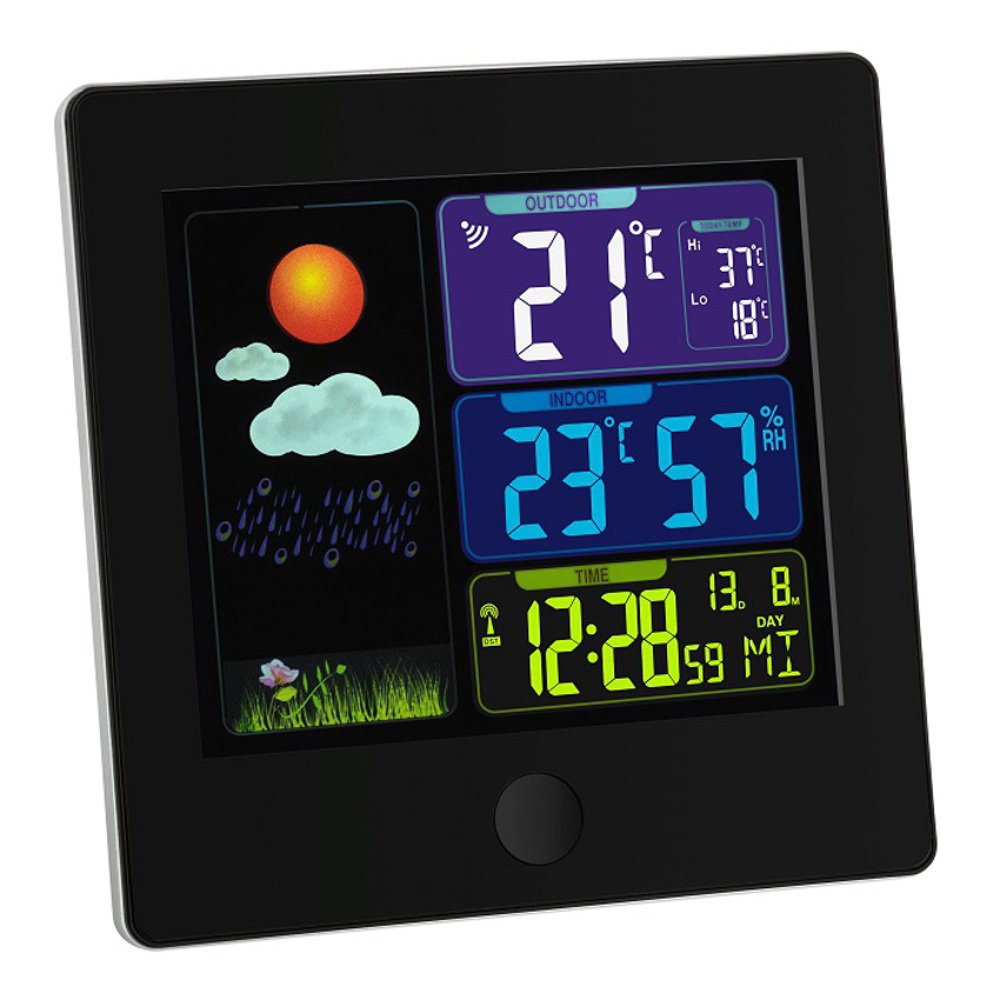
Image 1: TFA 35.1133.01 Sun Funk Weather Station. This image shows the main display unit and the compact wireless outdoor sensor. The main unit features a clear digital display, while the outdoor sensor is designed for external placement.
Prif Nodweddion Uned:
- Large LCD display for easy reading.
- Indoor temperature display.
- Outdoor temperature display (from wireless sensor).
- Weather forecast icons (sunny, partly cloudy, cloudy, rainy).
- Radio-controlled clock (DCF77 signal for automatic time synchronization).
- Adran batri.
Outdoor Sensor Features:
- Synhwyrydd tymheredd.
- Wireless transmission to the main unit.
- Adran batri.
- Wall mounting option.
5. Gosod
5.1 Gosod Batri
- Synhwyrydd Awyr Agored: Open the battery compartment cover on the back of the outdoor sensor. Insert 2 x AAA batteries, observing the correct polarity (+/-). Close the cover securely.
- Prif Uned: Open the battery compartment cover on the back of the main unit. Insert 2 x AAA batteries, observing the correct polarity (+/-). Close the cover securely.
- Important: Always insert batteries into the outdoor sensor first, then into the main unit. This ensures proper synchronization.
5.2 Lleoli Synhwyrydd
- Rhowch y synhwyrydd awyr agored mewn lleoliad cysgodol, sych, wedi'i amddiffyn rhag golau haul uniongyrchol a glaw, i sicrhau darlleniadau tymheredd cywir.
- Ensure the sensor is within the wireless range of the main unit (typically up to 30 meters in open air). Walls and other obstacles can reduce this range.
- Avoid placing the sensor near heat sources (e.g., vents, windows) or cold sources (e.g., refrigerators).
5.3 Cydamseru Cychwynnol a Gosod Amser
- After inserting batteries, the main unit will automatically search for the outdoor sensor signal. This may take a few minutes. The outdoor temperature will appear on the display once connected.
- The main unit will also attempt to receive the DCF77 radio time signal. This signal automatically sets the correct time and date. Place the main unit near a window for better reception. This process can take several minutes or even hours, depending on your location and signal strength.
- If the DCF77 signal is not received, you may need to manually set the time and date. Refer to the specific button functions on your device (e.g., MODE, SET buttons) for manual adjustment.
6. Cyfarwyddiadau Gweithredu
6.1 Gwybodaeth Arddangos
The main unit's display typically shows the following information:
- Amser a Dyddiad: Automatically set by the DCF77 radio signal.
- Tymheredd Dan Do: Tymheredd cyfredol wedi'i fesur gan y prif uned.
- Tymheredd Awyr Agored: Current temperature transmitted from the wireless sensor.
- Rhagolwg y Tywydd: Represented by icons (e.g., sun, clouds, rain) indicating predicted weather changes based on atmospheric pressure trends.
- Dangosydd Cryfder Signal: For both the outdoor sensor and the DCF77 time signal.
6.2 Button Functions (Example)
Er y gall labeli botymau penodol amrywio, mae swyddogaethau cyffredin yn cynnwys:
- MODE / SET: Used to switch between display modes (e.g., time, alarm) or to enter setting mode.
- +/ADJ: Used to increase values during setting or to manually adjust time/date.
- -/MEM: Used to decrease values during setting or to view minimum/maximum temperature records.
- SIANEL: If multiple outdoor sensors are supported, this button cycles through channels.
Refer to the specific button layout on your device for precise functions.
7. cynnal
7.1 Batri Newydd
- When the battery indicator appears on the display, replace the batteries in the respective unit (main unit or outdoor sensor).
- Always replace all batteries in a unit at the same time with new ones of the same type.
- Gwaredwch batris wedi'u disbyddu yn unol â rheoliadau lleol.
7.2 Glanhau
- Glanhewch y ddyfais gyda meddal, damp brethyn. Peidiwch â defnyddio glanhawyr neu doddyddion sgraffiniol.
- Ensure no moisture enters the device's interior.
7.3 Storio
- If the device will not be used for an extended period, remove all batteries to prevent leakage.
- Storiwch y ddyfais mewn lle oer, sych.
8. Datrys Problemau
| Problem | Achos Posibl | Ateb |
|---|---|---|
| Dim arddangosfa ar y prif uned. | Depleted or incorrectly inserted batteries. | Amnewidiwch y batris, gan sicrhau'r polaredd cywir. |
| Nid yw'r tymheredd awyr agored yn cael ei arddangos neu'n fflachio. | Outdoor sensor out of range, depleted batteries, or interference. |
|
| Incorrect outdoor temperature reading. | Synhwyrydd wedi'i amlygu i olau haul uniongyrchol neu ffynhonnell wres. | Relocate the outdoor sensor to a shaded, well-ventilated area. |
| Time not automatically set (DCF77 signal). | Derbyniad signal gwael oherwydd lleoliad neu ymyrraeth. |
|
9. manylebau
| Nodwedd | Manylyn |
|---|---|
| Rhif Model | 35.1133.01 |
| Brand | TFA-Dostmann |
| Dimensiynau Cynnyrch | Main Unit: 2.5 x 12 x 12 cm; 168 g |
| Power (Main Unit) | 2 x batris AAA (heb eu cynnwys) |
| Power (Outdoor Sensor) | 2 x batris AAA (heb eu cynnwys) |
| Deunydd | Plastig |
| Nodwedd Arbennig | Lightweight, Radio-controlled time (DCF77) |
| Defnydd a Argymhellir | Indoor/Outdoor temperature monitoring |
| Di-wifr Range | Up to 30 meters (open air, may vary with obstacles) |
10. Gwarant a Chefnogaeth
10.1 Gwybodaeth Gwarant
Mae'r cynnyrch hwn fel arfer wedi'i orchuddio gan Gwarant fasnachol 1 mlynedd from the date of purchase. This warranty covers manufacturing defects and material faults. It does not cover damage caused by improper use, accidents, unauthorized repairs, or normal wear and tear. Please retain your proof of purchase for warranty claims.
10.2 Cefnogaeth i Gwsmeriaid
For technical assistance, warranty claims, or further information, please contact your retailer or the manufacturer's customer service department. Contact details can usually be found on the product packaging or the manufacturer's official websafle.
Gwneuthurwr: TFA-Dostmann