
Rhagymadrodd
Diolch am brynuasing the Soundmaster DAB500SI Portable Digital Radio. This manual provides essential information for the safe and efficient operation of your device. Please read it thoroughly before use and retain it for future reference.
Cynnyrch Drosview
The Soundmaster DAB500SI is a compact and versatile digital radio, offering both DAB/DAB+ and FM reception. It features a clear display, intuitive controls, and a headphone output for personal listening. Its portable design allows for use in various locations.
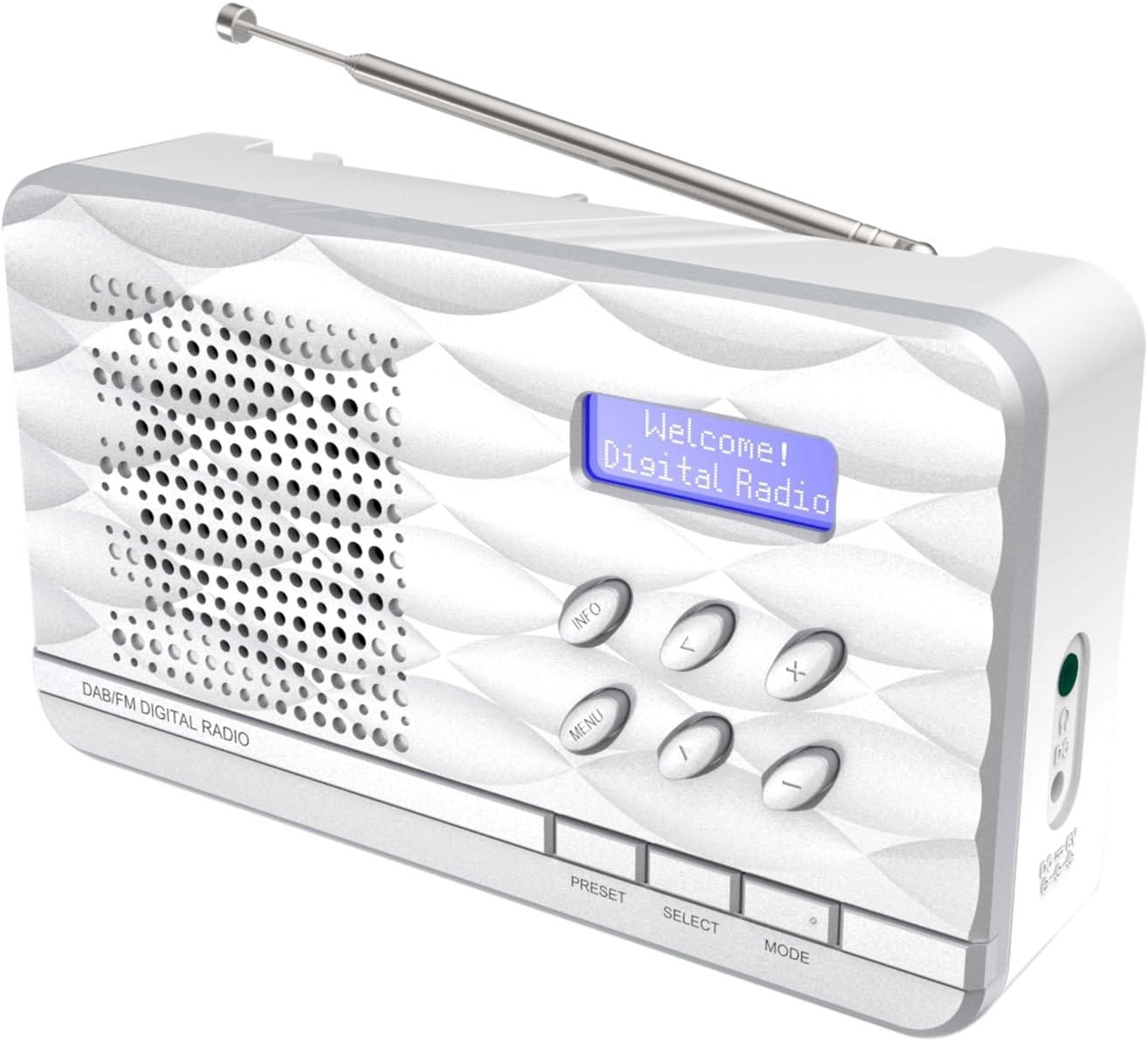
Ffigur 1: Soundmaster DAB500SI Portable Digital Radio. The image shows the silver radio with its extendable antenna, front speaker grille, blue backlit display showing "Welcome! Digital Radio", and control buttons labeled INFO, MENU, PRESET, SELECT, MODE, and navigation arrows. Dimensions are indicated as 19cm (width), 11cm (height), and 7cm (depth).
Gosod
1. dadbacio
Carefully remove the radio from its packaging. Ensure all components are present: the DAB500SI radio unit and this user manual.
2. Cysylltiad Pwer
The DAB500SI is powered by mains electricity. Locate the DC IN port on the side of the unit. Connect the provided power adapter to this port and then plug it into a standard wall outlet.
Alternatively, the unit can be powered by 4x AA batteries (not included) for portable use. Open the battery compartment on the rear of the unit and insert the batteries, observing correct polarity.
3. Addasiad Antena
Extend the telescopic antenna fully for optimal DAB/DAB+ and FM reception. Adjust its position to achieve the best signal quality.
Cyfarwyddiadau Gweithredu
1. Pŵer Ymlaen / I ffwrdd
Gwasgwch y GRYM button (usually combined with the MODE button or a dedicated button) to turn the radio on or off.
2. Mode Selection (DAB/FM)
Gwasgwch y MODD button to switch between DAB/DAB+ and FM radio modes.
3. Gweithrediad Radio DAB/DAB+
- Gosodiad Tro Cyntaf: When first powered on in DAB mode, the radio will automatically perform a full scan for available stations. This may take a few minutes.
- Dewis Gorsaf: Defnyddiwch y CHWITH/DE navigation buttons (labeled < and > on the device) to browse through the list of available DAB stations. Press DETHOL i gadarnhau eich dewis.
- Sgan â Llaw: If you move the radio to a new location or wish to update the station list, press BWYDLEN, then navigate to "Full Scan" or "Auto Scan" and press DETHOL.
- Arddangosfa Gwybodaeth: Gwasgwch y GWYBODAETH button repeatedly to cycle through various information displays such as program type, signal strength, time, date, and DLS (Dynamic Label Segment) text.
4. Gweithrediad Radio FM
- Sgan Auto: Yn y modd FM, pwyswch a dal y DETHOL button to perform an auto scan. The radio will scan and store available stations.
- Tiwnio â Llaw: Defnyddiwch y CHWITH/DE navigation buttons (labeled < and > on the device) to manually tune the frequency in small increments.
- Gwybodaeth RDS: If available, RDS (Radio Data System) information such as station name and program type will be displayed. Press GWYBODAETH to cycle through available RDS data.
5. Rhagosodiadau
The radio supports up to 20 preset stations for both DAB and FM modes.
- Storing a Preset: Tiwniwch i'r orsaf a ddymunir. Pwyswch a daliwch y RHAGOSOD button until "Preset Store" appears on the display. Use the navigation buttons to select a preset number (1-20) and press DETHOL i gadarnhau.
- Adalw Rhagosodiad: Gwasgwch y RHAGOSOD button briefly. Use the navigation buttons to select the desired preset number and press DETHOL i diwnio iddo.
6. Rheoli Cyfrol
Defnyddiwch y +/- buttons (labeled + and - on the device) to adjust the volume level.
7. Defnyddio Clustffonau
Connect standard 3.5mm headphones to the headphone jack on the side of the unit for private listening. The internal speaker will be muted automatically.
Cynnal a chadw
1. Glanhau
Wipe the radio with a soft, dry cloth. Do not use abrasive cleaners, waxes, or solvents as they may damage the finish. Ensure the unit is unplugged before cleaning.
2. Storio
If storing the radio for an extended period, remove the batteries to prevent leakage. Store in a cool, dry place away from direct sunlight and extreme temperatures.
3. Amnewid Batri
When using batteries, replace all four AA batteries simultaneously when the low battery indicator appears or audio quality degrades. Ensure correct polarity when inserting new batteries.
Datrys problemau
| Problem | Achos Posibl | Ateb |
|---|---|---|
| Dim pŵer | Power adapter not connected or faulty; batteries depleted or incorrectly inserted. | Check power adapter connection and wall outlet. Replace batteries, ensuring correct polarity. |
| Poor DAB/FM reception | Antenna not extended or poorly positioned; weak signal area. | Fully extend and adjust the telescopic antenna. Try repositioning the radio. Perform a full scan in DAB mode. |
| Dim sain gan y siaradwr | Cyfaint yn rhy isel; clustffonau wedi'u cysylltu. | Cynyddwch y sain. Datgysylltwch y clustffonau os nad ydych chi eisiau. |
| Radio freezes or becomes unresponsive | Gwall meddalwedd dros dro. | Disconnect power for a few seconds, then reconnect. If using batteries, remove and reinsert them. |
Manylebau
- Rhif Model: DAB500SI
- Brand: Sainfeistr
- Bandiau Radio â Chymorth: AM, DAB, DAB+, FM
- Gorsafoedd Rhagosodedig: 20 (DAB/FM)
- Uchafswm pŵer allbwn siaradwr: 1 Wat
- Technoleg Cysylltedd: Auxiliary (3.5mm headphone jack)
- Ffynhonnell Pwer: Mains (AC adapter) or 4x AA Batteries (not included)
- Arddangos: LCD wedi'i oleuo'n ôl
- Pwysau Eitem: 400 gram
- Dimensiynau (tua): 19 cm (Lled) x 11 cm (Uchder) x 7 cm (Dyfnder)
- Lliw: Arian
- Cydrannau wedi'u Cynnwys: Radio unit, User Manual
Gwarant a Chefnogaeth
Gwybodaeth Gwarant
Please refer to the warranty card included with your product for detailed warranty terms and conditions. Keep your purchase receipt as proof of purchase for any warranty claims.
Cefnogaeth i Gwsmeriaid
For technical assistance, troubleshooting, or spare parts inquiries, please contact your retailer or the Soundmaster customer service department. Contact details can typically be found on the manufacturer's official websafle neu ar becynnu'r cynnyrch.
Note: Spare parts availability information is not provided by the manufacturer. Software updates are not guaranteed.