
1. Rhagymadrodd
This manual provides essential instructions for the setup, operation, maintenance, and troubleshooting of your IBM Lenovo Preferred Pro USB Wired Keyboard and Mouse Set. Please read this manual thoroughly before using the product to ensure proper functionality and longevity.
2. Cynnyrch Drosview
The IBM Lenovo Preferred Pro USB Wired Keyboard and Mouse Set offers a reliable input solution for your computer. The keyboard features a standard layout with a numeric keypad, while the mouse is a 2-button optical mouse with a scroll wheel. Both devices connect via a standard USB interface, providing plug-and-play compatibility with most operating systems.

Ffigur 2.1: Uchaf view of the IBM Lenovo Preferred Pro USB Wired Keyboard.
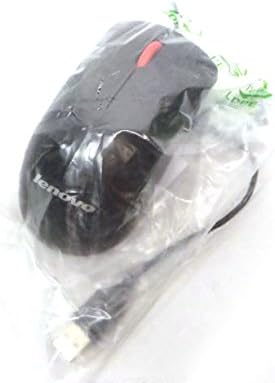
Ffigur 2.2: Uchaf view of the Lenovo USB 2-Button Optical Mouse.
Nodweddion Allweddol:
- USB Wired Connectivity: Ensures a stable and reliable connection.
- Plug-and-Play: No additional drivers typically required for basic functionality.
- Standard Keyboard Layout: Full-size keyboard with numeric keypad.
- Optical Mouse: Precise tracking with a scroll wheel for easy navigation.
3. Gosod
Follow these steps to connect your keyboard and mouse to your computer.
- Dadbacio'r Dyfeisiau: Tynnwch y bysellfwrdd a'r llygoden o'u pecynnu yn ofalus.
- Identify USB Connectors: Locate the USB connectors at the end of the keyboard and mouse cables.
- Cysylltu â Chyfrifiadur: Insert the USB connector of the keyboard into an available USB port on your computer. Repeat this step for the mouse.
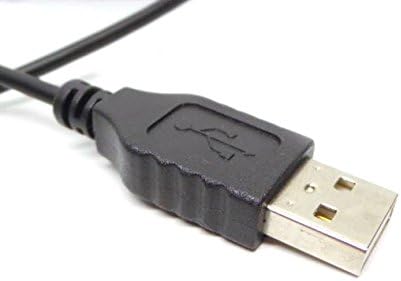
Figure 3.1: Close-up of a standard USB Type-A connector, used for connecting the keyboard and mouse.
Your computer should automatically detect and install the necessary drivers for the keyboard and mouse. No additional software installation is typically required for basic functionality.
4. Cyfarwyddiadau Gweithredu
4.1 Defnyddio'r Bysellfwrdd
- Teipio: Use the alphanumeric keys for text input.
- Allweddi Swyddogaeth (F1-F12): These keys perform various functions depending on the application or operating system.
- Bysellbad rhifol: Use the dedicated numeric keypad for efficient data entry. Ensure the "Num Lock" indicator light is on.
- Allweddi Arbennig: Utilize keys like "Print Screen", "Scroll Lock", "Pause/Break", "Insert", "Home", "Page Up", "Delete", "End", and "Page Down" for their respective functions.
4.2 Defnyddio'r Llygoden
- Symudiad: Move the mouse across a flat surface to control the cursor on the screen.
- Cliciwch ar y chwith: Pwyswch y botwm chwith i ddewis eitemau, agor dolenni, neu actifadu swyddogaethau.
- Cliciwch ar y dde: Press the right button to open context menus.
- Olwyn Sgroliwch: Rholiwch yr olwyn sgrolio i fyny neu i lawr i lywio trwy ddogfennau neu web pages. The scroll wheel may also function as a middle click button.
5. cynnal
Proper care and maintenance will extend the life of your keyboard and mouse.
- Glanhau:
- Disconnect devices from the computer before cleaning.
- Defnyddiwch feddal, damp cloth with a mild cleaning solution (e.g., water or isopropyl alcohol) to wipe surfaces.
- Avoid excessive moisture, especially near keycaps and optical sensors.
- Use compressed air to remove dust and debris from between keyboard keys.
- Storio: Store the devices in a clean, dry environment away from extreme temperatures and direct sunlight.
- Osgoi gollyngiadau: Keep liquids away from the keyboard and mouse to prevent damage.
6. Datrys Problemau
If you encounter issues with your keyboard or mouse, refer to the following common problems and solutions:
| Problem | Achos Posibl | Ateb |
|---|---|---|
| Bysellfwrdd/Llygoden ddim yn ymateb | Cysylltiad USB llac, porthladd USB diffygiol, problem gyrrwr. |
|
| Keys not working or typing incorrectly | Debris under keys, software conflict, keyboard settings. |
|
| Cyrchwr y llygoden yn afreolaidd neu ddim yn symud | Dirty optical sensor, unsuitable surface, software issue. |
|
If the problem persists after trying these solutions, contact customer support or your reseller for further assistance.
7. manylebau
| Nodwedd | Manylyn |
|---|---|
| Keyboard Model Numbers | 54Y9400, 41A5289, SK-8825, KB1021 |
| Mouse Model Numbers | 45J4888, 25011476, 45J4889, M-U0025-O |
| Brand | IBM / Lenovo |
| Lliw | Du |
| Technoleg Cysylltedd | USB Wired |
| Math Bysellfwrdd | Preferred Pro USB Wired Keyboard |
| Math Llygoden | 2-Button Black Red Scroll Wheel Optical Mouse |
| Dimensiynau Pecyn | 22 x 10.2 x 4.7 modfedd (bras) |
| Pwysau Eitem | 1 pwys (tua) |
| Gwneuthurwr | Lenovo |
8. Gwarant a Chefnogaeth
For warranty information, please refer to the documentation provided at the time of purchase or contact your reseller. IBM and Lenovo products typically come with a standard manufacturer's warranty.
For technical support or further inquiries, please contact the product's manufacturer or the authorized reseller from whom you purchased the item. Keep your purchase receipt and product model numbers handy for faster service.
