
1. Rhagymadrodd
This manual provides detailed instructions for the installation, operation, and maintenance of your ASUS X99-DELUXE motherboard. The ASUS X99-DELUXE is an ATX motherboard designed for high-performance computing, supporting Intel LGA 2011-3 processors and DDR4 memory.

Ffigur 1: O'r brig i lawr view of the ASUS X99-DELUXE Motherboard, showing the CPU socket, RAM slots, and heatsinks.
2. Nodweddion Allweddol
- ASUS OC Socket: Designed to enhance 8-core CPU and DDR4 performance beyond standard X99 expectations.
- Cefnogaeth Cof DDR4: Features a special memory overclocking design, supporting DDR4 memory speeds up to 3200MHz (O.C.).
- Dual M.2 X4 Support: Provides two M.2 slots with PCIe 3.0 x4 interface, enabling data transfer speeds up to 32Gb/s for compatible NVMe SSDs.
- Fan Extension Card: Includes an extension card for advanced PC cooling management.
- Optimeiddio 5 Ffordd: Utilizes Dual Intelligent Processors 5 for system optimization, including performance tuning, power saving, digital power control, and fan control.
- BIOS UEFI: Features a media-acclaimed Unified Extensible Firmware Interface (UEFI) BIOS for intuitive system configuration.
- SATA Express: Supports SATA Express for storage speeds up to 10Gb/s.
3. Gosod a Gosod
Cyn dechrau'r gosodiad, gwnewch yn siŵr bod eich system wedi'i diffodd a'i datgysylltu o'r ffynhonnell bŵer. Daliwch y famfwrdd wrth ei ymylon i osgoi rhyddhau statig.
3.1. CPU Installation (LGA 2011-3 Socket)
- Carefully open the CPU socket retention mechanism.
- Aliniwch y marc trionglog ar y CPU gyda'r marc cyfatebol ar y soced.
- Rhowch y CPU yn ysgafn yn y soced heb ei orfodi.
- Close the retention mechanism to secure the CPU. Ensure no pins are bent during this process.

Ffigur 2: Ongl view of the ASUS X99-DELUXE Motherboard, highlighting the LGA 2011-3 CPU socket.
3.2. Gosod Cof (DDR4)
The motherboard supports DDR4 memory modules. Refer to the motherboard manual for specific memory configurations and supported speeds.
- Agorwch y clipiau ar ddau ben y slot DIMM.
- Aliniwch y rhic ar y modiwl cof DDR4 gyda'r allwedd yn y slot DIMM.
- Mewnosodwch y modiwl yn gadarn yn y slot nes bod y clipiau'n clicio i'w lle.
3.3. Gosod Dyfais Storio (M.2, SATA)
Install M.2 SSDs into the dedicated M.2 slots and SATA drives to the SATA ports. The motherboard supports SATA 3 (6Gb/s) and SATA Express.
3.4. Cysylltu Perifferolion
Connect your display, keyboard, mouse, and other peripherals to the rear I/O panel. The motherboard provides various USB ports, Ethernet ports, and audio jacks.
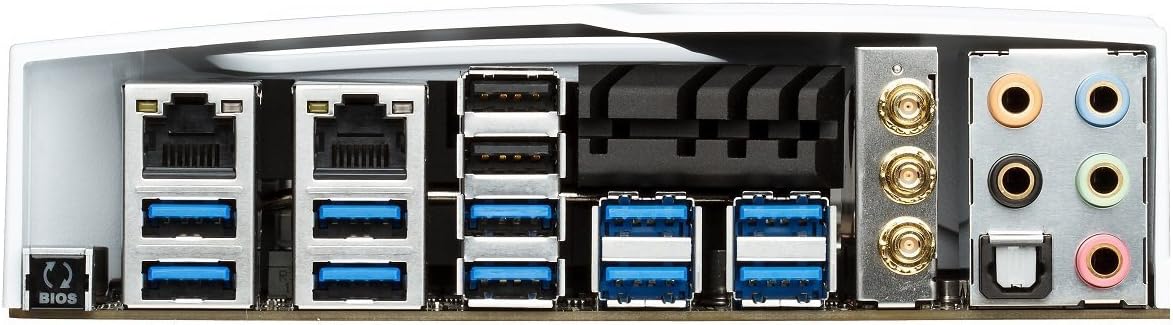
Figure 3: Rear I/O panel of the ASUS X99-DELUXE Motherboard, showing USB ports, Ethernet, and audio jacks.
4. Cyfarwyddiadau Gweithredu
4.1. UEFI BIOS Configuration
The UEFI BIOS allows you to configure system settings, boot options, and hardware parameters. To enter the BIOS, press the DEL allwedd wrth gychwyn y system.
- Modd EZ: Provides a simplified interface for basic settings.
- Modd Uwch: Offers comprehensive control over all motherboard features, including overclocking and fan control.
4.2. Gosod Gyrwyr
After installing your operating system (e.g., Windows XP, as listed in specifications, and newer OS versions), install the necessary drivers for the motherboard chipset, audio, network, and other integrated components. These are typically provided on a support DVD or available for download from the ASUS websafle.
4.3. 5-Way Optimization
The 5-Way Optimization feature, accessible through ASUS software, automatically tunes your system for optimal performance, power efficiency, digital power delivery, and fan acoustics based on your usage. It is recommended to manage overclocking and fan settings directly within the BIOS for more precise control.
5. cynnal
Mae cynnal a chadw rheolaidd yn helpu i sicrhau hirhoedledd a gweithrediad sefydlog eich mamfwrdd.
- Tynnu Llwch: Periodically clean dust from the motherboard and cooling components using compressed air. Ensure the system is powered off and unplugged before cleaning.
- Gwiriadau Cysylltiad: Verify that all cables and components are securely seated.
- Diweddariadau BIOS: Gwiriwch gefnogaeth ASUS website for the latest BIOS updates to improve compatibility and performance. Follow update instructions carefully.
6. Datrys Problemau
If you encounter issues with your ASUS X99-DELUXE motherboard, consider the following troubleshooting steps:
- Dim Pŵer/Dim Cychwyn:
- Gwnewch yn siŵr bod yr holl geblau pŵer (ATX 24-pin, CPU 8-pin) wedi'u cysylltu'n ddiogel.
- Verify the power supply unit (PSU) is functioning correctly.
- Check the front panel power switch connection to the motherboard.
- Dim Arddangosfa:
- Confirm the graphics card is properly seated in its PCIe slot and has adequate power.
- Ensure the monitor cable is securely connected to the graphics card.
- Profwch gyda chebl arddangos neu fonitor gwahanol os yn bosibl.
- Ansefydlogrwydd/Damweiniau System:
- Check RAM modules for proper seating; try reseating them or testing one module at a time.
- Ensure CPU cooler is correctly installed and making good contact with the CPU. Monitor CPU temperatures.
- Ailosod gosodiadau BIOS i'r rhagosodiad.
- Bent CPU Socket Pins:
Bent pins in the CPU socket can cause severe system malfunctions or prevent booting. This type of damage is typically not covered under warranty. Exercise extreme caution during CPU installation to avoid bending pins.
7. manylebau
| Categori | Manyleb |
|---|---|
| Brand | ASUS |
| Enw Model | X99-DELUXE |
| Soced CPU | LGA 2011-3 |
| Proseswyr Cydnaws | Intel Core i7 (LGA 2011-3) |
| Math o Sglodion | Intel X99 |
| Technoleg Cof RAM | DDR4 |
| Cyflymder Cloc Cof | Hyd at 3200 MHz (OC) |
| Slotiau Cof Ar Gael | 8 |
| Maint Uchaf Cof RAM | 64 GB |
| Rhyngwyneb cerdyn graffeg | PCI Express |
| Total PCIe Ports | 5 |
| Total SATA Ports | 8 |
| System Bus Standard Supported | SATA 3 |
| Porthladdoedd USB 2.0 | 2 (internal headers, total ports may vary) |
| Cyfanswm Porthladdoedd USB | Various (including USB 3.0 on rear I/O) |
| Nifer y Porthladdoedd Ethernet | 1 (Dual Gigabit LAN) |
| Math Prif Gysylltydd Pŵer | 24-Pin ATX |
| Dyfeisiau Cydnaws | Cyfrifiadur Personol |
| Llwyfan | Windows XP (and newer OS versions) |
| Pwysau Eitem | 4.44 pwys (tua 2.01 kg) |
8. Gwarant a Chefnogaeth
Am wybodaeth am warant a chymorth technegol, cyfeiriwch at ASUS swyddogol websafle neu cysylltwch â gwasanaeth cwsmeriaid ASUS. Cadwch eich prawf prynu ar gyfer hawliadau gwarant.
Cefnogaeth ASUS Websafle: https://www.asus.com/support/
Note: Damage resulting from improper installation, misuse, or unauthorized modifications may void your product warranty.