
CHAUVET DJ DFIHUB
CHAUVET DJ D-Fi Hub Wireless DMX Controller User Manual
Model: DFIHUB
Rhagymadrodd
The CHAUVET DJ D-Fi Hub is a compact and versatile DMX unit designed for wireless control of stage lighting. It functions as both a wireless DMX transmitter and receiver, providing flexible and reliable signal transmission for various lighting setups. This manual provides essential information for the safe and effective operation of your D-Fi Hub.
Gwybodaeth Diogelwch
- Cysylltwch yr uned â chylched wedi'i seilio bob amser er mwyn osgoi'r risg o drydanu.
- Sicrhewch y cyflenwad pŵer cyftage matches the unit's requirements.
- Peidiwch â gweithredu'r uned os yw'r llinyn pŵer wedi'i ddifrodi.
- Ceisiwch osgoi gwneud yr uned yn agored i law neu leithder.
- Cyfeirio'r holl wasanaethu at bersonél cymwys.
- Cadwch yr uned i ffwrdd o ddeunyddiau fflamadwy.
Cynnwys Pecyn
- CHAUVET DJ D-Fi Hub
- Addasydd Pŵer
- Quick Reference Guide (not included in this digital manual)
Cynnyrch Drosview
The D-Fi Hub features a compact design with essential controls and connectivity for wireless DMX operation.

Blaen view of the D-Fi Hub, showing the OLED display and control buttons.

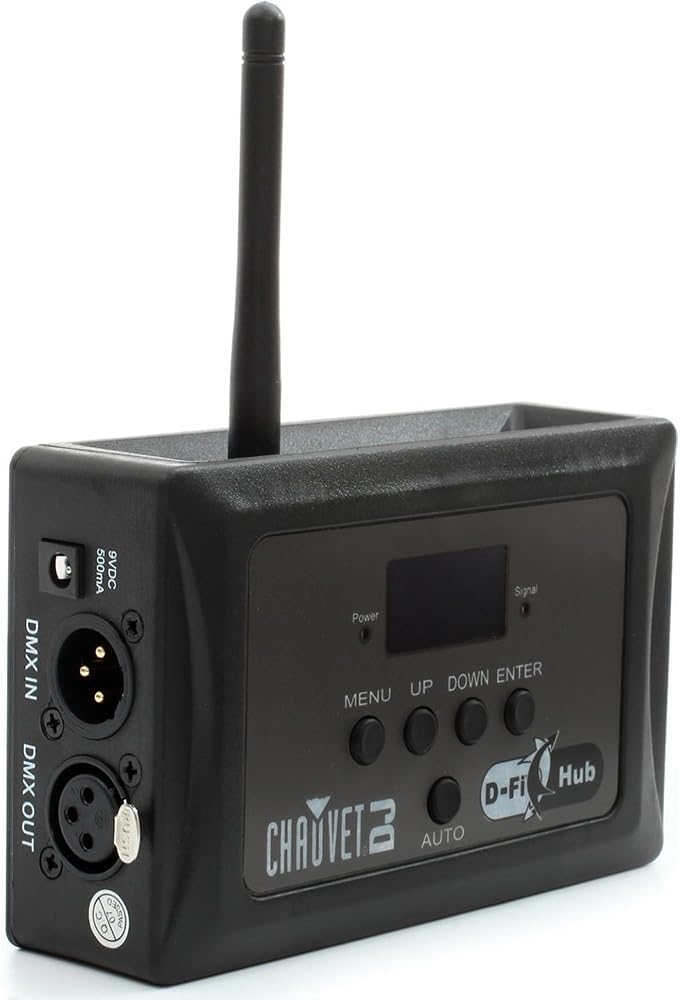
Ongl view of the D-Fi Hub, highlighting the antenna and side ports.
Nodweddion Allweddol:
- Compact Wireless DMX: Functions as both a transmitter and receiver.
- Auto Frequency Sync: Automatically selects the best 2.4 GHz channel for stable communication.
- Unlimited D-Fi Fixture Synchronization: Connects to an unlimited number of D-Fi-ready fixtures.
- Arddangosfa OLED: Clear digital display for easy setup and adjustments.
- FCC and RTTE Compliant: Professional design for reliable operation.
Adnabod Cydran:
- Arddangosfa OLED: Yn dangos y gosodiadau a'r statws cyfredol.
- Control Buttons (MENU, UP, DOWN, ENTER, AUTO): Ar gyfer llywio bwydlenni ac addasu gosodiadau.
- Antena: For wireless DMX signal transmission and reception.
- DMX IN/OUT Ports: 3-pin XLR connectors for wired DMX connections.
- Mewnbwn pŵer: 9VDC, 500mA connection for the power adapter.
- Opsiynau Gosod: Includes keyhole mounting holes and M10/M12 threaded holes for truss mounting.

Cefn view showing the DMX In/Out ports and power input.
Ochr view illustrating the M10 and M12 mounting holes.
Gosod
- Cysylltiad Pwer: Connect the provided power adapter to the 9VDC input on the D-Fi Hub and then to a suitable power outlet. The unit will power on automatically.
- DMX Connection (Transmitter Mode):
- Connect your DMX controller's output to the DMX YN port on the D-Fi Hub using a 3-pin DMX cable.
- The D-Fi Hub will now transmit the DMX signal wirelessly.
- DMX Connection (Receiver Mode):
- If using the D-Fi Hub as a receiver for non-D-Fi-ready fixtures, connect the DMX ALLAN port of the D-Fi Hub to the DMX IN port of your first lighting fixture.
- Daisy-chain additional fixtures using DMX cables from the DMX OUT of one fixture to the DMX IN of the next.
- Mowntio: Utilize the keyhole mounting holes or M10/M12 threaded holes to securely mount the D-Fi Hub to a truss or other suitable surface.
Cyfarwyddiadau Gweithredu
The D-Fi Hub offers both manual and automatic modes for DMX transmission and reception.
OLED Display and Navigation:
The OLED display provides real-time information about the unit's status and settings. Use the BWYDLEN, UP, I LAWR, a ENWCH buttons to navigate through the options.
Dewis Modd Gweithredu:
- Gwasgwch y BWYDLEN botwm i gael mynediad i'r brif ddewislen.
- Defnyddiwch y UP or I LAWR buttons to scroll to "Settings" and press ENWCH.
- Within "Settings", you can choose between:
- Transmit Manual: Manually select a DMX channel for transmission.
- Receive Manual: Manually select a DMX channel for reception.
- Transmit Auto: The unit automatically selects the best available channel for transmission. This is often the recommended setting for ease of use and stable performance.
- Gwasgwch ENWCH i gadarnhau eich dewis.
Auto Frequency Sync:
The D-Fi Hub operates on the 2.4 GHz frequency range. In "Transmit Auto" mode, the unit will automatically scan and select the clearest channel to minimize interference, ensuring a stable wireless DMX signal.

The D-Fi Hub mounted on a truss, demonstrating its application in a professional lighting rig.

Visual representation of the D-Fi Hub's wireless DMX capabilities and auto-sync technology.
Cynnal a chadw
- Glanhau: Clean the exterior of the unit with a soft, dry cloth. Do not use harsh chemicals or abrasive materials.
- Storio: Storiwch yr uned mewn lle oer, sych i ffwrdd o olau haul uniongyrchol a thymheredd eithafol.
- Arolygiad: Periodically inspect the power cable and DMX connectors for any signs of damage.
Datrys problemau
| Problem | Achos Posibl | Ateb |
|---|---|---|
| Dim pŵer | Addasydd pŵer heb ei gysylltu neu'n ddiffygiol. | Ensure power adapter is securely connected and plugged into a live outlet. Test with another adapter if available. |
| No wireless DMX signal | Incorrect channel selection, interference, or unit not in transmit mode. | Verify both transmitter and receiver are on the same DMX channel. Try "Transmit Auto" mode. Check for other 2.4 GHz devices causing interference. Ensure antenna is properly attached. |
| Signal ysbeidiol | Obstructions, distance, or interference. | Reduce distance between units. Clear line of sight. Change DMX channel or use "Transmit Auto". |
Manylebau

Image detailing the physical dimensions and key specifications of the D-Fi Hub.
- Model Cynnyrch: DFIHUB
- Dimensiynau (L x W x H): 3.2" x 1.6" x 4" (8.1 cm x 4.1 cm x 10.2 cm)
- Pwysau: 0.25 kg (0.55 pwys)
- Ffynhonnell Pwer: Trydan Corded
- Cyftage: 230 folt
- Ampdileu: 0.1 Amps
- Amlder Di-wifr: 2.4 GHz
- Ystod Diwifr: Up to 656 ft (200 m) unobstructed
- DMX Connection Type: 3-pin XLR (In/Out)
- Math Mowntio: Built-in hook and loop fastener strap, keyhole mounting holes, M10 and M12 threaded holes.
- Deunydd: Dur Di-staen, Plastig
- Lliw: Du
- Math o ffynhonnell golau: Light Emitting Diode (for internal indicators)
- Nodweddion arbennig: Manual/Automatic Channel Selection, OLED Display
Gwarant
The CHAUVET DJ D-Fi Hub comes with a 1-year limited manufacturer's warranty. Please retain your proof of purchase for warranty claims. For detailed warranty terms and conditions, refer to the official CHAUVET DJ websafle neu cysylltwch â chymorth cwsmeriaid.
Cefnogaeth
For technical assistance, troubleshooting, or further information regarding your CHAUVET DJ D-Fi Hub, please visit the official CHAUVET DJ website or contact their customer support team. You can find contact details and additional resources on their websafle: www.chauvetdj.com
Ask a question about this manual
Ask about setup, troubleshooting, compatibility, parts, safety, or missing instructions. Manuals+ will review the question and use this page’s manual context to help answer it.