
Rhagymadrodd
The Nyko Media Remote for Xbox One provides convenient control over your Xbox One console and various media applications. This remote simplifies navigation and playback of streaming content and physical media, offering dedicated buttons for common functions. It also features the ability to power your Xbox One on and off, and control basic functions of your television.

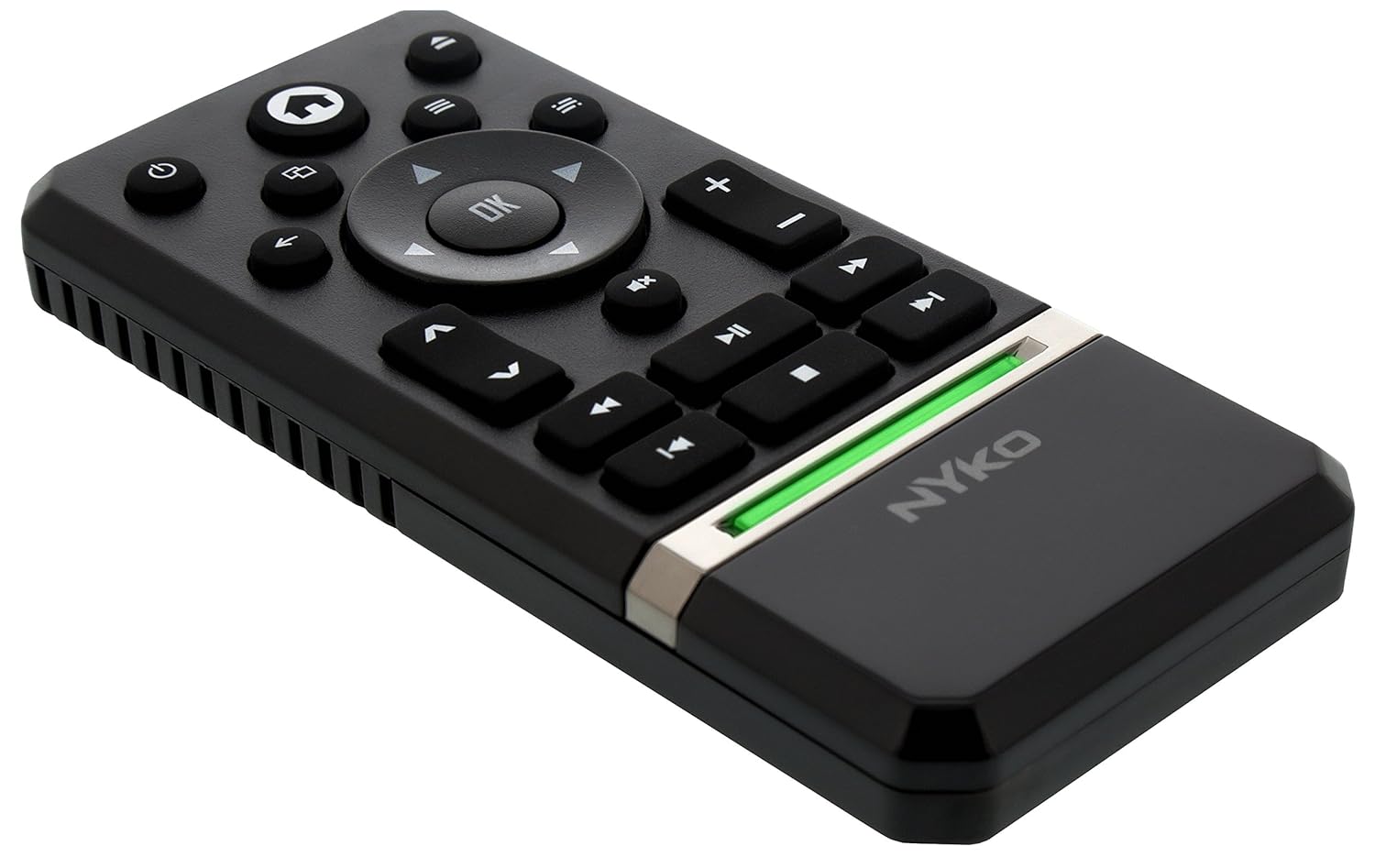
Image: Nyko Media Remote for Xbox One, front view.
Cynnwys Pecyn
- Nyko Media Remote for Xbox One (Model: 86116)
- Nodyn: Nid yw batris AAA wedi'u cynnwys a rhaid eu prynu ar wahân.

Image: Nyko Media Remote for Xbox One in its retail packaging.
Gosod
1. Gosod Batri
- Lleolwch y compartment batri ar gefn y teclyn anghysbell.
- Llithrwch glawr y batri i lawr i agor.
- Mewnosodwch ddau (2) fatri AAA, gan sicrhau'r polaredd cywir (+/-) fel y nodir y tu mewn i'r adran.
- Rhowch glawr y batri yn ôl trwy ei lithro i fyny nes ei fod yn clicio i'w le.
Delwedd: Cefn view of the remote with the battery cover removed, illustrating the AAA battery placement.
2. Cysylltiad Cychwynnol
The Nyko Media Remote uses infrared (IR) technology. No manual pairing is required for the Xbox One. Simply ensure a clear line of sight between the remote's IR emitter and the Xbox One's IR receiver.
For TV control functions (volume, channels, power), your TV must be configured to respond to the Xbox One's IR signals, typically through the Xbox One's OneGuide settings. The remote sends commands to the Xbox One, which then relays them to your TV via its IR blaster (if configured) or Kinect sensor.
Cyfarwyddiadau Gweithredu
The Nyko Media Remote provides comprehensive control for your Xbox One and various media applications. Refer to the diagram below for button identification and their primary functions.

Delwedd: Blaen view of the Nyko Media Remote, displaying all control buttons.
Swyddogaethau botwm:
| Botwm | Swyddogaeth |
|---|---|
| Botwm Pŵer (⏻) | Powers the Xbox One console on or off. |
| Botwm Cartref (⌂) | Returns to the Xbox One Home screen. |
| View Botwm (🗀) | Accesses additional information or options within an app or game. |
| Botwm Dewislen (☰) | Yn agor dewislenni neu opsiynau sy'n sensitif i gyd-destun. |
| Pad Cyfeiriadol (D-Pad) | Yn llywio trwy ddewislenni a chynnwys. |
| Botwm Iawn | Confirms selections. Can also function as Play/Pause in some apps. |
| Botwm Cefn (←) | Yn mynd yn ôl i'r sgrin neu'r ddewislen flaenorol. |
| OneGuide Button (📱) | Launches the Xbox OneGuide for live TV and media. |
| Cyfrol i Fyny/I Lawr (⏸ / ⏷) | Adjusts the television volume (requires TV setup via Xbox One). |
| Botwm Tewi (🔇) | Mutes or unmutes television audio. |
| Channel Up / Down (▲ / ▼) | Changes television channels (requires TV setup via Xbox One). |
| Ailddirwyn Cyflym (⏪) | Yn dirwyn yn ôl chwarae cyfryngau. |
| Chwarae/Saib (⏯) | Yn chwarae neu'n oedi chwarae cyfryngau. |
| Cyflym Ymlaen (⏩) | Chwarae cyfryngau ymlaen yn gyflym. |
| Trac Blaenorol (⏮) | Yn neidio i ddechrau'r trac cyfredol neu'r trac blaenorol. |
| Stopio (⏹) | Yn atal chwarae cyfryngau. |
| Trac Nesaf (⏭) | Skips to the next track or chapter. |
Media and App Control:
The remote is designed for seamless control of various Xbox One applications, including:
- OneGuide
- Netflix
- Hulu Plus
- Fideo Instant Amazon
- Other streaming services and Blu-ray/DVD playback
Dedicated playback buttons (Play, Pause, Fast Forward, Rewind, Stop, Skip) provide intuitive control for movies, music, and other media.
Cynnal a chadw
Amnewid Batri:
When the remote's performance diminishes or it stops responding, it is likely time to replace the batteries. Follow the "Battery Installation" steps in the Setup section to replace the two AAA batteries.
Glanhau:
To clean the remote, gently wipe it with a soft, dry cloth. Avoid using harsh chemicals, abrasive cleaners, or excessive moisture, as these can damage the remote's finish or internal components.
Datrys problemau
- Ddim yn Ymateb o Bell:
- Gwnewch yn siŵr bod batris AAA ffres wedi'u gosod yn gywir.
- Verify there is a clear line of sight between the remote and the Xbox One console. Obstructions can block the infrared signal.
- Move closer to the Xbox One console. The remote has a maximum effective range of approximately 9 meters (25 feet).
- TV Control (Volume, Channel, Power) Not Working:
- Confirm that your Xbox One's OneGuide settings are properly configured for your television. The remote sends commands to the Xbox One, which then controls the TV.
- Ensure any necessary IR blasters or Kinect sensors are correctly set up and positioned.
- Ymateb Ysbeidiol:
- This can sometimes occur due to weak batteries or environmental interference. Replace batteries and ensure a clear line of sight.
Manylebau
| Nodwedd | Manylyn |
|---|---|
| Brand | Nyko |
| Enw Model | Cyfryngau Anghysbell |
| Rhif Model | 86116 |
| Technoleg Cysylltedd | Is-goch (IR) |
| Dyfeisiau Cydnaws | Xbox One, Television (via Xbox One IR blaster/Kinect) |
| Math Batri | 2 x batris AAA (heb eu cynnwys) |
| Ystod Uchaf | Hyd at 9 metr (25 troedfedd) |
| Pwysau Eitem | 0.1 pwys (tua 45 gram) |
| Lliw | Llwyd Tywyll |
| Nodweddion Ychwanegol | Ergonomic design, dedicated media playback controls. |
Gwarant a Chefnogaeth
Nyko products are designed for quality and reliability. For specific warranty details, please refer to the documentation included with your purchase or visit the official Nyko website. The product includes warranty information in multiple languages.
Cefnogaeth i Gwsmeriaid:
- E-bost: customer.support@nyko.com
- Ffôn: +1-888-400-6956
- Cofrestru Ar-lein: www.nyko.com
- Gwybodaeth Ychwanegol: http://uqr.me/nykotechnologies/qr/83215

Delwedd: Cefn view of the product packaging, detailing features and customer support contact information.