
Rhagymadrodd
This manual provides essential instructions for the safe and efficient operation of your Muse M-28 VF Portable CD/MP3 Radio with USB Player. Please read this manual thoroughly before using the device and retain it for future reference.
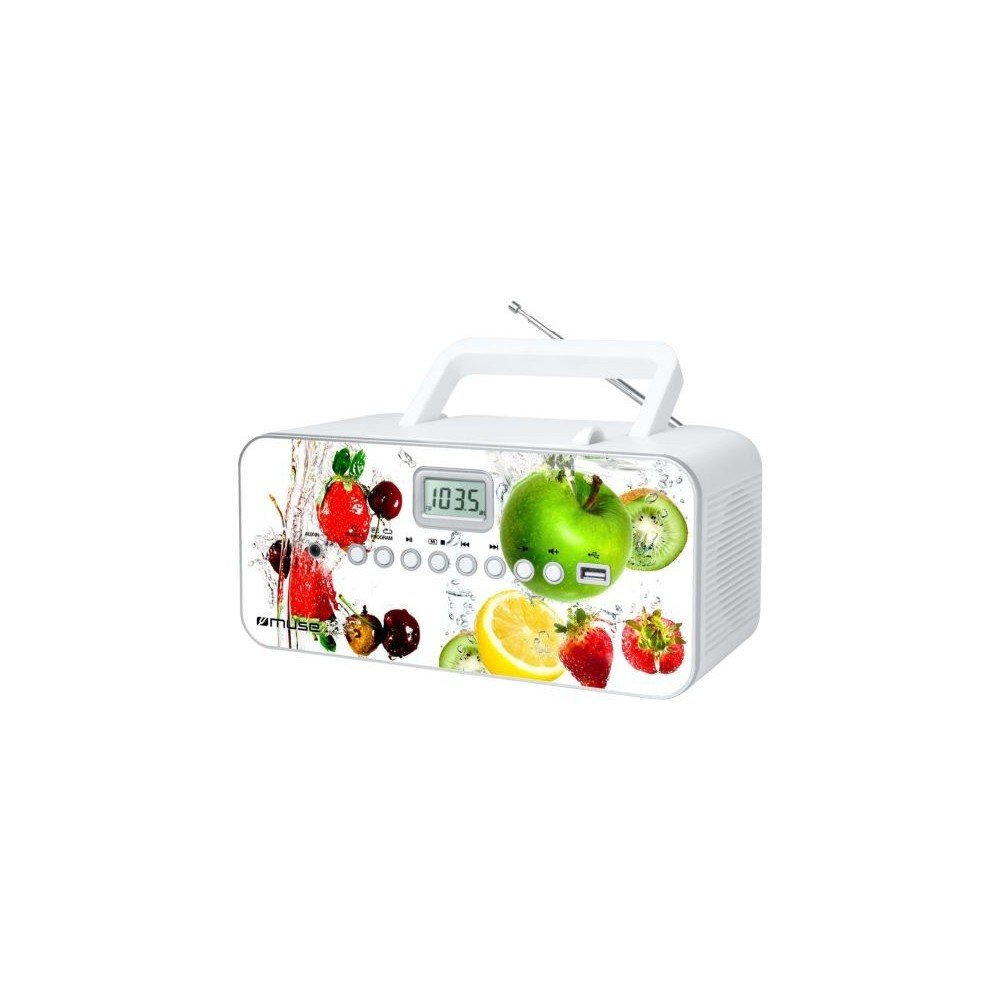
Blaen view of the Muse M-28 VF portable CD/MP3 radio, showing the CD compartment, display, and control buttons.
Gwybodaeth Diogelwch
- Peidiwch â gwneud yr uned yn agored i law neu leithder.
- Peidiwch â rhwystro unrhyw agoriadau awyru.
- Sicrhewch awyru priodol o amgylch yr uned.
- Defnyddiwch atodiadau/ategolion a nodir gan y gwneuthurwr yn unig.
- Datgysylltwch yr uned yn ystod stormydd mellt neu pan na chaiff ei defnyddio am gyfnodau hir.
- Cyfeirio pob gwasanaeth i bersonél gwasanaeth cymwys.
Gosod
1. Cysylltiad Pwer
- Locate the AC power cord.
- Insert the small end of the power cord into the AC IN jack on the back of the unit.
- Plug the other end of the power cord into a standard wall outlet.
2. Addasiad Antena
For optimal FM radio reception, fully extend the telescopic antenna. For MW (AM) reception, the unit has a built-in antenna; rotate the unit for best reception.
Cyfarwyddiadau Gweithredu
1. Pŵer Ymlaen / I ffwrdd
Gwasgwch y GRYM botwm i droi'r uned ymlaen neu i ffwrdd.
2. Dewis Modd
Gwasgwch y MODD button repeatedly to switch between CD, USB, FM Radio, MW Radio, and AUX modes.
3. Chwarae CD
- Agorwch ddrws yr adran CD.
- Place a CD (CD/CD-R/CD-RW/MP3 compatible) with the label side facing up.
- Caewch ddrws y compartment CD.
- Dewiswch y modd CD gan ddefnyddio'r MODD botwm.
- Gwasgwch y CHWARAE/SEIBIANT botwm i ddechrau chwarae.
- Defnyddiwch y SGIP botymau (botymau (<< / >>) i lywio traciau.
- Gwasgwch y AROS botwm i orffen chwarae.
- The unit features a full or partial repeat function. Refer to the display for repeat mode indicators.
4. Chwarae USB
- Mewnosodwch yriant fflach USB i'r porthladd USB.
- Dewiswch fodd USB gan ddefnyddio'r MODD botwm.
- Playback will start automatically or by pressing the CHWARAE/SEIBIANT botwm.
- Defnyddiwch y SGIP botymau (botymau (<< / >>) i lywio traciau.
5. FM/MW Radio Operation
- Select FM or MW mode using the MODD botwm.
- Pwyswch a dal y Tiwn +/- botymau i sganio'n awtomatig am yr orsaf nesaf sydd ar gael.
- Gwasgwch y Tiwn +/- buttons briefly to fine-tune the frequency.
- To store a station: Tune to the desired station, then press and hold the RHAGLEN botwm. Defnydd SGIP botymau i ddewis rhif rhagosodedig, yna pwyswch RHAGLEN again to confirm. The unit supports 20 FM and 10 MW storable stations.
- To recall a stored station: Press the COF or RHAGOSOD botwm, yna defnyddiwch SGIP buttons to select the desired preset.
6. Mewnbwn Cynorthwyol (AUX MEWN)
- Connect an external audio device (e.g., smartphone, MP3 player) to the AUX IN jack using a 3.5mm audio cable (not supplied).
- Dewiswch y modd AUX gan ddefnyddio'r MODD botwm.
- Rheoli chwarae o'r ddyfais allanol gysylltiedig.
7. Rheoli Cyfrol
Cylchdroi y CYFROL botwm i addasu lefel y sain.
Cynnal a chadw
1. Glanhau'r Uned
- Before cleaning, ensure the unit is powered off and unplugged from the wall outlet.
- Defnyddiwch frethyn meddal, sych i sychu'r arwynebau allanol.
- Ar gyfer staeniau ystyfnig, ychydig dampgolchwch y brethyn gyda dŵr. Peidiwch â defnyddio glanhawyr sgraffiniol, cwyrau na thoddyddion.
- Clean the CD lens periodically with a specialized CD lens cleaner disc (not supplied).
2. Storio
Pan nad yw'n cael ei ddefnyddio am gyfnodau hir, storiwch yr uned mewn lle oer, sych, i ffwrdd o olau haul uniongyrchol a thymheredd eithafol.
Datrys problemau
| Problem | Achos Posibl | Ateb |
|---|---|---|
| Dim pŵer | Nid yw llinyn pŵer wedi'i gysylltu'n iawn. | Gwiriwch a yw'r llinyn pŵer wedi'i blygio'n ddiogel i'r uned a'r soced wal. |
| Dim sain | Mae'r sain yn rhy isel neu wedi'i mudo. Modd anghywir wedi'i ddewis. | Increase the volume. Ensure the correct playback mode (CD, USB, Radio, AUX) is selected. |
| CD ddim yn chwarae | CD inserted incorrectly. CD is dirty or scratched. Incorrect mode. | Insert CD with label side up. Clean or replace the CD. Select CD mode. |
| USB ddim yn chwarae | USB drive not inserted correctly. Incompatible file fformat. | Ensure USB drive is fully inserted. Check if files are MP3 format. |
| Derbyniad radio gwael | Antenna not extended/positioned correctly. Interference. | Fully extend and adjust the FM telescopic antenna. Rotate the unit for MW reception. Move away from other electronic devices. |
Manylebau
- Model: M-28 VF
- Brand: AMGUEDD
- Mathau Disgiau Cydnaws: CD, CD-R, CD-RW, MP3
- Tiwniwr Radio: PLL FM/MW
- Gorsafoedd Rhagosodedig: 20 FM, 10 MW
- Cysylltedd: USB Port (1), Auxiliary Input (3.5mm)
- Math o Siaradwr: Stereo
- Ffynhonnell Pwer: Cebl AC
- Pŵer Allbwn: 14 Wat
- Dimensiynau (L x W x H): 17 x 26 x 13 cm (tua 6.7 x 10.2 x 5.1 modfedd)
- Pwysau: 1.4 cilogram (tua 3.1 pwys)
- Cydnaws Bluetooth: Nac ydw
Gwybodaeth Gwarant
This product comes with a manufacturer's warranty of 1 flwyddyn from the date of purchase. Please retain your proof of purchase for warranty claims. The warranty covers defects in materials and workmanship under normal use. It does not cover damage caused by misuse, accident, unauthorized modification, or external causes.
Cefnogaeth i Gwsmeriaid
For further assistance, technical support, or warranty inquiries, please refer to the contact information provided with your product packaging or visit the official MUSE websafle. Peidiwch â cheisio atgyweirio'r uned eich hun.