
Akai Professional MPKMINI2
Akai Professional MPK Mini MKII User Manual
1. Cynnyrch Drosview
The Akai Professional MPK Mini MKII is an ultra-compact keyboard controller designed for both traveling musicians and desktop producers. It combines production-centric hardware controls with a slim, portable footprint, allowing users to record, compose, and perform with virtual instruments, effect plugins, and DAWs wherever inspiration strikes. Key features include 25 velocity-sensitive synth-action keys, a 4-way thumbstick for dynamic pitch and modulation, 8 backlit velocity-sensitive MPC-style pads, and 8 assignable Q-Link knobs. Dedicated buttons for Note Repeat, Full Level, and Octave Up/Down, along with an onboard arpeggiator and sustain pedal input, provide comprehensive control. The MPK Mini MKII is USB-powered, requiring no external power adapter or software drivers for basic operation, offering plug-and-play connectivity with Mac or PC. It also includes a production software package for Mac and PC, featuring Akai Pro MPC Essentials, SONiVOX Wobble, and Hybrid 3 by AIR Music Tech.
- Compact keyboard controller easily fits backpack and studio production desk (12.4" long, 1.6 lbs)
- Powered by USB connection to computer, with free virtual-instrument download packages
- Crammed full of all the features you need to play and edit musical ideas
- 25-synth-action mini-keys, 8 velocity-sensitive rubber drum pads with two banks, and eight assignable control knobs
- Dedicated buttons for Note Repeat, Full Level, and Octave Up and Down
- 1400 Sounds and Everything You Need For Pro Production: Production software package for Mac and PC included: Akai Pro MPC Essentials, SONiVOX Wobble, and Hybrid 3 by AIR Music Tech (downloads)

Ffigur 1: Blaen view of the Akai Professional MPK Mini MKII, showcasing its compact design with 25 keys, 8 drum pads, and control knobs.
2. Gosod a Gosod
The MPK Mini MKII is designed for easy setup. Simply connect the device to your computer using a standard USB cable. No external power adapter is required as the unit is USB-powered. For full functionality and access to included software, follow the steps below:
2.1 Cysylltiad Caledwedd
Connect the MPK Mini MKII to your Mac or PC using the provided USB cable. The device is plug-and-play, meaning it should be recognized by your operating system automatically.

Ffigur 2: Cefn view of the Akai Professional MPK Mini MKII, highlighting the USB port for connectivity and power.
2.2 Software Installation and Authorization
The MPK Mini MKII comes bundled with powerful software, including Akai Pro MPC Essentials and Hybrid 3 by AIR Music Tech. To download, install, and authorize this software, you will need to register your product on the Akai Professional websafle.
Video 1: An official video from inMusic Brands Inc. introducing MPC Beats, the included software for beatmaking with your Akai Professional MPK Mini MKII.
Video 2: An official video from InMusic demonstrating the complete setup process for the Akai Pro MPK Mini MKII, including software installation and configuration.
3. Nodweddion Allweddol a Gweithrediad
The MPK Mini MKII offers a comprehensive set of controls for music production and performance.
3.1 Allweddi a Padiau
- 25 Velocity-Sensitive Synth-Action Mini-Keys: Play melodies, chords, and basslines. The keys are velocity-sensitive, meaning the sound's intensity changes based on how hard you press them.
- 8 Backlit Velocity-Sensitive MPC-Style Pads: These pads are perfect for drumming, triggering samples, or launching clips. They are also velocity-sensitive and feature two banks (A/B) for a total of 16 assignable pads.

Ffigur 3: Uchaf view of the Akai Professional MPK Mini MKII, showing the layout of keys, pads, and control knobs.
3.2 Control Knobs and Thumbstick
- 8 Assignable Q-Link Knobs: These knobs can be assigned to control various parameters in your software, such as volume, pan, effects, or virtual instrument settings.
- 4-Way Thumbstick: This innovative controller allows for dynamic manipulation of pitch and modulation, offering expressive control over your sounds.
3.3 Dedicated Buttons and Arpeggiator
- Octave Up/Down Buttons: Extend the melodic range of the 25 keys, allowing access to the full spectrum of notes.
- Note Repeat and Full Level Buttons: Enable classic MPC features for creative beat-making and performance.
- Onboard Arpeggiator: Generate complex melodic patterns automatically with adjustable resolution, range, and modes.
- Cynnal Mewnbwn Pedal: Connect an external sustain pedal for more expressive piano-style performances.
Video 3: An official video from InMusic demonstrating the unboxing and basic operation of the Akai Pro MPK Mini MKII.
4. Portability and Durability
The MPK Mini MKII is designed with portability in mind, weighing only 1.6 lbs and measuring 12.4 inches long. Its compact size makes it easy to fit into a backpack or studio desk. Despite its small footprint, the unit is built to be sturdy and withstand regular use, making it a reliable companion for musicians on the go.
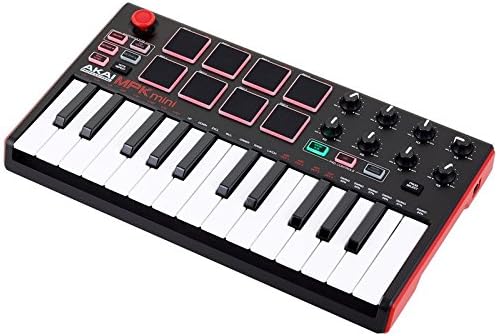
Ffigur 4: Ongl view of the Akai Professional MPK Mini MKII, emphasizing its compact and portable design.
5. Software Suite
The MPK Mini MKII includes a powerful software production package to get you started with beat-making and music production:
- Akai Pro MPC Essentials: A powerful 64-bit music production package featuring up to eight pad banks (for a total of 128 tracks), a 1 GB sound library, and user-friendly import capability for your own WAV and AIFF samples.
- SONiVOX Wobble: An electronic music grime synthesizer with two independent channels of spectral morphing synthesis, harmonic controls, individual filtering, and discrete LFO controls.
- Hybrid 3 by AIR Music Tech: A critically acclaimed high-definition synthesizer capable of creating a wide range of sounds, from fat, retro synth sounds to edgy modern leads.
6. manylebau
| Nodwedd | Manylyn |
|---|---|
| Enw Model | Old model |
| Pwysau Eitem | 1.63 pwys |
| Dimensiynau Cynnyrch | 7.13 x 12.52 x 1.73 modfedd |
| Rhif Model yr Eitem | MPKMINI2 |
| Enw Lliw | Coch |
| Dyfeisiau Cydnaws | PC |
| Math o Gysylltydd | USB |
| Rhyngwyneb Caledwedd | USB |
| Meddalwedd â Chymorth | Curiadau MPC |
| Math o Ddeunydd | Rwber |
| Arddull Gerddorol | Electronig |
| Nifer yr Allweddi Allweddell | 25 |
| Llwyfan Caledwedd | PC/Mac |
7. Datrys Problemau
If you encounter issues with your MPK Mini MKII, consider the following common troubleshooting steps:
- Cysylltedd: Ensure the USB cable is securely connected to both the MPK Mini MKII and your computer. Try a different USB port or cable if problems persist.
- Adnabyddiaeth Meddalwedd: Verify that your operating system and DAW (Digital Audio Workstation) recognize the MPK Mini MKII. Check your DAW's MIDI settings to ensure the controller is enabled.
- Gosod Meddalwedd: If you are having trouble with the included software (MPC Essentials, Hybrid 3), double-check that you have followed all installation and authorization steps correctly, including registering your product on the Akai Professional websafle.
- Key/Pad Responsiveness: If keys or pads are not responding as expected, ensure the device is properly powered via USB. Check your software's velocity settings.
- Diweddariadau: Ensure your operating system, DAW, and Akai Professional software are all up to date.
8. Gwarant a Chefnogaeth
For detailed warranty information and technical support, please refer to the official Akai Professional website or the user manual PDF. The manufacturer typically provides a limited warranty covering defects in materials and workmanship.
You can access the comprehensive User Manual (PDF) for the Akai Professional MPK Mini MKII directly from the manufacturer's websafle: