
1. Rhagymadrodd
Thank you for choosing the SCHWAIGER DCR600HD Full HD Cable TV Receiver. This manual provides essential information for the safe and efficient use of your device. Please read these instructions carefully before installation and operation, and keep them for future reference.
2. Cyfarwyddiadau Diogelwch
- Cyflenwad Pŵer: Defnyddiwch yr addasydd pŵer a gyflenwir gyda'r ddyfais yn unig. Sicrhewch fod y cyfainttage yn cyfateb i'ch cyflenwad pŵer lleol.
- Awyru: Do not block ventilation openings. Ensure adequate space around the receiver for proper airflow to prevent overheating.
- Lleithder: Keep the device away from water, moisture, and high humidity. Do not expose it to rain or splashes.
- Glanhau: Datgysylltwch y pŵer cyn glanhau. Defnyddiwch frethyn meddal, sych. Peidiwch â defnyddio glanhawyr hylif na glanhawyr aerosol.
- Lleoliad: Place the receiver on a stable, flat surface. Avoid direct sunlight, heat sources, and strong magnetic fields.
- Gwasanaethu: Peidiwch â cheisio agor na thrwsio'r ddyfais eich hun. Cyfeiriwch bob gwasanaethu at bersonél cymwys.
3. Cynnwys Pecyn
Gwiriwch y pecyn am yr eitemau canlynol:
- SCHWAIGER DCR600HD Cable TV Receiver
- Rheolaeth Anghysbell
- Power Cable (integrated or separate adapter)
- Llawlyfr Defnyddiwr (y ddogfen hon)
4. Cynnyrch Drosview
4.1 Panel Blaen
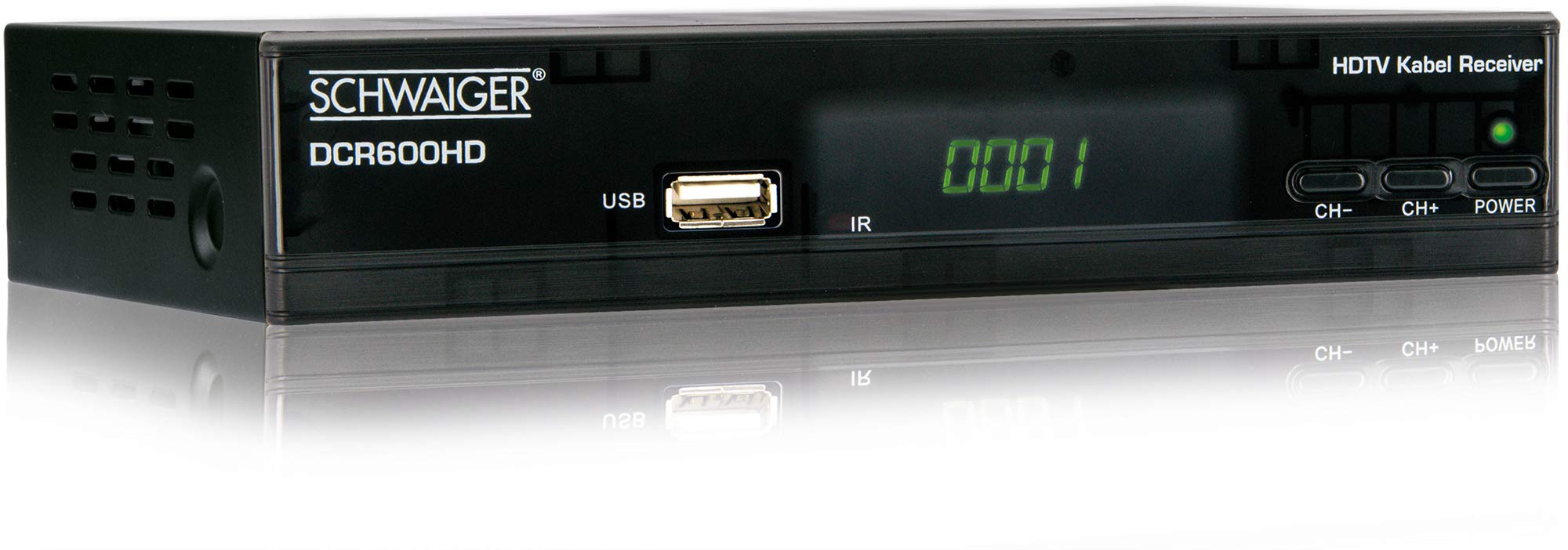
Delwedd: Blaen view of the SCHWAIGER DCR600HD receiver, showing the display, USB port, IR receiver, and control buttons.
- Arddangos: Yn dangos rhif y sianel neu'r amser.
- Porth USB: Ar gyfer cysylltu dyfeisiau storio USB ar gyfer chwarae cyfryngau.
- IR: Derbynnydd isgoch ar gyfer y teclyn rheoli o bell.
- CH- / CH+: Buttons for changing channels.
- PŴER: Button to turn the receiver on or off (standby).
4.2 Panel Cefn

Delwedd: Cefn view of the SCHWAIGER DCR600HD receiver, displaying various input and output ports.
- RF YN: Input for connecting to your cable TV network.
- ETHERNET / LAN: For network connection (if supported for updates or specific services).
- HDMI: High-Definition Multimedia Interface output for connecting to an HD TV.
- TV SCART (CVBS): SCART output for connecting to older TVs or other devices.
- ~220-240V 50/60Hz: Power input for the receiver.
4.3 Rheoli o Bell

Delwedd: Layout of the SCHWAIGER DCR600HD remote control, showing various function buttons.
The remote control allows you to operate all functions of your receiver. Familiarize yourself with the button layout for easy navigation.
5. Gosod
5.1 Cysylltu'r Derbynnydd
- Connect to Cable Network: Connect your cable TV antenna cable to the RF YN porthladd ar banel cefn y derbynnydd.
- Cysylltu â'r teledu:
- For High Definition (HD) picture quality, connect an HDMI cable from the HDMI porthladd ar y derbynnydd i fewnbwn HDMI ar eich teledu.
- For standard definition (SD) or older TVs, connect a SCART cable from the TV SCART (CVBS) porthladd ar y derbynnydd i'r mewnbwn SCART ar eich teledu.
- Pwer Cysylltu: Plug the power cable into the receiver's power input and then into a wall outlet.
- Turn on TV: Switch on your television and select the correct input source (HDMI or SCART) corresponding to your connection.
5.2 Gosod Tro Cyntaf
Upon first power-on, the receiver will typically guide you through an initial setup process:
- Dewis Iaith: Use the remote control to select your preferred language for the on-screen menus.
- Dewis Gwlad: Select your country. This helps configure regional settings and channel frequencies.
- Sgan Sianel: The receiver will prompt you to perform an automatic channel scan. Confirm to start scanning for available cable TV channels. This process may take several minutes.
- Cadw Gosodiadau: Once the scan is complete, save the found channels. Your receiver is now ready for use.
6. Cyfarwyddiadau Gweithredu
6.1 Gweithrediad Sylfaenol
- Pŵer ymlaen / i ffwrdd: Gwasgwch y GRYM button on the remote control or front panel to switch the receiver on or to standby mode.
- Dewis sianel: Defnyddiwch y CH+ / CH- buttons on the remote or front panel to change channels sequentially. Alternatively, use the number buttons to directly enter a channel number.
- Addasiad Cyfaint: Defnyddiwch y VOL+ / VOL- botymau ar y teclyn rheoli o bell i addasu cyfaint y sain.
- Tewi: Gwasgwch y MUTE button to temporarily turn off the sound. Press again to restore.
6.2 Canllaw Rhaglen Electronig (EPG)
The EPG provides a schedule of current and upcoming TV programs.
- Gwasgwch y EPG button on the remote control to access the Electronic Program Guide.
- Navigate through channels and program times using the arrow buttons.
- Gwasgwch OK i view gwybodaeth fanwl am raglen ddethol.
6.3 Chwarae Cyfryngau drwy USB
Gallwch chi chwarae amlgyfrwng files (AVI, MKV, MP3) from a USB storage device.
- Insert a USB flash drive or external hard drive into the USB porthladd ar y panel blaen.
- The receiver should detect the USB device and prompt you to open the media player, or you can access it via the main menu.
- Llywio drwy eich files and folders using the arrow buttons and press OK to select and play a file.
- Use the media control buttons (Play, Pause, Stop, Fast Forward, Rewind) on the remote control for playback.
6.4 Teletestun
Access teletext services provided by broadcasters.
- Gwasgwch y TTX button on the remote control to activate teletext.
- Use the number buttons to enter page numbers or the arrow buttons to navigate.
- Gwasgwch TTX again to exit teletext.
7. cynnal
- Glanhau: Regularly wipe the receiver with a soft, dry, lint-free cloth. Do not use abrasive cleaners, waxes, or solvents.
- Awyru: Ensure that the ventilation slots are not obstructed by dust or other objects.
- Diweddariadau Meddalwedd: Gwiriwch y gwneuthurwr yn rheolaidd website for any available software updates for your model. Follow the instructions provided with the update carefully.
8. Datrys Problemau
If you encounter problems with your receiver, refer to the following common issues and solutions:
| Problem | Achos / Ateb Posibl |
|---|---|
| Dim llun na sain |
|
| Rheolaeth bell ddim yn gweithio |
|
| No channels found during scan |
|
| USB media not playing |
|
9. manylebau
| Nodwedd | Disgrifiad |
|---|---|
| Enw Model | DCR600HD |
| Math o Gynnyrch | Digital DVB TV Tuner / Digital Player |
| Lliw | Du |
| Dimensiynau (W x D x H) | 17 cm x 4.5 cm x 10 cm |
| Pwysau | 380 g |
| Technoleg Cysylltedd | HDMI, USB, SCART, RF |
| Dyfeisiau Cydnaws | Teledu |
| Amgodio Fideo | H.264 |
| Penderfyniadau a Gefnogir | 576i, 576p, 720p, 1080i, 1080p |
| Cymarebau Agwedd | 4:3, 16:9 |
| Modd Allbwn Sain | Stereo |
| Fformatau Sain â Chymorth | MP3 |
| Mathau Cyfryngau â Chefnogaeth | AVI, MKV, MP3 |
| Cyfanswm Porthladdoedd USB | 1 (USB 4-pin Type A) |
| Cyfanswm Porthladdoedd HDMI | 1 |
| Defnydd Pŵer | 3.8 Gw |
| Cyftage | 240 folt |
| Nodweddion Arbennig | Electronic Program Guide (EPG), Teletext, Built-in Bluetooth (Note: Bluetooth functionality may vary by region/firmware) |
| Rheolaeth Anghysbell | Yn gynwysedig |
10. Gwarant a Chefnogaeth
For warranty information and technical support, please refer to the documentation included with your product packaging or visit the official SCHWAIGER websafle. Cadwch eich derbynneb prynu fel prawf o brynu ar gyfer hawliadau gwarant.