
1. Rhagymadrodd
This manual provides detailed instructions for the safe and efficient operation of your VOLTCRAFT 8210 Function Generator. The 8210 is a versatile instrument combining a sweep function, function generator, pulse generator, and frequency counter into a single unit. It is designed for professional use, generating various waveforms with precision.
2. Cyfarwyddiadau Diogelwch
Please read these safety instructions carefully before operating the device to prevent injury and damage. Keep this manual for future reference.
- Cysylltwch y ddyfais ag allfa bŵer wedi'i seilio bob amser.
- Peidiwch â gweithredu'r ddyfais mewn gwlyb neu damp amodau.
- Sicrhewch awyru priodol i atal gorboethi.
- Peidiwch ag agor y ddyfais casing; nid oes unrhyw rannau y gall y defnyddiwr eu gwasanaethu y tu mewn. Cyfeiriwch y gwaith cynnal a chadw at bersonél cymwys.
- Datgysylltwch y pŵer cyn glanhau neu symud yr uned.
- Osgoi gwneud cais cyftages exceeding the specified maximum input ratings.
3. Cynnyrch Drosview
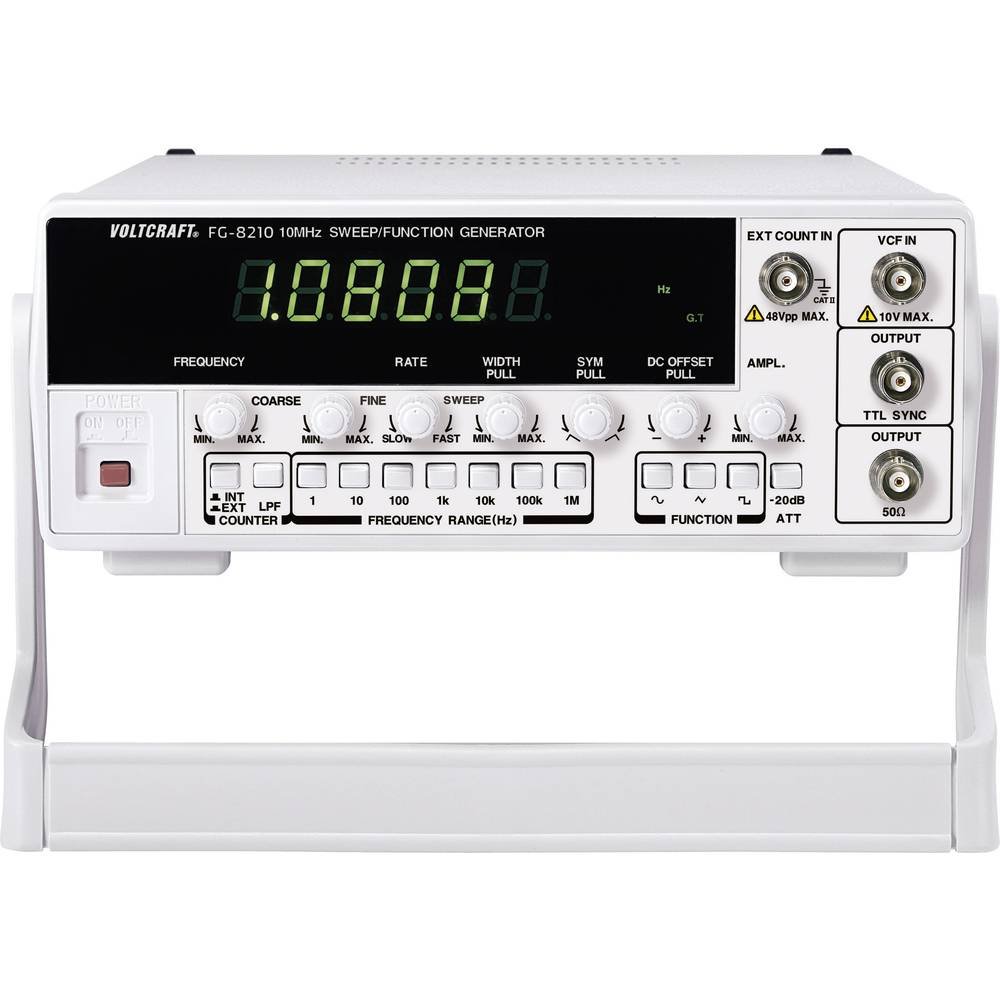
The VOLTCRAFT 8210 is a versatile 4-in-1 instrument designed for various electronic testing and development applications. It integrates the functionalities of a sweep function generator, a standard function generator, a pulse generator, and a frequency counter.
Nodweddion Allweddol:
- Four-in-one functionality: Sweep function, function generator, pulse generator, and frequency counter.
- Amrediad Amrediad: Generates signals from 0.1 Hz to 10 MHz.
- Rhifydd Amlder: Measures frequencies from 2 Hz to 100 MHz.
- Waveform Generation: Produces professional-grade rectangular, triangular, and sawtooth signals.
- Allbwn Ampgolau: Uchafswm amplitude of 20 Vpp (10 Vpp into 50 ohms).
Delweddau Cynnyrch:


Fideos Cynnyrch Swyddogol:
Nid oes unrhyw fideos cynnyrch swyddogol gan y gwerthwr ar gael i'w mewnosod ar hyn o bryd.
4. Gosod
- Dadbacio: Carefully remove the function generator from its packaging. Inspect the unit for any signs of damage during transit. Retain the packaging for future storage or transport.
- Lleoliad: Place the unit on a stable, flat surface with adequate ventilation around it. Avoid placing it near heat sources or in direct sunlight.
- Cysylltiad Pwer: Connect the provided power cord to the power input on the rear panel of the 8210 and then to a suitable grounded AC power outlet. Ensure the power switch is in the OFF position before connecting.
- Pŵer Cychwynnol Ar: Flip the power switch to the ON position. The display should illuminate, indicating the unit is receiving power.
- Cysylltiadau Allbwn: Connect your test leads or cables to the appropriate output terminals (e.g., BNC connectors for main output, TTL output) on the front panel, depending on your application.
5. Cyfarwyddiadau Gweithredu
This section details the basic operation of the VOLTCRAFT 8210 for its primary functions.
5.1. Function Generator Mode
- Dewiswch Donffurf: Use the dedicated buttons (e.g., Sine, Square, Triangle) on the front panel to select the desired output waveform.
- Amlder Gosod: Adjust the frequency using the frequency control knob and range buttons. The display will show the current frequency.
- Addasu Ampgolau: Defnyddiwch y amplitude knob to set the desired output voltage peak-to-peak (Vpp). Monitor the output with an oscilloscope for precise adjustment.
- Gwrthbwyso DC: If available, use the DC offset control to add a DC bias to the output signal.
- Allbwn Cysylltu: Connect the main output (e.g., BNC) to your circuit or device under test.
5.2. Sweep Function Mode
The sweep function allows the output frequency to vary automatically over a specified range.
- Activate Sweep: Press the "Sweep" button to enable this mode.
- Set Start/Stop Frequencies: Use the frequency controls to define the lower and upper limits of the sweep range.
- Adjust Sweep Rate: Set the sweep duration or rate using the dedicated control.
- Monitro Allbwn: Observe the sweeping signal on an oscilloscope to verify the settings.
5.3. Frequency Counter Mode
The built-in frequency counter measures external signals.
- Select Counter Input: Connect the external signal to the designated frequency counter input terminal.
- Activate Counter: Press the "Counter" or "Freq. Meas." button to switch to frequency measurement mode.
- Read Frequency: The display will show the frequency of the input signal.
6. cynnal
Proper maintenance ensures the longevity and accuracy of your VOLTCRAFT 8210.
- Glanhau: Defnyddiwch frethyn meddal, sych i lanhau tu allan yr uned. Ar gyfer baw ystyfnig, defnyddiwch frethyn ychydig yn sych.amp cloth with mild detergent can be used, ensuring no liquid enters the device. Do not use abrasive cleaners or solvents.
- Storio: When not in use for extended periods, store the unit in a dry, dust-free environment, preferably in its original packaging.
- graddnodi: Periodic calibration by qualified service personnel is recommended to maintain measurement accuracy, especially for critical applications.
7. Datrys Problemau
If you encounter issues with your VOLTCRAFT 8210, refer to the following common problems and solutions:
| Problem | Achos Posibl | Ateb |
|---|---|---|
| Dim pŵer/Arddangosfa i ffwrdd | Power cord disconnected, power switch off, faulty outlet. | Check power cord connection, ensure power switch is ON, test outlet with another device. |
| Dim signal allbwn | Output cable disconnected, amplitude set to zero, incorrect function selected. | Verify output cable connection, increase amplitude, ensure correct waveform/function is selected. |
| Incorrect frequency reading (counter) | Signal too weak, incorrect input range, noisy signal. | Ensure signal amplitude is sufficient, check input range settings, use shielded cables. |
Os yw'r broblem yn parhau ar ôl rhoi cynnig ar yr atebion hyn, cysylltwch â chymorth cwsmeriaid.
8. manylebau
The following are the technical specifications for the VOLTCRAFT 8210 Function Generator:
- Gwneuthurwr: VOLTCRAFT
- Rhif Model: 8210
- Pwysau Eitem: 3 cilogram
- Number of items in package: 1
- Batris wedi'u cynnwys: Nac ydw
- Batris Angenrheidiol: Nac ydw
- ASIN: B00EPLFP46
- First Available Date on Amazon.fr: 15 Chwefror 2014
- Argaeledd Rhannau Sbâr: Gwybodaeth ar gael am rannau sbâr
9. Gwarant a Chefnogaeth
Information regarding specific warranty terms and conditions for the VOLTCRAFT 8210 Function Generator is not available in the provided product data. Please refer to the documentation included with your purchase or contact VOLTCRAFT customer support directly for warranty details and technical assistance.
For further support, visit the official VOLTCRAFT websafle neu cysylltwch â'u canolfannau gwasanaeth awdurdodedig.