
Rhagymadrodd
This manual provides comprehensive instructions for the setup, operation, and maintenance of your VTech CS6829-2 2-Handset Cordless Phone with Answering System. This system is designed for home use, offering features such as caller ID, a digital answering machine, backlit keypad, and a full duplex speakerphone for enhanced communication.
Beth Sydd yn y Bocs
Gwiriwch fod yr holl eitemau wedi'u cynnwys yn eich pecyn:
- Uned sylfaen
- 2 set law ddi-wifr
- Gwefrydd
- 2 addasydd
- 2 becyn batri
- Cordyn llinell ffôn
- Braced mowntio wal
- Canllaw cychwyn cyflym
Gosod
Follow these steps to set up your VTech CS6829-2 phone system:
- Cysylltu'r Uned Sylfaen:
Plug one end of the telephone line cord into the TEL LINE jack on the back of the base unit. Plug the other end into a telephone wall jack. Plug the small end of the power adapter into the POWER jack on the back of the base unit. Plug the large end of the power adapter into a wall outlet not controlled by a wall switch.
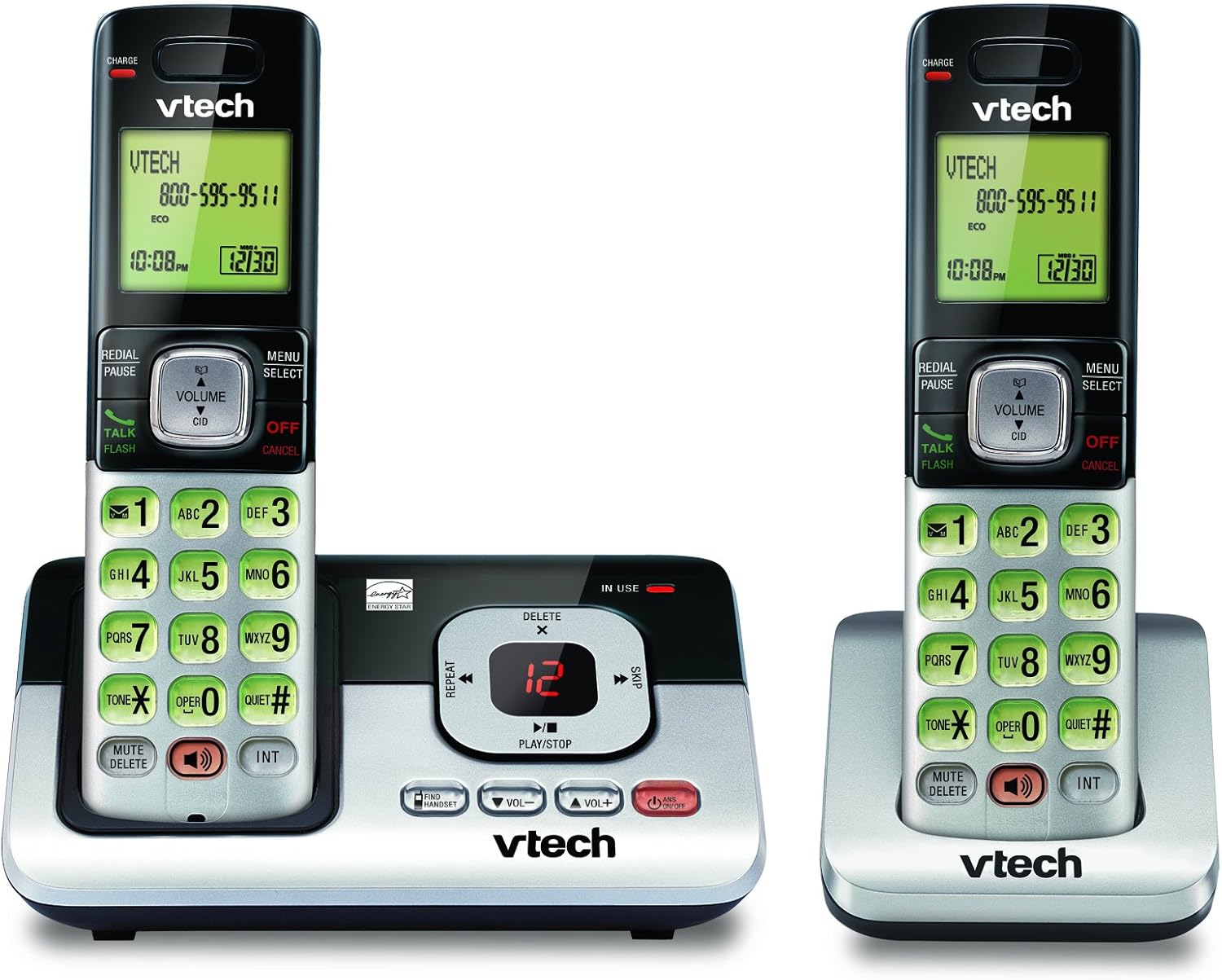
Image: The VTech CS6829-2 base unit with one handset docked, and a second handset with its charging cradle. This illustrates the main components of the phone system.
- Gosod Batris y Ffôn:
Open the battery compartment cover on the back of each handset. Connect the battery pack connector securely into the jack inside the compartment. Place the battery pack with the label facing up and tuck the wires inside the compartment. Close the battery compartment cover.
- Gwefru Ffonau Llaw:
Place each handset in the base unit or charger with the display facing up. The CHARGE light on the handset will illuminate, indicating proper charging. Allow the handsets to charge for at least 16 hours before initial use for optimal battery performance.

Delwedd: Ongl view of the VTech CS6829-2 base unit with one handset docked, and the second handset in its separate charging cradle. This shows how the handsets are placed for charging.
- Gosod Dyddiad ac Amser:
After the handsets are charged, follow the on-screen prompts or refer to the quick start guide to set the date and time. This is important for accurate caller ID and answering system timestamps.
Cyfarwyddiadau Gweithredu
Gwneud ac Ateb Galwadau
- I Wneud Galwad: Gwasgwch SIARAD / FFLACH or any dialing key to get a dial tone, then dial the phone number.
- I Ateb Galwad: Pan fydd y ffôn yn canu, pwyswch SIARAD / FFLACH neu unrhyw allwedd deialu.
- I Derfynu Galwad: Gwasgwch DIFFODD/CANSLO or place the handset back in the base unit/charger.
System Ateb Digidol
- Chwarae Negeseuon: Ar yr uned sylfaen, pwyswch CHWARAE/STOPIO. On a handset, press BWYDLEN/DEWIS, scroll to "Answering System", then select "Play Messages".
- Recording an Outgoing Announcement: On the base unit or handset, navigate to the answering system menu and select "Record OGM" (Outgoing Message).
- Dileu Negeseuon: Tra bod neges yn chwarae, pwyswch DILEU on the base unit or handset.
Swyddogaeth Speakerphone
- To Use Speakerphone: Yn ystod galwad, pwyswch y SIARADWR button on the handset. Press it again to switch back to the handset earpiece.
Nodweddion Allweddol
- Digital Answering System with LED Indicator and Volume Control: This system records up to 14 minutes of messages, announcements, and memos. An LED indicator notifies you of new messages. Volume control keys on the base allow easy adjustment of message playback volume.
- Caller ID / Call Waiting — Stores up to 50 Calls: Displays the name, number, time, and date of incoming calls, helping you identify callers before answering.
- Ffôn Siaradwr Duplex Llawn: The handset features a full duplex speakerphone, enabling natural two-way conversations where both parties can speak and be heard simultaneously.
- Bysellbad ac Arddangosfa wedi'i Ol-oleuo: The entire keypad and LCD screen on the handset illuminate, ensuring clear visibility and easy dialing even in low-light conditions.
- ECO Mode Power-Conserving Technology: This technology optimizes power consumption for extended battery performance and energy efficiency.
- Modd Tawel: Allows you to silence the ringer on both the handset and base unit immediately or for a set period, providing peace and quiet when needed.
Cynnal a chadw
- Glanhau: Clean the phone and base unit with a soft, damp lliain. Peidiwch â defnyddio chwistrellau glanhau na glanhawyr hylif.
- Gofal Batri: Replace batteries when they no longer hold a charge. Use only the specified battery type. Dispose of old batteries responsibly according to local regulations.
- Amodau Amgylcheddol: Avoid placing the phone in direct sunlight, near heat sources, or in areas with excessive moisture.
Datrys problemau
If you experience issues with your phone, try the following solutions:
| Problem | Ateb |
|---|---|
| Dim tôn deialu. | Ensure the telephone line cord is securely plugged into both the base unit and the wall jack. Check that the power adapter is plugged into a working electrical outlet. |
| Nid yw'r ffôn llaw yn gwefru. | Ensure the handset is properly seated in the base unit or charger. Clean the charging contacts on both the handset and base/charger with a dry cloth. Verify the power adapter is connected. |
| Ansawdd sain gwael / Statig. | Move the handset closer to the base unit. Avoid placing the phone near other electronic devices (e.g., microwaves, computers) that may cause interference. Check the telephone line cord for damage. |
| System ateb ddim yn recordio negeseuon. | Ensure the answering system is turned ON. Check if the memory is full; delete old messages if necessary. |
Manylebau
| Nodwedd | Manylyn |
|---|---|
| Rhif Model | CS6829-2 |
| Dimensiynau Cynnyrch | 5.77 x 3.41 x 6.77 modfedd |
| Pwysau Eitem | 1.41 pwys |
| Batris | Angen 2 batris cynnyrch penodol (wedi'u cynnwys) |
| Math o System Ateb | Digidol |
| Cof ID Galwr | Up to 50 calls |
| Amser Recordio System Ateb | Hyd at 14 munud |
| Lliw | Du/Arian |
| Math Ffôn | Diwifr |
Gwarant a Chefnogaeth
For warranty information and technical support, please refer to the warranty card included with your product or visit the official VTech websafle. Cadwch eich derbynneb prynu fel prawf o brynu ar gyfer hawliadau gwarant.
Gallwch hefyd ymweld â'r VTech Store on Amazon am wybodaeth ychwanegol am gynhyrchion ac adnoddau cymorth.