
BLACK+DECKER FSMHDA
BLACK+DECKER Steam-Mop Delta Accessory User Manual
Model: FSMHDA | Brand: BLACK+DECKER
Rhagymadrodd
This manual provides instructions for the BLACK+DECKER Delta Steam Accessory, designed to enhance the cleaning capabilities of your compatible BLACK+DECKER steam-mop.
The Delta Steam Accessory is specifically engineered for use with BLACK+DECKER steam-mop models FSMH1621 and FSS1600. It is ideal for cleaning and sanitizing large surface areas, particularly tiles and other hard floors.
Cynnwys y Pecyn:
- 1 x Delta Steam Accessory (Model: FSMHDA)
- 2 x Washable Microfiber Pads

Image: The BLACK+DECKER Delta Steam Accessory, shown with its two included microfiber pads.
Gosod
Follow these steps to properly attach the Delta Steam Accessory and its microfiber pads to your compatible BLACK+DECKER steam-mop.
1. Attaching the Delta Accessory to the Steam-Mop:
- Ensure your steam-mop is unplugged and cool before attaching any accessories.
- Align the connection point of the Delta Steam Accessory with the corresponding port on your steam-mop (typically the hand-held unit or flexible hose).
- Push the accessory firmly onto the port and rotate it approximately 90 degrees until you hear an audible "click." This indicates a secure connection.

Delwedd: Ochr view of the Delta Steam Accessory, highlighting the connection mechanism for the steam-mop.
2. Attaching the Microfiber Pads:
- Place one of the washable microfiber pads on a flat surface with the white mesh side facing up.
- Align the Delta Steam Accessory over the pad, ensuring the hook-and-loop fasteners on the accessory match the corresponding areas on the pad.
- Press the accessory firmly onto the pad to secure it. The "easy on/off" design allows for quick attachment and removal.

Image: The underside of the Delta Steam Accessory, showing how the microfiber pad attaches via hook-and-loop fasteners.
Cyfarwyddiadau Gweithredu
Once the Delta Steam Accessory and microfiber pad are securely attached, you can begin using your steam-mop for cleaning.
- Ensure your steam-mop is filled with water according to its specific instructions.
- Plug in the steam-mop and allow it to heat up until steam is ready.
- Hold the steam-mop with the Delta Accessory against the surface you wish to clean.
- Move the accessory slowly and steadily over the surface to allow the steam and microfiber pad to effectively clean and sanitize.
- For stubborn spots, hold the accessory over the area for a few extra seconds to allow the steam to penetrate.
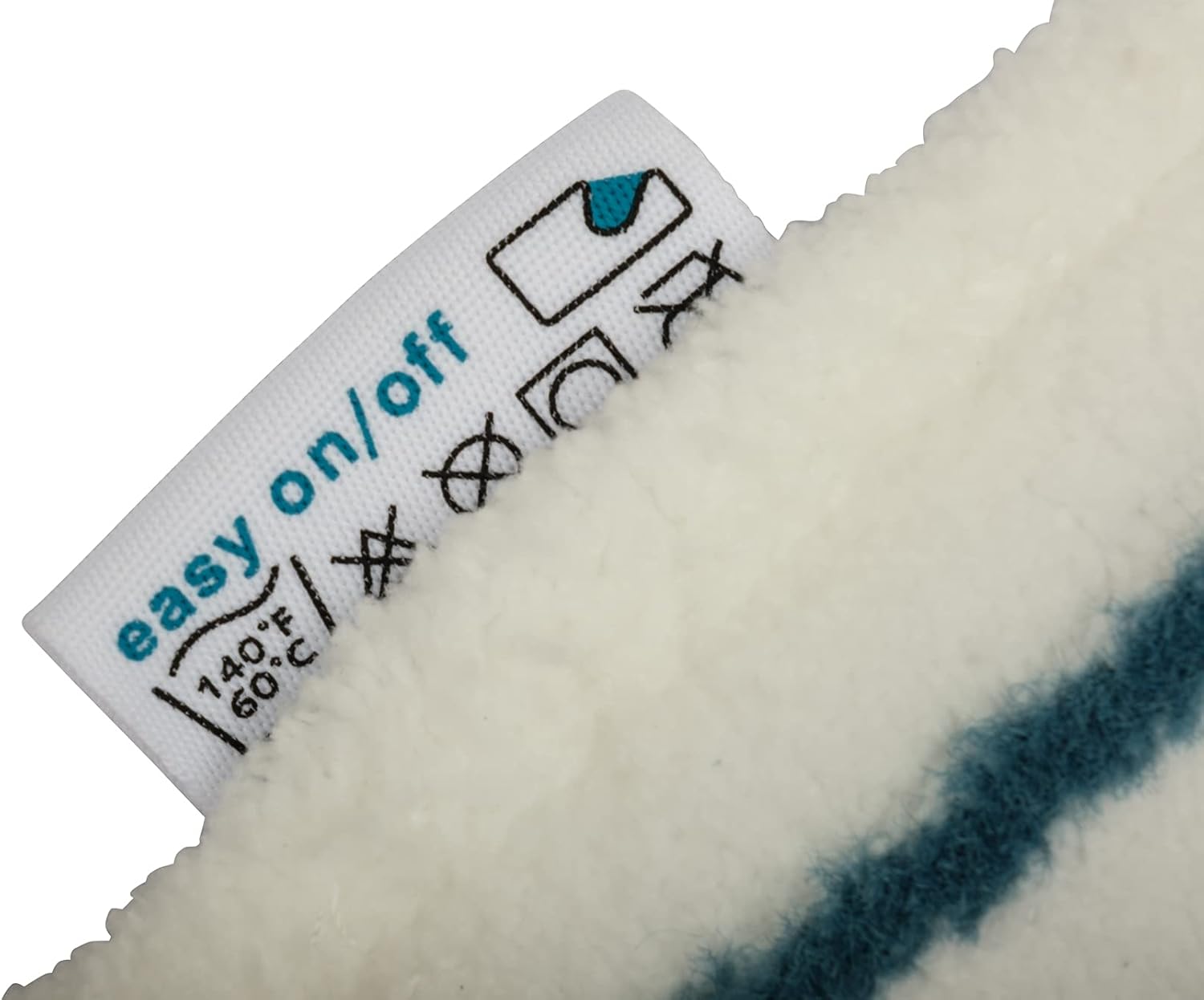
Image: A hand demonstrating the grip and handling of the Delta Steam Accessory with an attached microfiber pad, ready for use.
Cynnal a chadw
Proper maintenance of your microfiber pads will ensure optimal cleaning performance and extend their lifespan.
Glanhau'r Padiau Microfiber:
- After each use, remove the microfiber pad from the Delta Steam Accessory.
- The pads are machine washable. Wash them at a maximum temperature of 140°F (60°C).
- Peidiwch â defnyddio meddalydd ffabrig, as it can clog the microfiber and reduce its cleaning effectiveness.
- Peidiwch â defnyddio cannydd.
- Allow pads to air dry. Do not tumble dry, iron, or dry clean.

Delwedd: Manwl view of the care label on a BLACK+DECKER microfiber pad, showing washing instructions and warnings against fabric softener, bleach, tumble drying, ironing, and dry cleaning.
Care for the Delta Accessory:
- Wipe the accessory with a damp brethyn ar ôl ei ddefnyddio i gael gwared ar unrhyw weddillion.
- Store the accessory in a clean, dry place when not in use.
Datrys problemau
If you encounter issues with your Delta Steam Accessory, consider the following common solutions:
| Problem | Achos / Ateb Posibl |
|---|---|
| Accessory falls off during use. | The accessory may not be securely attached. Ensure it is pushed firmly onto the steam-mop's port and rotated approximately 90 degrees until it clicks into place. |
| Pads do not stick to the accessory. | The hook-and-loop fasteners on the pad or accessory may be dirty or worn. Clean the fasteners. If worn, replace the microfiber pad. |
| Reduced cleaning effectiveness. | Microfiber pads may be dirty or have residue from fabric softener. Wash pads according to maintenance instructions. Replace if heavily soiled or worn. |
Manylebau
| Nodwedd | Manylyn |
|---|---|
| Brand | DU+DECKER |
| Enw Model | FSMHDA |
| Cydrannau wedi'u Cynnwys | 1 x Delta Steam Accessory, 2 x washable microfibre pads |
| Pwysau Eitem | 1.76 owns (tua 50 gram) |
| Dimensiynau Cynnyrch | 0.39 x 0.79 x 0.91 modfedd (tua 1 x 2 x 2.3 cm) |
| Argymhelliad Arwyneb | Tile (Fliese) |
| UPC | 787162501629, 791456109330, 616268329342 |
Gwarant a Chefnogaeth
Warranty information for your BLACK+DECKER steam-mop and its accessories is typically provided with the main steam-mop unit at the time of purchase. Please refer to the documentation included with your steam-mop for specific warranty terms and conditions.
For further support, product registration, or to explore other BLACK+DECKER products, please visit the official BLACK+DECKER store or websafle: