
Rhagymadrodd
This manual provides instructions for the Vivanco RR 220 remote control, designed for compatibility with Samsung Smart TVs. Please read this manual thoroughly before using the device to ensure proper operation and to understand its features.
Cynnwys Pecyn
- Vivanco RR 220 Remote Control
- Y Llawlyfr Defnyddiwr hwn
Nodyn: Nid yw batris wedi'u cynnwys a rhaid eu prynu ar wahân.
Gosod
1. Gosod Batri
- Lleolwch y compartment batri ar gefn y teclyn rheoli o bell.
- Llithrwch glawr y batri i lawr neu pwyswch y clicied a'i godi i agor.
- Mewnosodwch ddau (2) fatri AAA, gan sicrhau bod y terfynellau positif (+) a negatif (-) yn cyd-fynd â'r marciau y tu mewn i'r adran.
- Rhowch glawr y batri yn ôl, gan sicrhau ei fod yn clicio'n ddiogel i'w le.
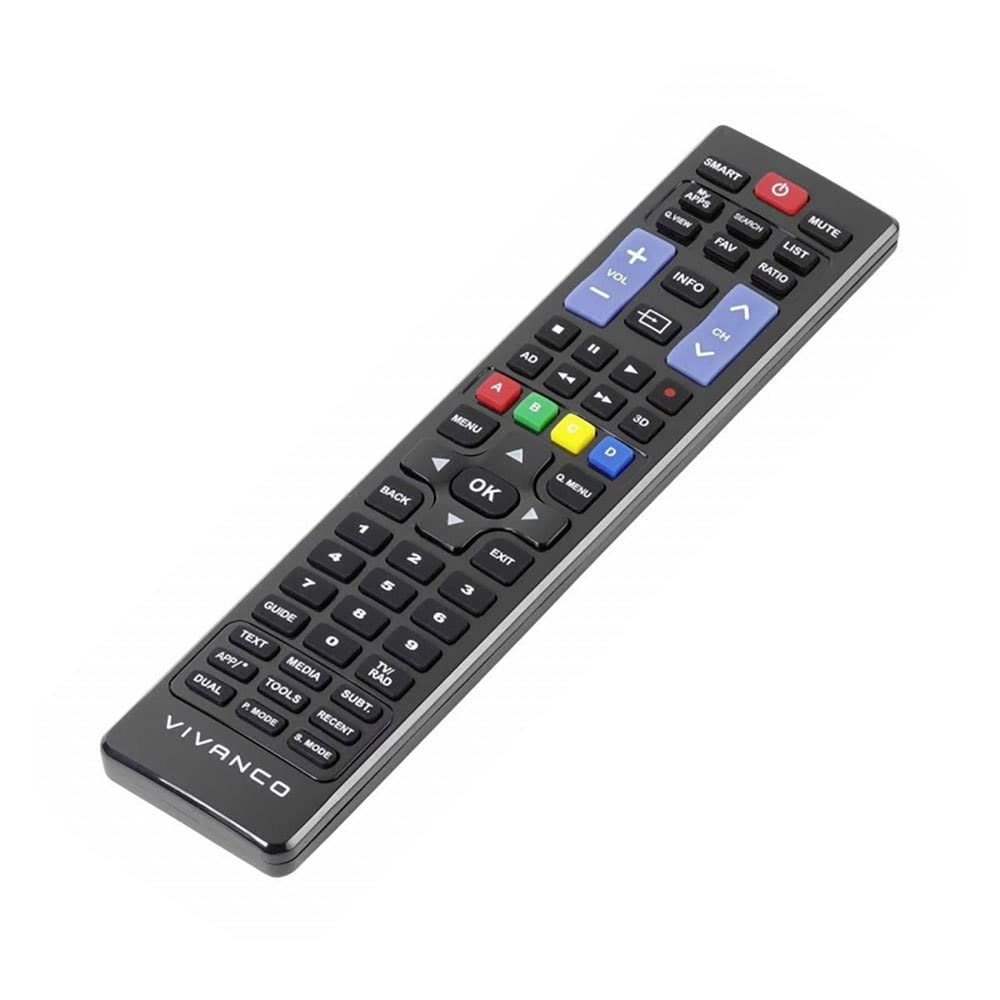
Delwedd 1: Vivanco RR 220 remote control. This image displays the front of the remote control, highlighting its 57 buttons and ergonomic design. The battery compartment is located on the reverse side.
2. Defnydd Cychwynnol
The Vivanco RR 220 is pre-programmed for Samsung Smart TVs. No additional setup or pairing is typically required. Once batteries are installed, point the remote control towards your Samsung Smart TV and press the Power button to test functionality.
Cyfarwyddiadau Gweithredu
The remote control features 57 buttons, providing comprehensive control over your Samsung Smart TV and compatible devices. Below are common button functions:
- Botwm Pŵer: Yn troi'r teledu ymlaen neu i ffwrdd.
- Botymau Rhif (0-9): For direct channel selection or data input.
- Cyfrol i fyny/i lawr: Yn addasu'r cyfaint sain.
- Sianel i fyny/i lawr: Yn newid sianeli teledu.
- Botwm Munud: Yn tawelu sain y teledu.
- Navigation Pad (Up, Down, Left, Right, Enter): Fe'i defnyddir i lywio bwydlenni a dewis opsiynau.
- Botwm Yn Ôl/Dychwelyd: Yn dychwelyd i'r sgrin neu'r ddewislen flaenorol.
- Smart Hub/Home Button: Accesses the Smart Hub or main menu of your Samsung Smart TV.
- Ffynhonnell/Botwm Mewnbwn: Yn dewis ffynonellau mewnbwn (HDMI, AV, ac ati).
- Botymau Lliw (Coch, Gwyrdd, Melyn, Glas): For specific functions within certain applications or menus, as indicated on-screen.
- Rheolyddion Chwarae (Chwarae, Saib, Stopio, Symud Ymlaen yn Gyflym, Ail-ddirwyn): Controls media playback on compatible devices or apps.
For specific functions related to your TV model, refer to your Samsung TV's user manual.
Cynnal a chadw
Glanhau'r Rheolaeth Anghysbell
- Use a soft, dry cloth to wipe the surface of the remote control.
- Ar gyfer baw ystyfnig, ychydig yn dampjw.org cy y brethyn â dŵr neu lanhawr ysgafn nad yw'n sgraffiniol.
- Peidiwch â defnyddio cemegau llym, toddyddion na padiau glanhau sgraffiniol, gan y gall y rhain niweidio gorffeniad neu gydrannau mewnol y teclyn rheoli o bell.
- Ensure no liquid enters the remote control through button gaps or the battery compartment.
Amnewid Batri
Replace batteries when the remote's response becomes sluggish or it stops functioning. Always replace both batteries simultaneously with new AAA alkaline batteries. Do not mix old and new batteries or different types of batteries.
Datrys problemau
| Problem | Achos Posibl | Ateb |
|---|---|---|
| Rheoli o bell ddim yn gweithio. |
|
|
| Some buttons do not function. |
|
|
Manylebau
- Brand: Vivanco
- Enw'r Model: RR 220
- Rhif Model Cynnyrch: 38016
- Dyfeisiau Cydnaws: Home cinema, DVD/Blu-ray player, Television (Samsung Smart TV compatible)
- Technoleg Cysylltedd: Wireless IR (Infrared)
- Nifer y Botymau: 57
- Math o batri: 2 x AAA (Alkaline recommended)
- Batris wedi'u cynnwys: Nac ydw
- Dimensiynau Cynnyrch: 18 x 4.8 x 2.3 cm
- Pwysau Cynnyrch: 80 g
- Ystod Uchaf: 15 metr
- Nodweddion arbennig: IPTV, DVB-T, HDTV compatibility