
1. Rhagymadrodd a Throsoddview
This manual provides comprehensive instructions for the setup, operation, maintenance, and troubleshooting of your InFocus IN3124 Projector. Designed for clarity and ease of use, this guide will help you maximize your projector's performance and longevity.
The InFocus IN3124 is a high-performance projector featuring XGA (1024 x 868) native resolution, 4800 lumens of brightness, and a 3000:1 contrast ratio, making it suitable for various presentation environments. Its portable design allows for flexible placement and usage.
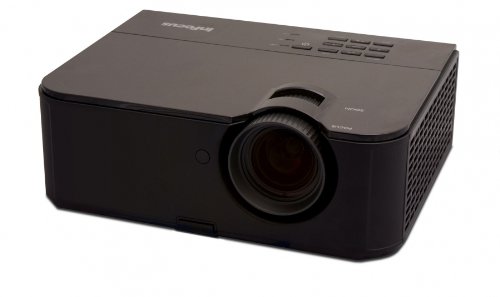
Ffigur 1: Ochr flaen view of the InFocus IN3124 Projector, highlighting the main lens and the top-mounted control panel.
2. Gosod
2.1 Dadbacio
Carefully remove the projector and all accessories from the packaging. Verify that all components listed in the packing list are present. Retain the original packaging for future transport or storage.
2.2 Lleoliad
Position the projector on a stable, level surface. Ensure adequate ventilation around the unit to prevent overheating. Maintain a clear path between the projector lens and the projection screen or surface. The optimal projection distance will vary based on the desired screen size.
2.3 Pŵer Cysylltu
- Cysylltwch y llinyn pŵer â mewnbwn pŵer y taflunydd.
- Plygiwch ben arall y llinyn pŵer i mewn i allfa drydanol wedi'i seilio.
2.4 Cysylltu Ffynonellau Mewnbwn
The IN3124 projector supports various input sources. Connect your video source (e.g., computer, DVD player) to the appropriate input port on the projector. Common ports include VGA and HDMI (if available on your specific model).
- VGA: Use a VGA cable to connect to a computer's video output.
- HDMI: Use an HDMI cable for digital video and audio (check projector for HDMI port availability).
3. Cyfarwyddiadau Gweithredu
3.1 Pweru Ymlaen/Diffodd
- I Bweru Ymlaen: Press the power button on the projector's control panel or the remote control. The power indicator light will illuminate.
- I Bweru i ffwrdd: Press the power button twice. The projector will enter a cooling cycle before shutting down completely. Do not unplug the projector during the cooling cycle.
3.2 Addasu Ffocws a Chwyddo
Rotate the focus ring on the projector lens until the image appears sharp and clear. Use the zoom ring (if present) to adjust the image size to fit your screen.
3.3 Dewis Ffynonellau Mewnbwn
Press the "Source" or "Input" button on the projector's control panel or remote control to cycle through available input sources (e.g., VGA, HDMI). Select the input corresponding to your connected device.
3.4 Menu Navigation and Keystone Correction
Use the menu buttons on the projector or remote to access the On-Screen Display (OSD). Navigate through the menu options to adjust settings such as brightness, contrast, color, and keystone correction. Keystone correction helps to square the image if the projector is not perfectly perpendicular to the screen.
4. cynnal
4.1 Glanhau'r Lens
Gently wipe the projector lens with a soft, lint-free cloth specifically designed for optical surfaces. Do not use abrasive cleaners or excessive force, as this can scratch the lens.
4.2 Glanhau Hidlwyr Aer
Regularly check and clean the projector's air filters to ensure proper airflow and prevent overheating. Refer to the projector's specific filter access instructions. Use a soft brush or vacuum cleaner to remove dust accumulation.
4.3 Lamp Amnewid
Y taflunydd lamp oes gyfyngedig. Pan fydd y lamp life indicator appears or the image becomes dim, the lamp may need replacement. Consult the full service manual or manufacturer's website for detailed lamp replacement procedures and compatible lamp models. Always allow the projector to cool down completely before attempting lamp amnewid.
4.4 Storio
Pan nad yw'n cael ei ddefnyddio am gyfnodau hir, storiwch y taflunydd mewn lle oer, sych, i ffwrdd o olau haul uniongyrchol a thymheredd eithafol. Defnyddiwch y pecyn gwreiddiol neu gas amddiffynnol i atal llwch a difrod.
5. Datrys Problemau
This section addresses common issues you might encounter with your InFocus IN3124 Projector. For more complex problems, contact customer support.
- Dim Delwedd wedi'i Arddangos:
- Ensure the projector is powered on and the power indicator is solid.
- Verify that the input source cable (VGA, HDMI) is securely connected to both the projector and the source device.
- Select the correct input source using the "Source" button.
- Check if the source device is outputting a signal.
- Dim or Faded Image:
- Adjust brightness and contrast settings in the OSD menu.
- Sicrhau y lamp is not nearing the end of its lifespan.
- Clean the projector lens and air filters.
- Check the projection mode (e.g., Eco mode might reduce brightness).
- Mae'r ddelwedd yn aneglur:
- Addaswch y cylch ffocws ar y lens taflunydd.
- Ensure the projection surface is flat and the projector is stable.
- Check the resolution settings of your source device to match the projector's native resolution.
- Rheolaeth Anghysbell Ddim yn Gweithio:
- Amnewid y batris yn y teclyn rheoli o bell.
- Gwnewch yn siŵr nad oes unrhyw rwystrau rhwng y teclyn rheoli o bell a derbynnydd IR y taflunydd.
- Pwyntiwch y teclyn rheoli o bell yn uniongyrchol at y taflunydd.
6. manylebau
The following table outlines the key technical specifications for the InFocus IN3124 Projector:
| Nodwedd | Manyleb |
|---|---|
| Rhif Model | IN3124 |
| Display Resolution (Native) | XGA (1024 x 868) |
| Disgleirdeb | 4800 lumens |
| Cymhareb Cyferbyniad | 3000:1 |
| Math Arddangos | LCD, LCoS |
| Pwysau Eitem | 8.16 pwys (3.7 kg) |
| Dimensiynau Cynnyrch (L x W x H) | 12.83 x 10.43 x 4.8 modfedd (32.59 x 26.49 x 12.19 cm) |
| Nodwedd Arbennig | Cludadwy |
7. Gwarant a Chefnogaeth
For detailed warranty information, please refer to the warranty card included with your product packaging or visit the official InFocus websafle. Mae'r warant fel arfer yn cwmpasu diffygion gweithgynhyrchu am gyfnod penodol o ddyddiad y pryniant.
If you encounter issues that cannot be resolved using the troubleshooting guide, or require technical assistance, please contact InFocus customer support. Contact details can usually be found on the manufacturer's websafle neu yn nogfennaeth eich cynnyrch.