
1. Rhagymadrodd
This manual provides instructions for the OEM RMT-B119A remote control, designed as a replacement or secondary remote for various Sony Blu-ray player models. This remote offers full functionality for controlling your Blu-ray player's features.
Compatible Sony Blu-ray Player Models:
- BDP-BX59
- BDP-S390
- BDP-S590
- BDP-BX110
- BDP-S1100
- BDP-S3100
- BDP-BX310
2. Gosod
2.1 Gosod Batri
Mae angen dau (2) fatri AAA ar y teclyn rheoli o bell (heb eu cynnwys). Dilynwch y camau hyn i osod y batris:
- Lleolwch y clawr compartment batri ar gefn y teclyn rheoli o bell.
- Pwyswch i lawr ar y tab a llithro'r clawr i lawr i agor yr adran.
- Mewnosodwch ddau fatri AAA, gan sicrhau bod y terfynellau positif (+) a negatif (-) yn alinio'n gywir â'r marciau y tu mewn i'r adran.
- Llithrwch glawr adran y batri yn ôl i'w le nes ei fod yn clicio'n ddiogel.
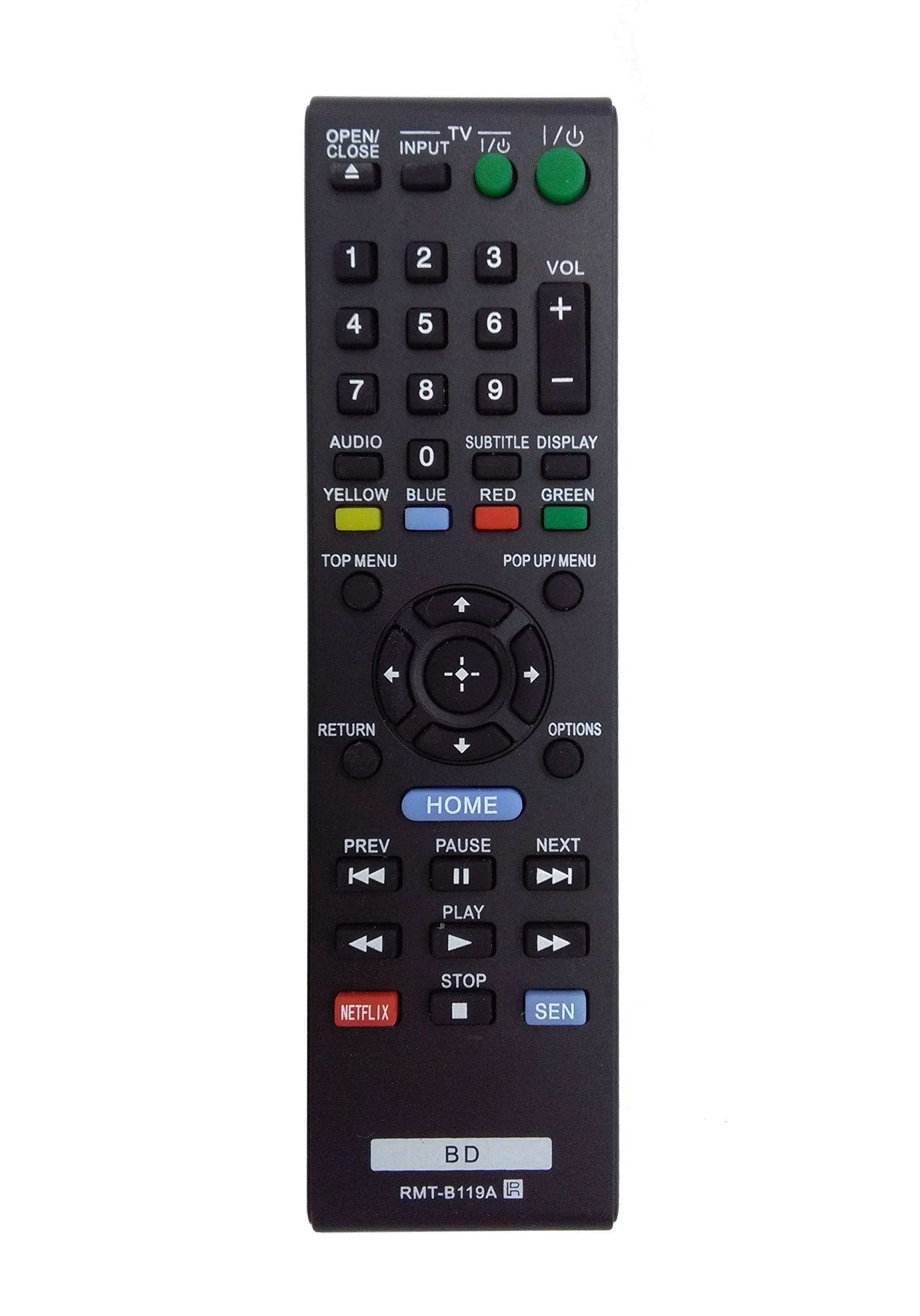
Image: The OEM RMT-B119A remote control, showing the full button layout on the front and a partial view of the open battery compartment on the back, revealing the battery terminals.
3. Cyfarwyddiadau Gweithredu
3.1 Remote Control Layout and Button Functions
Familiarize yourself with the buttons on your RMT-B119A remote control. Below is a description of each button's primary function.
Image: The OEM RMT-B119A remote control, displaying all buttons and their labels.
- Power (I/O): Turns the Blu-ray player on or off.
- OPEN/CLOSE (▲): Yn agor neu'n cau'r hambwrdd disg.
- MEWNBWN: Switches the input source on the connected TV (if programmed).
- Teledu: Switches the remote to TV control mode (if programmed).
- Pad Rhif (0-9): Used for direct track selection, chapter selection, or entering numerical data.
- VOL (+/-): Adjusts the volume level (typically for the connected TV, if programmed).
- SAIN: Changes the audio track or language during playback.
- SUBTITLE DISPLAY: Toggles subtitle display on or off, or cycles through available subtitle languages.
- YELLOW, BLUE, RED, GREEN: Color-coded function buttons, typically used for specific features within menus or interactive content. Their function varies depending on the disc or menu.
- MENU TOP: Accesses the main menu of the Blu-ray disc.
- POP UP/MENU: Displays the pop-up menu during disc playback.
- Directional Pad (↑↓←→): Llywio trwy ddewislenni ac opsiynau.
- Center Button (Enter/Select): Yn cadarnhau dewis neu'n nodi eitem ar y ddewislen.
- DYCHWELYD: Yn mynd yn ôl i'r sgrin neu'r ddewislen flaenorol.
- OPSIYNAU: Displays context-sensitive options or settings.
- CARTREF: Accesses the Blu-ray player's home menu.
- PREV (◀◀): Skips to the beginning of the current track/chapter or the previous track/chapter.
- PAUSE (▌▌): Yn oedi chwarae.
- NEXT (▶▶): Skips to the next track or chapter.
- CHWARAE (▶): Yn dechrau neu'n ailddechrau chwarae.
- STOPIO (■): Yn atal chwarae.
- NETFLIX: Direct access button for the Netflix streaming service.
- AAA: Direct access button for the Sony Entertainment Network (now PlayStation Video/Music).
- BD: Likely a dedicated button for Blu-ray Disc functions or to switch to Blu-ray mode.
4. cynnal
To ensure the longevity and proper functioning of your remote control, follow these maintenance guidelines:
- Glanhau: Sychwch y teclyn rheoli o bell gyda lliain meddal, sych. Ar gyfer baw ystyfnig, sychwch ychydigampgolchwch y brethyn gyda dŵr neu lanhawr ysgafn, nad yw'n sgraffiniol. Osgowch ddefnyddio cemegau llym neu doddyddion.
- Amnewid Batri: Replace batteries when the remote's response becomes sluggish or it stops functioning. Always replace both batteries at the same time with new ones of the same type.
- Storio: Store the remote in a cool, dry place away from direct sunlight, extreme temperatures, and high humidity. If the remote will not be used for an extended period, remove the batteries to prevent leakage.
- Osgoi diferion: Amddiffynwch y teclyn rheoli o bell rhag effaith gorfforol, gan y gall diferion niweidio cydrannau mewnol.
5. Datrys Problemau
Os ydych chi'n cael problemau gyda'ch teclyn rheoli o bell, cyfeiriwch at y tabl canlynol am broblemau cyffredin ac atebion:
| Problem | Achos Posibl | Ateb |
|---|---|---|
| Nid yw o bell yn gweithio. | Batris marw neu wedi'u mewnosod yn anghywir. | Amnewidiwch y batris gyda rhai newydd, gan sicrhau'r polaredd cywir (+/-). |
| Mae'r pellter o bell yn gweithio'n ysbeidiol. | Pŵer batri isel neu rwystr. | Replace batteries. Ensure no objects are blocking the remote's signal path to the Blu-ray player. |
| Remote does not control the TV. | Remote not programmed for TV or TV mode not selected. | This remote is primarily for Blu-ray players. TV control functionality may require specific programming not covered by this manual, or may not be supported by this OEM model. |
| Mae botymau'n anymatebol neu'n gludiog. | Baw neu falurion o dan fotymau. | Clean the remote control surface. Avoid spilling liquids on the remote. |
6. manylebau
- Brand: OEM
- Rhif Model: RMT-B119A
- Technoleg Cysylltedd: Is-goch (IR)
- Dyfeisiau Cydnaws: Sony Blu-ray Players (specific models listed in Introduction)
- Ffynhonnell Pwer: 2 x Batri AAA (heb eu cynnwys)
- Ystod Uchaf: Tua 10 metr (33 troedfedd)
- Nodwedd arbennig: Dyluniad ergonomig
7. Gwarant a Chefnogaeth
This OEM RMT-B119A remote control comes with a gwarant 30 diwrnod o ddyddiad y pryniant, gan gwmpasu diffygion gweithgynhyrchu. Cadwch eich prawf prynu ar gyfer hawliadau gwarant.
For technical support or warranty inquiries, please contact the retailer or manufacturer directly. Refer to your purchase documentation for specific contact information.