
1. Rhagymadrodd
Diolch am brynuasing the KLH R5100 Surround Sound Receiver. This receiver is designed to provide high-quality audio and video performance for your home entertainment system. It features multiple audio and video inputs, surround sound processing, and a powerful amplifier to deliver an immersive listening experience. Please read this manual thoroughly before operating the unit to ensure proper setup and optimal performance.
2. Gwybodaeth Bwysig am Ddiogelwch
Er mwyn lleihau'r risg o sioc drydanol, tân, neu ddifrod i'r uned, dilynwch y rhagofalon diogelwch canlynol:
- Ffynhonnell Pwer: Connect the unit only to an AC 120V, 60Hz power supply.
- Awyru: Sicrhewch awyru digonol. Peidiwch â rhwystro agoriadau awyru. Caniatewch ddigon o le o amgylch yr uned ar gyfer llif aer priodol.
- Dŵr a lleithder: Peidiwch ag amlygu'r uned i law, lleithder, na lleithder gormodol. Peidiwch â gosod gwrthrychau sy'n llawn hylifau, fel fasys, ar yr uned.
- Gwres: Cadwch yr uned i ffwrdd o ffynonellau gwres fel rheiddiaduron, cofrestri gwres, stofiau, neu offer arall (gan gynnwys amplifyddion) sy'n cynhyrchu gwres.
- Glanhau: Datgysylltwch yr uned o'r soced wal cyn glanhau. Defnyddiwch frethyn sych i'w lanhau.
- Gwasanaethu: Peidiwch â cheisio cynnal a chadw'r uned hon eich hun. Cyfeiriwch yr holl waith cynnal a chadw at bersonél gwasanaeth cymwys.
- Ceblau: Amddiffynnwch y llinyn pŵer rhag cael ei gerdded ymlaen neu ei binsio, yn enwedig wrth blygiau, cynwysyddion cyfleustra, a'r pwynt lle maent yn gadael yr uned.
3. Cynnwys Pecyn
Gwiriwch fod eich pecyn yn cynnwys yr eitemau canlynol:
- KLH R5100 Surround Sound Receiver
- Uned Rheoli o Bell
- Llawlyfr Defnyddiwr
- Audio/Video Cables (RCA type)
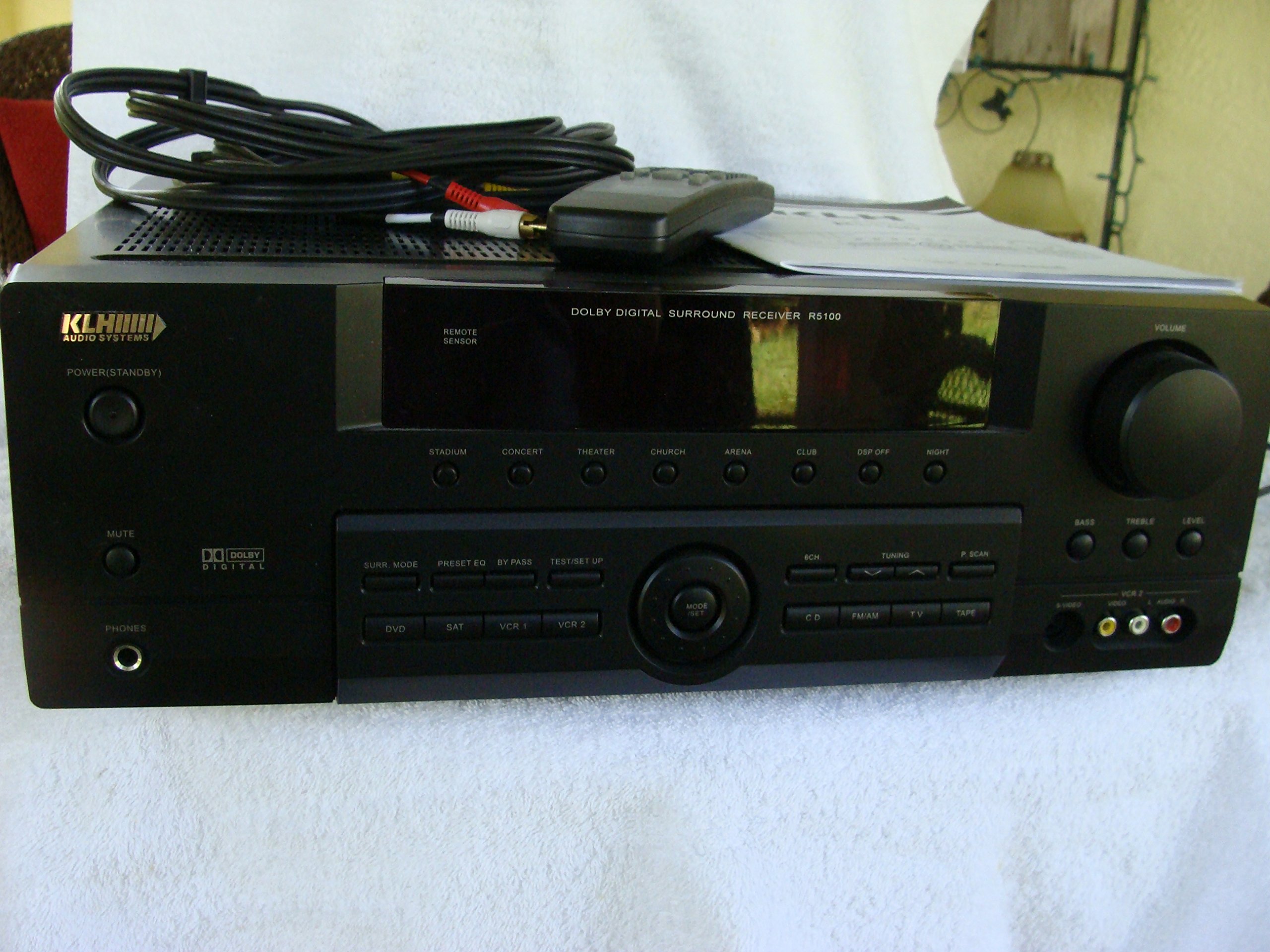
Image: The KLH R5100 receiver, its remote control, user manual, and included audio/video cables.
4. Cynnyrch Drosview
4.1 Rheolaethau Panel Blaen
The front panel provides access to essential controls and indicators for daily operation.

Delwedd: Manwl view of the receiver's front panel, highlighting the display, volume control, and input selection buttons.
- Botwm Pŵer: Yn troi'r derbynnydd ymlaen neu i ffwrdd.
- Dewiswyr Mewnbwn: Buttons for DVD, SAT, VCR 1, VCR 2, CD, FM/AM, TV, TAPE to choose your audio/video source.
- Knob Cyfrol: Yn addasu'r gyfrol allbwn gyffredinol.
- Surround Mode Buttons: Select various sound fields like Stadium, Concert, Theater, Church, Arena, Club, DSP Off, Night.
- Bass/Treble/Level: Controls for adjusting audio tone and individual channel levels.
- Jack Clustffon: Ar gyfer gwrando preifat.
4.2 Cysylltiadau Panel Cefn
The rear panel houses all input and output terminals for connecting your audio and video components, as well as speakers.

Image: The full rear panel of the receiver, displaying all connection ports for audio, video, and speakers.
- Terfynellau Siaradwyr: Connections for Main (Front Left/Right), Center, and Rear (Surround Left/Right) speakers.
- Audio Inputs (RCA): For connecting CD players, tape decks, VCRs, TVs, and other stereo audio sources.
- Video Inputs/Outputs (RCA/S-Video): For connecting video sources like DVD players, VCRs, and TVs.
- Mewnbynnau Sain Digidol (Optegol/Cyfecal): For connecting digital audio sources like DVD players or set-top boxes.
- 6CH Direct Input: For connecting external multi-channel decoders or players with 5.1 analog outputs.
- Subwoofer Allan: Allbwn RCA ar gyfer cysylltu is-woofer gweithredol.
- Terfynellau Antena: For FM and AM antennas.
4.3 Uned Rheoli Anghysbell
The remote control provides convenient access to all receiver functions from your listening position.

Delwedd: Llun agos view of the remote control unit, detailing its buttons for various functions.
- Pŵer ymlaen / i ffwrdd: Yn troi'r derbynnydd ymlaen neu i ffwrdd.
- Dewiswyr Mewnbwn: Dedicated buttons for each input source (DVD, CD, TV, etc.).
- Cyfrol i fyny/i lawr: Yn addasu'r brif gyfrol.
- Tewi: Yn tawelu'r allbwn sain dros dro.
- Modd Amgylchynol: Cycles through available surround sound modes.
- Level/Test: For adjusting individual speaker levels and running a test tone.
- Rheolaethau tiwniwr: For FM/AM station tuning and memory functions.
5. Gosod
5.1 Connecting Your Speakers
Ensure the receiver is unplugged from the power outlet before making any connections.
- Siaradwyr blaen: Connect your main left and right speakers to the 'MAIN SPEAKERS (8Ω)' terminals. Ensure correct polarity (+ to + and - to -).
- Siaradwr y Ganolfan: Connect your center channel speaker to the 'CENTER SPEAKER (8Ω)' terminals.
- Siaradwyr Cefn: Connect your surround left and right speakers to the 'REAR SPEAKERS (8Ω)' terminals.
- Subwoofer: Connect an active subwoofer to the 'SUBWOOFER OUT' RCA jack using a single RCA cable.

Delwedd: Manwl view of the speaker connection terminals on the rear panel.
5.2 Connecting Audio/Video Sources
Use appropriate cables (RCA, Optical, Coaxial) to connect your source components to the receiver.
- Chwaraewr DVD: Connect the audio output of your DVD player to the 'DVD' audio input jacks (RCA) on the receiver. For digital audio, use either the 'DIGITAL IN OPTICAL' or 'DIGITAL IN COAXIAL' input. Connect the video output to the 'DVD' video input.
- Chwaraewr CD: Connect the audio output of your CD player to the 'CD' audio input jacks (RCA).
- TV/Cable Box: Connect the audio output of your TV or cable box to the 'TV' audio input jacks (RCA). Connect video output to the 'TV' video input.
- Dyfeisiau Eraill: Use 'SAT', 'VCR 1', 'VCR 2', or 'TAPE' inputs for other audio/video components as needed.

Image: A close-up of the digital audio inputs (Coaxial, Optical) and the 6-channel direct input section on the rear panel.
5.3 Cysylltiad Antena
Connect the supplied FM and AM antennas to their respective terminals on the rear panel for radio reception.
6. Cyfarwyddiadau Gweithredu
6.1 Gweithrediad Sylfaenol
- Pŵer Ymlaen: Press the Power button on the front panel or remote control.
- Dewiswch Mewnbwn: Press the desired input selector button (e.g., 'DVD', 'CD') on the front panel or remote control to choose your source.
- Addasu Cyfrol: Turn the Volume knob on the front panel or use the Volume Up/Down buttons on the remote control.
6.2 Surround Sound Modes
The R5100 offers various sound modes to enhance your listening experience:
- Stadiwm: Simulates the acoustics of a large stadium.
- Cyngerdd: Creates a concert hall ambiance.
- Theatr: Optimized for movie playback, enhancing dialogue and effects.
- Eglwys: Replicates the spaciousness of a church.
- Arena: Provides a wide, open sound field.
- Clwb: Simulates a lively club environment.
- DSP Off: Disables digital sound processing for a direct stereo signal.
- Noson: Reduces dynamic range for late-night listening without disturbing others.
Press the 'SURR. MODE' button on the remote or front panel to cycle through these modes.
6.3 Rheoli Tôn
Use the BASS and TREBLE controls on the front panel or remote to adjust the low and high frequency response. The LEVEL controls allow for fine-tuning of individual speaker output levels.
6.4 Gweithrediad y Tiwniwr
To listen to radio:
- Press the 'FM/AM' input selector.
- Use the 'TUNING' buttons on the front panel or remote to find stations.
- Press 'MEMORY' to store favorite stations, and 'P.SCAN' to scan through presets.
7. cynnal
To ensure the longevity and optimal performance of your KLH R5100 receiver, follow these maintenance guidelines:
- Glanhau: Wipe the exterior surfaces with a soft, dry cloth. Do not use abrasive cleaners, waxes, or solvents as they may damage the finish.
- Awyru: Regularly check that the ventilation openings are not obstructed by dust or debris. Use a soft brush or vacuum cleaner to gently remove any build-up.
- llinyn pŵer: Inspect the power cord periodically for any signs of damage. If damaged, discontinue use and contact qualified service personnel.
- Storio: If storing the unit for an extended period, unplug it from the power outlet and cover it to protect against dust.
8. Datrys Problemau
If you encounter problems with your receiver, refer to the following common issues and solutions before seeking professional service.
| Problem | Achos Posibl | Ateb |
|---|---|---|
| Dim pŵer | Power cord unplugged; Power outlet not active | Ensure power cord is securely plugged in; Check power outlet with another device |
| Dim sain | Incorrect input selected; Speakers not connected properly; Volume too low; Mute function active | Select correct input source; Check speaker connections and polarity; Increase volume; Deactivate Mute |
| Rheolaeth bell ddim yn gweithio | Batteries depleted; Obstruction between remote and receiver; Remote sensor blocked | Replace batteries; Remove any obstructions; Ensure remote sensor on receiver is clear |
| Derbyniad radio gwael | Antenna not connected or poorly positioned | Connect antennas securely; Adjust antenna position for better reception |
| Sain gwyrgam | Input signal too high; Speaker impedance mismatch; Damaged cables | Reduce source volume; Ensure speakers match 8Ω impedance; Check and replace damaged cables |
9. manylebau
The following are the technical specifications for the KLH R5100 Surround Sound Receiver:
- Rhif Model: R5100
- Dimensiynau Cynnyrch: 16.88 x 6.88 x 15.75 modfedd
- Pwysau Eitem: 24.2 pwys
- Ffynhonnell Pwer: AC 120V, 60Hz
- Defnydd pŵer: 320W
- Modd Allbwn Sain: Amgylchynu
- Ffurfweddiad Sianel Sain Amgylchynol: 5.1
- Technoleg Cysylltedd: RCA, 3.5mm Jack, Optical, Coaxial
- Dyfeisiau Cydnaws: Siaradwyr
- Math o Reolwr: Anghysbell
- Nodwedd arbennig: Advanced Room Calibration (as per product listing, though specific details may vary)
- Lliw: Du
10. Gwarant a Chefnogaeth
For warranty information and customer support, please refer to the documentation included with your purchase or contact KLH customer service directly. Keep your proof of purchase for any warranty claims.