
1. Rhagymadrodd
This manual provides detailed instructions for the setup, operation, and maintenance of your Vibe Axcess 5-in-1 Universal Remote. Please read this manual thoroughly before using the remote control to ensure proper functionality and to maximize your user experience. This remote is designed to control up to five different audio/video devices.
2. Cynnyrch Drosview
The Vibe Axcess 5-in-1 Universal Remote is designed to consolidate control of multiple home entertainment devices into a single unit. It features dedicated buttons for various functions and device types.
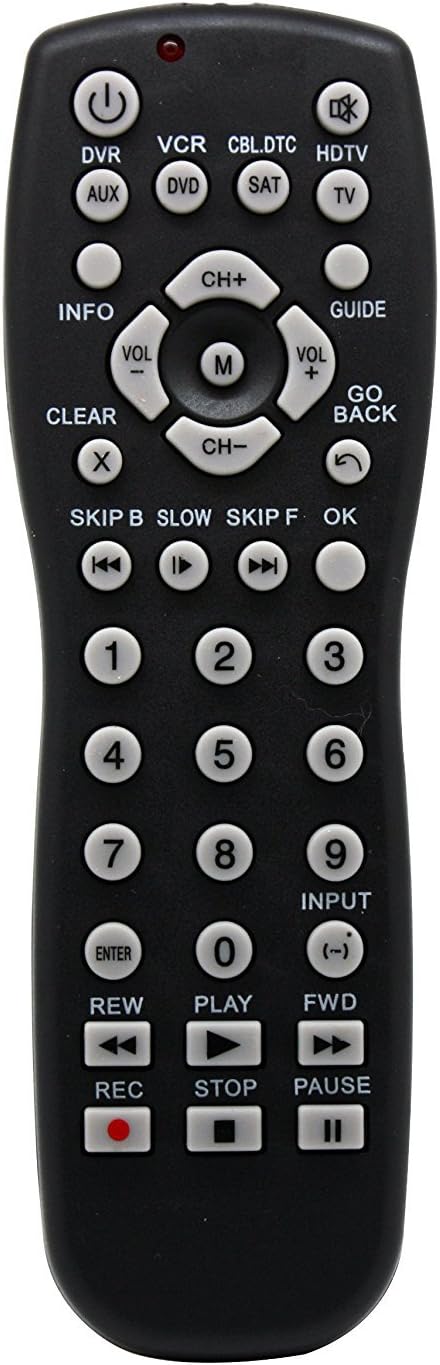
Ffigur 1: Blaen view of the Vibe Axcess 5-in-1 Universal Remote. This image displays the remote's layout, including device selection buttons (DVR, VCR, CBL.DTC, HDTV, AUX, DVD, SAT, TV), navigation pad, number keys, and media control buttons (REW, PLAY, FWD, REC, STOP, PAUSE).

Ffigur 2: Packaging of the Vibe Axcess 5-in-1 Universal Remote. The packaging highlights the remote's 5-in-1 capability and compatibility with various device types such as DVD/VCR, HDTV, DVD, AUX, and CBL/SAT/CABLE.
3. Gosod
3.1 Gosod Batri
- Lleolwch y clawr compartment batri ar gefn y teclyn rheoli o bell.
- Llithrwch y clawr i lawr neu pwyswch y clicied a'i godi i agor.
- Mewnosodwch ddau (2) fatri AAA, gan sicrhau bod y terfynellau positif (+) a negatif (-) yn cyd-fynd â'r diagramau y tu mewn i'r adran.
- Rhowch glawr adran y batri yn ôl, gan ei lithro'n ôl i'w le nes ei fod yn clicio'n ddiogel.
Nodyn: Always use fresh batteries and replace both batteries at the same time. Do not mix old and new batteries or different types of batteries.
3.2 Rhaglennu'r Rheolydd o Bell
To control your devices, the universal remote must be programmed with the correct codes for each device. There are typically two methods for programming:
3.2.1 Mynediad Cod Uniongyrchol
This method involves entering a specific code from a code list (usually provided with the remote or available online) for your device's brand.
- Trowch y ddyfais rydych chi am ei rheoli ymlaen (e.e., teledu, chwaraewr DVD).
- Press and hold the desired device button on the remote (e.g., TV, DVD) for approximately 3 seconds until the indicator light (usually red) illuminates and stays on.
- While the indicator light is on, enter the 3-digit or 4-digit code for your device's brand using the number keys.
- If the code is valid, the indicator light will turn off. If the light flashes and remains on, the code was invalid; re-enter the code.
- Profwch y teclyn rheoli o bell drwy wasgu'r GRYM button. If the device turns off, the code is correct. If not, try the next code listed for your brand.
3.2.2 Chwilio Cod Auto
If you cannot find a code or direct code entry fails, use the auto code search method.
- Trowch y ddyfais rydych chi am ei rheoli ymlaen.
- Press and hold the desired device button (e.g., TV) for approximately 3 seconds until the indicator light illuminates and stays on.
- While holding the device button, press the GRYM button once. The indicator light will start flashing, indicating it is searching for a code.
- Point the remote at the device and wait for the device to turn off. This may take several minutes as the remote cycles through codes.
- Unwaith y bydd y ddyfais yn diffodd, pwyswch y botwm ar unwaith ENWCH botwm i gadw'r cod. Bydd y golau dangosydd yn diffodd.
- Test the remote's functions. If some functions do not work, repeat the auto search process to find a more compatible code.
4. Cyfarwyddiadau Gweithredu
Once programmed, operating your Vibe Axcess 5-in-1 Universal Remote is straightforward.
- Dewiswch Dyfais: Pwyswch y botwm dyfais cyfatebol (e.e., TV, DVD, CBL.DTC) for the device you wish to control. The indicator light will briefly illuminate to confirm selection.
- Pŵer ymlaen / i ffwrdd: Gwasgwch y GRYM botwm i droi'r ddyfais a ddewiswyd ymlaen neu i ffwrdd.
- Rheoli cyfaint: Defnyddiwch y VOL+ a VOL- botymau i addasu'r cyfaint.
- Rheoli sianel: Defnyddiwch y CH+ a CH- botymau i newid sianeli.
- Allweddi Rhif: Use the number keys (0-9) to directly enter channel numbers or other numerical inputs.
- Llywio: Use the directional pad (up, down, left, right) and OK button for menu navigation.
- Rheolaethau'r Cyfryngau: Defnydd CHWARAE, OEDIAD, AROS, REW, FWD, a REC for controlling media playback on compatible devices.
5. cynnal
5.1 Glanhau
To clean your remote, gently wipe it with a soft, dry cloth. Do not use abrasive cleaners, solvents, or harsh chemicals, as these can damage the remote's finish or internal components.
5.2 Batri Newydd
When the remote's performance degrades or the indicator light fails to illuminate, it is time to replace the batteries. Follow the battery installation steps in Section 3.1. Dispose of used batteries responsibly according to local regulations.
6. Datrys Problemau
- Ddim yn gweithio o bell:
- Gwiriwch a yw'r batris wedi'u mewnosod yn gywir ac nad ydynt wedi gwanhau. Amnewidiwch os oes angen.
- Ensure you have selected the correct device button (e.g., TV for your television).
- Verify that the remote is programmed with the correct code for your device. Re-program if unsure.
- Gwnewch yn siŵr nad oes unrhyw rwystrau rhwng y teclyn rheoli o bell a synhwyrydd is-goch y ddyfais.
- Rhai swyddogaethau ddim yn gweithio:
- Some universal remote codes may not support all original remote functions. Try another code for your device brand using the programming steps.
- Ensure the device you are trying to control supports the specific function (e.g., not all TVs have a dedicated 'INFO' button function).
- Golau dangosydd ddim yn goleuo:
- Gwiriwch ac ailosod batris.
- If the issue persists after battery replacement, the remote may be faulty.
7. manylebau
- Model: OT795-KO
- Brand: Vibe
- Dimensiynau Cynnyrch: 10.7 x 4 x 0.8 modfedd
- Pwysau Eitem: 4 owns
- Batris: Angen 2 batris AAA (heb eu cynnwys)
- Uchafswm nifer y dyfeisiau â chymorth: 5
- Technoleg Cysylltedd: Isgoch
- Nodwedd arbennig: Cyffredinol
8. Gwarant a Chefnogaeth
For information regarding warranty coverage or technical support, please refer to the documentation included with your purchase or contact the retailer where the product was acquired. Specific warranty terms may vary.