
1. Rhagymadrodd
This manual provides essential information for the safe and correct installation, operation, and maintenance of the MITSUBISHI FR-D740-080-NA Inverter Drive. Please read this manual thoroughly before attempting to install or operate the unit. Keep this manual in a safe place for future reference.
1.1 Rhagofalon Diogelwch
Failure to follow these instructions may result in serious injury or equipment damage. Always observe all local and national electrical codes.
- PERYGL: Risg o sioc drydanol. Ensure the power supply is completely disconnected and wait at least 10 minutes after power-off before touching any internal components. Verify voltage gyda mesurydd.
- WARNING: Proper grounding is essential. Connect the inverter to a reliable ground source to prevent electric shock.
- CAUTION: Installation environment. Install the inverter on a non-combustible surface, away from direct sunlight, excessive dust, corrosive gases, or moisture. Ensure adequate ventilation.
- Personél cymwys yn unig. Installation, wiring, and maintenance should only be performed by qualified and trained personnel.

Ffigur 1.1: Blaen view of the FR-D740-080-NA Inverter Drive, highlighting the control panel and integrated safety warnings regarding electrical shock and proper grounding.
2. Gosod a Gosod
2.1 Mowntio
Mount the inverter vertically on a flat, rigid, non-combustible surface. Ensure sufficient space around the unit for proper heat dissipation and ventilation. Avoid mounting in areas subject to vibration or direct impact.
2.2 Gwifrau
All wiring must comply with local and national electrical codes. Use appropriate wire gauges for the rated current of 8 Amps and 5 HP motor. Ensure all connections are secure to prevent loose contacts, which can cause malfunctions or damage.
- Cyflenwad Pŵer (Mewnbwn): Connect the three-phase 400 VAC power supply to the designated input terminals (R/L1, S/L2, T/L3).
- Motor Connection (Output): Connect the motor to the output terminals (U, V, W).
- Sylfaen: Connect the ground terminal (E) to a reliable earth ground. This is critical for safety.
- Control Circuit Wiring: Refer to the detailed wiring diagrams in the full product manual for control signal connections (e.g., start/stop, frequency reference, fault output).

Ffigur 2.1: Ochr view of the FR-D740-080-NA Inverter Drive, illustrating the heat sink and potential locations for power and control wiring connections.
3. Cyfarwyddiadau Gweithredu
3.1 Panel Rheoli Drosview
The FR-D740-080-NA features an integrated control panel for basic operation and parameter setting. Key elements include:
- Botwm Rhedeg: Yn cychwyn gweithrediad y modur.
- Botwm STOPIO/AILOSOD: Stops motor operation and resets alarms.
- Botwm MODE: Toggles between display modes and parameter groups.
- Botwm SET: Confirms parameter changes.
- PU/EXT Button: Switches between PU (Panel Unit) control and external control modes.
- Dial/Potentiometer: Used for frequency adjustment or parameter value changes.
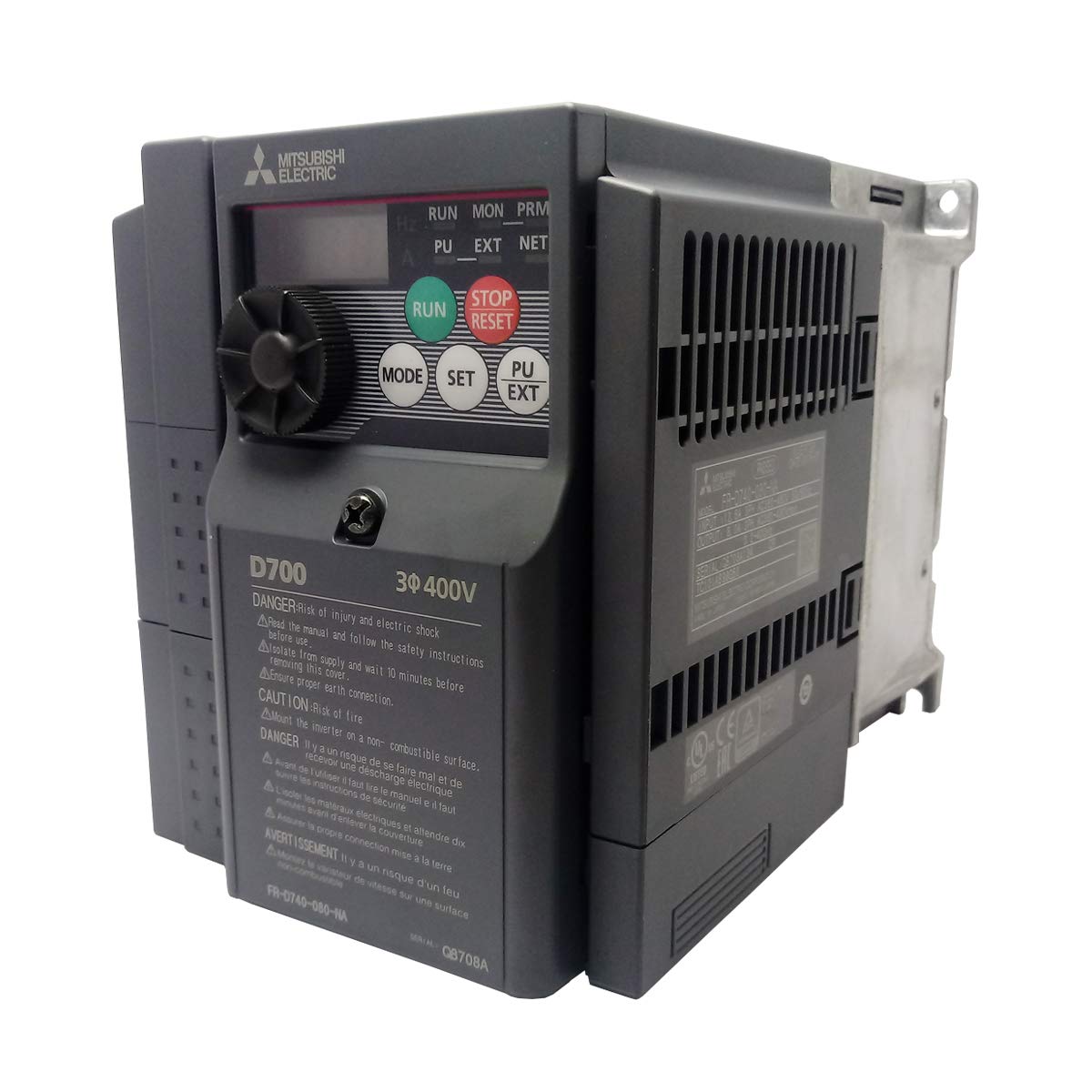
Ffigur 3.1: Y prif view of the FR-D740-080-NA Inverter Drive, clearly showing the control panel with its display, RUN, STOP/RESET, MODE, SET, and PU/EXT buttons, and the frequency adjustment dial.
3.2 Dilyniant Gweithrediad Sylfaenol
- Gwnewch yn siŵr bod yr holl weirio yn gywir ac yn ddiogel.
- Apply power to the inverter.
- Set the desired operating frequency using the dial or external reference. The drive supports a frequency range of 0.2 to 400 Hz.
- Gwasgwch y RHEDEG botwm i gychwyn y modur.
- To stop the motor, press the STOP / AILOSOD botwm.
4. cynnal
4.1 Archwiliad Arferol
Regular inspection helps ensure reliable operation and extends the lifespan of the inverter. Perform the following checks periodically:
- Check for loose terminal screws and retighten if necessary.
- Inspect for dust accumulation on the heat sink and internal components.
- Look for signs of discoloration or overheating on wiring and components.
- Verify that cooling fans (if present) are operating correctly and not obstructed.
4.2 Glanhau
Use a soft, dry cloth to clean the exterior of the inverter. For internal cleaning, disconnect power and use compressed air to remove dust from the heat sink and circuit boards. Avoid using solvents or abrasive cleaners.
5. Datrys Problemau
If the inverter does not operate as expected, consider the following general troubleshooting steps before contacting support:
- Dim pŵer: Check the input power supply and circuit breakers. Ensure all power connections are secure.
- Modur heb redeg: Verify that the RUN command is active and the frequency reference is set correctly. Check motor wiring.
- Dynodiad Diffyg: If an error code is displayed, consult the full product manual for specific fault descriptions and corrective actions.
- Gorboethi: Ensure adequate ventilation and that the ambient temperature is within the specified operating range. Clean any dust from the heat sink.
6. manylebau
Key technical specifications for the MITSUBISHI FR-D740-080-NA Inverter Drive:
| Paramedr | Gwerth |
|---|---|
| Rhif Model | FR-D740-080-NA |
| Cyfres | Cyfres FR-D700 |
| Mewnbwn Voltage | 400 VAC, Three-Phase |
| Allbwn Ystod Amlder | 0.2 - 400 Hz |
| Cyfredol â Gradd | 8 Amp |
| Rated Motor Horsepower (HP) | 5 HP |
| Dimensiynau Cynnyrch (L x W x H) | 6.96 x 5.04 x 6.96 modfedd |
| Pwysau | 3 Bunt |
| Gwneuthurwr | MITSUBISHI |
| Dyddiad Ar Gael Cyntaf | Medi 17, 2013 |
| Part Number (from label) | 1AVF0518072101 |
| Serial Number (from label) | C8708A134 |

Ffigur 6.1: Yn agos view of the identification label on the FR-D740-080-NA Inverter Drive, displaying the model number, part numbers (1AVF0518072101, 1AVF05ZZ7L4AQ), and serial number (Q8708A134).
7. Cefnogaeth
For further technical assistance, detailed wiring diagrams, advanced parameter settings, or warranty information, please refer to the comprehensive MITSUBISHI FR-D700 Series Inverter Drive manual available from the manufacturer's official website or contact MITSUBISHI customer support directly.
MITSUBISHI Electric Automation, Inc.
For contact information and support resources, please visit the official MITSUBISHI Electric websafle.