
Technoleg La Crosse 616-146-INT
La Crosse Technology Color Projection Alarm Clock
Model: 616-146
Brand: Technoleg La Crosse
Rhagymadrodd
This manual provides comprehensive instructions for the setup, operation, and maintenance of your La Crosse Technology Color Projection Alarm Clock (Model 616-146). This device offers accurate atomic time and date, indoor and outdoor temperature display, and a unique projection feature for time and/or outdoor temperature onto your ceiling or wall. It also includes a convenient USB charging port.

Ffigur 1: Blaen view of the La Crosse Technology Color Projection Alarm Clock.
Gosod a Chyfluniad Cychwynnol
1. Pweru'r Uned
- Connect the provided 5 Volt AC Adapter to the alarm clock and a power outlet.
- For battery backup, install 4 AAA batteries (not included) into the battery compartment, ensuring correct polarity. Use fresh, name-brand alkaline batteries dated at least 7 years in advance, testing voltage to ensure at least 1.48V.
2. Outdoor Sensor Setup
- Install batteries into the wireless outdoor temperature sensor first, following the diagrams in the battery compartment.
- Place the outdoor sensor and the display unit within 5 feet of each other for 15 minutes to establish a strong connection. Do not press any buttons during this time. An outdoor temperature reading should appear within the first minute.
- Mount the TX141 wireless weather-resistant transmitting sensor on a North-facing wall or in a shaded area, preferably under an eave or deck rail. Mount in a vertical position for proper moisture drainage. Avoid direct sunlight or radiating heat sources for accurate readings.
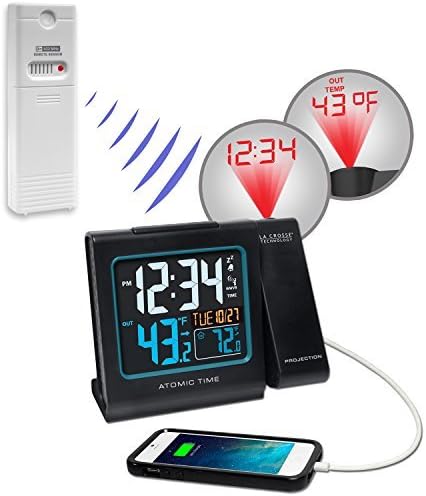
Figure 2: Alarm clock with outdoor sensor and USB charging capability.
3. Gosod Amser a Dyddiad Cychwynnol
The clock automatically sets time via WWVB atomic time signal. If manual setting is required or preferred, follow these steps:
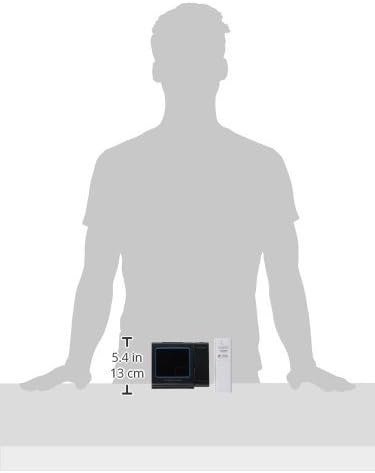
Ffigur 3: Cefn view of the alarm clock with setting buttons.
- WWVB ON/OFF: Daliwch y SET/°F/°C button for 5 seconds. "WWVB" and "ON" will flash. Press +/TEMP or -/TIME to turn OFF if atomic time reception is not desired. Confirm with SET/°F/°C.
- PARTH AMSER: "EST" will flash. Press +/TEMP or -/TIME to select your time zone (AST, EST, CST, MST, PST, AKT, HAT). Confirm with SET/°F/°C.
- AMSER ARBED GOLAU DYDD (DST): "DST" and "ON" will flash. Press +/TEMP or -/TIME to turn OFF if DST is not observed. Confirm with SET/°F/°C.
- 12/24 HOUR TIME: "12H" will flash. Press +/TEMP or -/TIME to select "24H". Confirm with SET/°F/°C.
- AWR: The hour will flash. Press +/TEMP or -/TIME to set the correct hour. Confirm with SET/°F/°C.
- COFNODION: The minutes will flash. Press +/TEMP or -/TIME to set the correct minutes. Confirm with SET/°F/°C.
- BLWYDDYN: The year will flash. Press +/TEMP or -/TIME to set the correct year. Confirm with SET/°F/°C.
- MIS: The month will flash. Press +/TEMP or -/TIME to set the correct month. Confirm with SET/°F/°C.
- DYDDIAD: The date will flash. Press +/TEMP or -/TIME to set the correct date. Confirm with SET/°F/°C to exit the program menu.
- The Day of the Week will set automatically after the year, month, and date are configured.
- If no buttons are pressed for 20 seconds, the alarm will return to live display, saving any adjustments made.
Cyfarwyddiadau Gweithredu
1. Arddangos a Backlight
- The color LCD displays time, indoor temperature, outdoor temperature, and date.
- The display features a nighttime backlight for improved visibility in low light conditions.
- Adjust display brightness using the appropriate button (refer to device for specific button, often labeled "DIM" or similar).
2. Projection Feature
- The projector can display time and/or outdoor temperature onto your ceiling or wall.
- The projection arm has 90-degree rotation for optimal positioning.
- Automatic focus ensures clear projection.

Figure 4: Projection of time and outdoor temperature.
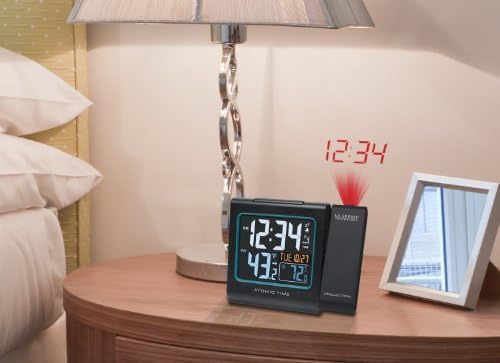
Figure 5: Alarm clock projecting time in a bedroom setting.
3. Porthladd Codi Tâl USB
- A USB port is integrated for convenient charging of compatible devices.
Cynnal a chadw
To ensure optimal performance and longevity of your alarm clock:
- Clean the display and casing gyda meddal, damp brethyn. Osgowch lanhawyr neu doddyddion sgraffiniol.
- Periodically check the outdoor sensor for debris or obstructions that might affect readings.
- Replace batteries in both the main unit (for backup) and the outdoor sensor annually, or when low battery indicators appear.
Datrys problemau
Outdoor Temperature Shows Dashes or Not Syncing
- Lost Connection: Dashes indicate a lost connection between the display and the outdoor sensor. The station will display the last recorded data for 10 minutes before showing dashes.
- Batris: Fresh batteries are the most common solution. Ensure batteries are new and properly installed.
- Sianeli: Confirm that the frequency on the sensor and the display are the same (this display is sold with a 433MHz version).
- Distance/Resistance: Avoid more than one wall, window, or tree between the display and sensor. UV-coated windows or stucco walls can reflect/absorb the signal.
- Ail-leoli: Try repositioning your sensor or display for better reception. Orient the display 90 degrees towards the thermo sensor for improved signal.
Restart Procedure (for connection issues)
- Bring Sensor In: For best results, bring the outdoor sensor indoors and place it 5 feet from the display unit.
- Dileu Pŵer: Remove batteries from the sensor and batteries (and/or AC cord) from the display.
- Discharge Electricity: With power removed, press any button on the display at least 20 times to clear all memory. Verify the display is blank.
- Unpowered for 15 Minutes: Allow both units to remain without power for at least 15 minutes. Failure to do so can result in connection issues or missing segments on the display.
- Gosod Batris: Place fresh batteries into the outdoor sensor first, ensuring correct installation. Then, install batteries (or AC cord) into the display.
- Cysylltiad: Allow the sensor and display to remain 5 feet apart for 15 minutes to establish a strong connection. Do not press buttons during this time.
Manylebau
| Nodwedd | Manylyn |
|---|---|
| Brand | Technoleg La Crosse |
| Rhif Model | 616-146-INT |
| Lliw | Du |
| Math Arddangos | Digidol |
| Ffynhonnell Pwer | Trydan Corded |
| Gofyniad Batri | 4 AAA batteries (for backup) |
| Dimensiynau Cynnyrch | 5.23"W x 4.33"H (7.09" L x 3.62" W x 2.87" H) |
| Pwysau Eitem | 12.8 owns |
| Defnydd Dan Do / Awyr Agored | Indoor (main unit), Outdoor (sensor) |
| Modd Gweithredu | Atomig |
| Nodwedd Arbennig | Alarm, Projection, USB Port |
Gwarant a Chefnogaeth
Gwybodaeth Gwarant
Daw'r cynnyrch hwn gyda a Gwarant Cyfyngedig. Please refer to the warranty description for full details: "1 limited warranty."
Cefnogaeth Ychwanegol
For further assistance, you may refer to the official user manual:
Lawrlwythwch y Llawlyfr Defnyddiwr (PDF)
Additional documents are also available: