
1. Rhagymadrodd
This user manual provides essential information for the safe and effective use of your Sony MDR-1R closed-type high-resolution headphones. Please read this manual thoroughly before using the product and retain it for future reference.
The Sony MDR-1R headphones are designed to deliver high-fidelity audio with a comfortable fit. They feature a Liquid Crystal Polymer Film diaphragm for clear sound reproduction across a wide frequency range and silent joints to minimize mechanical noise during wear. The headphones include a detachable cable with an in-line remote and microphone, compatible with iPhone, iPod, and iPad devices.
2. Gwybodaeth Diogelwch
- Diogelu'r Clyw: Osgowch wrando’n hir ar lefelau cyfaint uchel er mwyn atal niwed i’r clyw.
- Ymwybyddiaeth Amgylcheddol: Do not use headphones in situations where the inability to hear ambient sounds could be dangerous, such as while driving, cycling, or walking in traffic.
- Glanhau: Clean the headphones with a soft, dry cloth. Do not use liquid cleaners or solvents.
- Storio: Storiwch y clustffonau mewn lle oer, sych i ffwrdd o olau haul uniongyrchol a thymheredd eithafol.
- Dadosod: Peidiwch â cheisio dadosod na newid y clustffonau. Gall hyn ddirymu'r warant ac achosi difrod.
3. Cynnwys Pecyn
Gwiriwch fod yr holl eitemau yn bresennol yn y pecyn:
- Sony MDR-1R Headphones
- Detachable Audio Cable with In-line Remote and Microphone
- Cwdyn Cario

Delwedd: Blaen view of the Sony MDR-1R headphones.

Image: The carrying pouch included with the Sony MDR-1R headphones.
4. Gosod
4.1 Cysylltu'r Cebl Sain
- Locate the audio input jack on the left earcup of the headphones.
- Insert the smaller end of the detachable audio cable firmly into the headphone jack until it clicks into place.
- Connect the larger 3.5mm plug of the cable to the audio output jack of your device (e.g., smartphone, tablet, music player).

Delwedd: Ochr view of the Sony MDR-1R headphones, illustrating the cable connection point on the earcup.
4.2 Addasu'r Band Pen
Adjust the headband by sliding the extenders on each side until the earcups comfortably cover your ears. Ensure a snug fit for optimal sound quality and comfort during extended listening sessions.
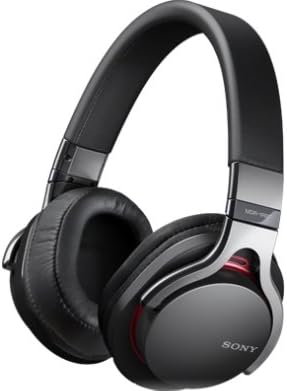
Image: A person holding the Sony MDR-1R headphones, showing how they fit over the ears.
5. Cyfarwyddiadau Gweithredu
5.1 Chwarae Sain
Once connected to your audio device, begin playback from your device. The headphones will reproduce the audio. Adjust the volume using your connected device's volume controls.
5.2 Using the In-line Remote and Microphone (for compatible devices)
The detachable cable includes an in-line remote and microphone, primarily designed for use with iPhone, iPod, and iPad devices. Functionality may vary with other smartphones or audio players.
- Chwarae/Seibiant: Pwyswch y botwm canol unwaith i chwarae neu oedi cerddoriaeth.
- Trac Sgip: Press the center button twice quickly to skip to the next track.
- Trac Blaenorol: Press the center button three times quickly to go to the previous track.
- Ateb / Diwedd Galwad: Press the center button once to answer an incoming call or end an ongoing call.
- Galwad Dirywiad: Press and hold the center button for approximately two seconds to decline an incoming call.
- Rheoli llais: Press and hold the center button to activate voice control features (e.g., Siri) on compatible devices.
Note: Volume control is typically managed directly on your connected device. The in-line remote does not feature dedicated volume buttons.
6. cynnal
6.1 Glanhau
- Wipe the headphones, including earcups and headband, with a soft, dry cloth.
- Do not use alcohol, benzene, thinner, or other chemical solvents, as they may damage the finish or material.
- Regularly check the audio jack and cable for dust or debris and clean gently if necessary.
6.2 Storio
- Pan nad ydynt yn cael eu defnyddio, storiwch y clustffonau yn y cwdyn cario a ddarperir i'w hamddiffyn rhag llwch a chrafiadau.
- Avoid wrapping the cable too tightly around the headphones to prevent damage to the cable or connectors.
- Do not expose the headphones to extreme temperatures, humidity, or direct sunlight.
7. Datrys Problemau
7.1 Dim Sŵn neu Gyfaint Isel
- Ensure the audio cable is securely connected to both the headphones and your audio device.
- Check the volume level on your audio device and increase it if necessary.
- Test the headphones with a different audio device or a different cable (if available) to rule out device or cable issues.
- Ensure the audio source is playing correctly.
7.2 Poor Sound Quality (Distortion, Static)
- Verify that the audio cable is fully inserted and not loose.
- Reduce the volume on your audio device if distortion occurs at high levels.
- Ensure the audio source file mae o ansawdd da.
- Clean the audio jacks on both the headphones and your device if there is visible debris.
7.3 In-line Remote/Microphone Not Working
- Confirm that your device is compatible with the remote and microphone functions (primarily designed for iPhone, iPod, iPad).
- Sicrhewch fod y cebl wedi'i gysylltu'n ddiogel.
- Ailgychwynwch eich dyfais sain.
- Test with another compatible device if possible.
8. manylebau
| Enw'r Model: | MDR-1R |
| Math Clustffon: | Closed-type, Dynamic |
| Cysylltedd: | Wired |
| Lliw: | Arian |
| Nodweddion cebl: | Detachable, with In-line Remote and Microphone |
| Pwysau: | Approx. 240 grams (excluding cable) |
| GTIN (Rhif Adnabod Masnach Fyd-eang): | 04905524891652 |
9. Gwarant a Chefnogaeth
Am wybodaeth am warant, cyfeiriwch at y cerdyn gwarant sydd wedi'i gynnwys gyda'ch cynnyrch neu ewch i wefan gymorth swyddogol Sony website for your region. If you require technical assistance or have questions not covered in this manual, please contact Sony customer support.
Cefnogaeth Sony Websafle: https://www.sony.com/electronics/support


