
1. Rhagymadrodd
The D-Link GO-SW-5G is a 5-Port Unmanaged Gigabit Desktop Switch designed for home and small office environments. This device provides a simple and cost-effective solution to expand your network connectivity, offering high-speed Gigabit Ethernet ports for reliable data transfer. It incorporates D-Link's Green Technology for energy efficiency, reduced heat generation, and extended product lifespan.
This switch is a plug-and-play device, requiring no complex configuration or software installation, making it easy to integrate into an existing network.
2. Cynnwys Pecyn
Gwiriwch fod yr holl eitemau a restrir isod wedi'u cynnwys yn eich pecyn:
- D-Link GO-SW-5G 5-Port Gigabit Desktop Switch
- Addasydd Pŵer
- Canllaw Gosod Cyflym
Os oes unrhyw eitemau ar goll neu wedi'u difrodi, cysylltwch â'ch manwerthwr i gael cymorth.
3. Cyfarwyddiadau Gosod
The D-Link GO-SW-5G switch is designed for easy plug-and-play installation. Follow these steps to set up your device:
3.1. Cysylltwch yr Adaptydd Pŵer
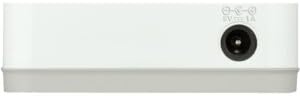
- Locate the power input port on the side of the D-Link GO-SW-5G switch.
- Connect the provided power adapter to this port.
- Plygiwch ben arall yr addasydd pŵer i mewn i soced drydanol safonol.
- The power LED on the front of the switch will illuminate, indicating that the device is receiving power.

Ffigur 1: Ochr view of the D-Link GO-SW-5G switch with the power input port.
3.2. Cysylltu â'ch Rhwydwaith
- Using a standard Ethernet cable (RJ45), connect one end to an available LAN port on your router (not your modem).
- Connect the other end of this Ethernet cable to any of the five available ports on the back of the D-Link GO-SW-5G switch.
- The corresponding LED on the front of the switch will light up, indicating an active connection.
Ffigur 2: Cefn view of the D-Link GO-SW-5G switch with five Ethernet ports.
3.3. Connect Network Devices
- Connect your network devices (e.g., computers, gaming consoles, network printers, smart TVs) to the remaining available Ethernet ports on the D-Link GO-SW-5G switch using Ethernet cables.
- Each connected device will have its corresponding LED on the front of the switch illuminate, confirming a successful connection.

Ffigur 3: Blaen view of the D-Link GO-SW-5G switch showing active port LEDs.
4. Cyfarwyddiadau Gweithredu
The D-Link GO-SW-5G is an unmanaged switch, meaning it operates automatically without requiring user configuration. Once connected as described in the Setup section, it will begin forwarding network traffic between connected devices.
- Negodi Awtomatig: The switch automatically detects the network speed (10/100/1000 Mbps) and duplex mode (half/full) of connected devices and adjusts accordingly.
- MDI/MDIX Awtomatig: All ports support automatic MDI/MDIX crossover, eliminating the need for crossover cables when connecting to other switches or hubs.
- Dangosyddion LED: Each port has an LED indicator on the front panel. A lit LED indicates an active link, and blinking indicates network activity.
5. cynnal
To ensure optimal performance and longevity of your D-Link GO-SW-5G switch, consider the following maintenance guidelines:
- Lleoliad: Place the switch in a cool, dry location away from direct sunlight, heat sources, and excessive moisture. Ensure adequate ventilation around the device.
- Glanhau: Use a soft, dry cloth to clean the exterior of the switch. Avoid using liquid or aerosol cleaners, as they may damage the device.
- Rheoli Ceblau: Keep Ethernet cables neatly organized to prevent tangles and accidental disconnections.
- Cylchred Pwer: If you experience network issues, a simple power cycle (unplugging the power adapter for 10 seconds and then plugging it back in) can often resolve minor problems.
6. Datrys Problemau
If you encounter issues with your D-Link GO-SW-5G switch, refer to the following common troubleshooting steps:
- Dim LED Pŵer:
- Gwnewch yn siŵr bod yr addasydd pŵer wedi'i gysylltu'n ddiogel â'r switsh ac allfa drydanol sy'n gweithio.
- Gwiriwch fod y soced drydanol yn gweithio drwy blygio dyfais arall i mewn.
- No Link/Activity LED for a Connected Device:
- Gwiriwch fod y cebl Ethernet wedi'i blygio'n ddiogel i borthladd y switsh a'r ddyfais rhwydwaith.
- Rhowch gynnig ar gebl Ethernet gwahanol i ddiystyru cebl diffygiol.
- Gwnewch yn siŵr bod y ddyfais gysylltiedig wedi'i throi ymlaen a bod ei haddasydd rhwydwaith yn gweithredu'n gywir.
- Ceisiwch gysylltu'r ddyfais â phorthladd gwahanol ar y switsh.
- Cyflymder Rhwydwaith Araf:
- Verify that all connected devices and cables support Gigabit Ethernet (1000 Mbps) for optimal performance. The switch will operate at the lowest common speed.
- Ensure your router and internet service provider (ISP) plan support the desired speeds.
- Perform a power cycle on the switch and your router.
- Cysylltedd ysbeidiol:
- Gwiriwch am gysylltiadau cebl rhydd.
- Ensure the switch is not overheating; provide adequate ventilation.
- Test with different Ethernet cables.
7. manylebau
| Brand | D-Cyswllt |
| Rhif Model | GO-SW-5G/B |
| Nifer y Porthladdoedd | 5 |
| Newid Math | Heb ei reoli |
| Cyfradd Trosglwyddo Data | 1 Gigabits Per Second (10/100/1000 Mbps) |
| Rhyngwyneb | RJ45 |
| Lliw | Gwyn |
| Pwysau Eitem | 0.22 Bunt |
| Cyftage | 100-240 folt |
| Dyfeisiau Cydnaws | PC, Mac, and other Ethernet-enabled devices |
| Newid Ffabrig | 10 Gbps |
| UPC | 790069365669 |
8. Gwarant a Chefnogaeth
Gwarant Cyfyngedig: The D-Link GO-SW-5G switch comes with a 3-year limited warranty. For detailed terms and conditions, please refer to the warranty information included in your package or visit the official D-Link websafle.
Cymorth Technegol: For technical assistance, product registration, or to download the latest firmware and documentation, please visit the Cefnogaeth D-Link Websafle or contact D-Link customer service.