
RCA RTS736W
RCA RTS736W 30-Inch Streaming Soundbar User Manual
Model: RTS736W
Rhagymadrodd
This user manual provides comprehensive instructions for the installation, operation, and maintenance of your RCA RTS736W 30-Inch Streaming Soundbar. Please read this manual thoroughly before using the product to ensure proper functionality and to prevent damage.
The RCA RTS736W is designed to enhance your home audio experience with its 3.0 channel sound and integrated Wi-Fi for streaming online content.
Nodweddion Allweddol
- Wi-Fi Built-In for streaming video content to a TV.
- 3.0 Channel Left/Center/Right audio configuration.
- HDMI 1080p Output for high-definition connectivity.
- Includes 1 Rear Analog Audio-in Jack and 1 Side Line-in Jack for various audio sources.
- Flexible placement options: includes table or wall mounting brackets.
Cynnwys Pecyn
Gwiriwch fod yr holl eitemau yn bresennol yn y pecyn:
- RCA RTS736W 30-Inch Streaming Soundbar
- Rheolaeth Anghysbell
- Addasydd Pŵer
- Table or Wall Mounting Brackets
- Llawlyfr Defnyddiwr (y ddogfen hon)
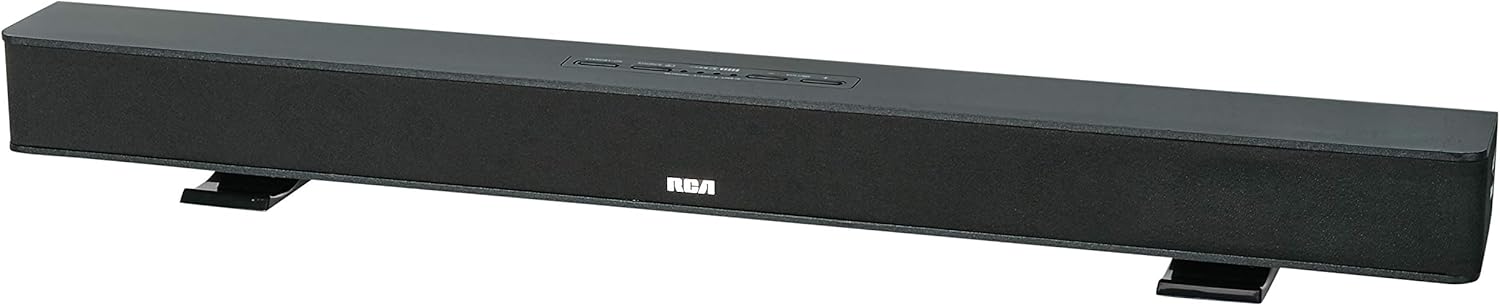
Image: The RCA RTS736W 30-Inch Streaming Soundbar, shown with its sleek black design and integrated controls.
Gosod
1. Dewisiadau Lleoli
The soundbar offers flexible placement:
- Lleoliad Pen bwrdd: Place the soundbar on a flat, stable surface in front of your television. Ensure there is adequate ventilation around the unit.
- Mowntio Wal: Use the included wall mounting brackets to secure the soundbar to a wall. Refer to the separate wall mounting template (if provided) for detailed instructions. Ensure the wall can support the weight of the soundbar.

Image: The RCA RTS736W soundbar positioned on a TV stand, demonstrating a typical home theater setup with various streaming service icons displayed on the television screen.
2. Cysylltu â Phwer
- Connect the power adapter to the DC IN 13.5V port on the back of the soundbar.
- Plygiwch ben arall yr addasydd pŵer i mewn i allfa wal.
3. Cysylltiadau Sain
Choose one of the following methods to connect the soundbar to your audio source:
- Allbwn HDMI: Connect an HDMI cable from the HDMI OUT port on the soundbar to an HDMI input on your television. This connection supports 1080p video output from the soundbar's streaming functions.
- Analog Audio-in (AUX 1 / AUX 2): Use RCA audio cables to connect your TV or other audio devices to the AUX 1 or AUX 2 input jacks on the back of the soundbar. Match the red and white connectors.
- Side Line-in Jack: For portable devices like smartphones or tablets, connect a 3.5mm audio cable from your device's headphone jack to the Line-in jack located on the side of the soundbar.

Delwedd: Llun agos view of the rear panel of the RCA RTS736W soundbar, highlighting the AUX 1, AUX 2, DC IN 13.5V, HDMI OUT, and VIDEO OUT ports for various connections.
4. Cysylltiad Rhwydwaith (Wi-Fi)
To utilize the streaming features, connect the soundbar to your home Wi-Fi network. This process is typically guided by on-screen prompts when the soundbar is first powered on and connected to a TV via HDMI.
- Ensure your TV is connected to the soundbar via HDMI and powered on.
- Follow the on-screen instructions to select your Wi-Fi network and enter the password.
Cyfarwyddiadau Gweithredu
1. Pŵer Ymlaen / I ffwrdd
Gwasgwch y Grym botwm ar y bar sain neu'r teclyn rheoli o bell i droi'r uned ymlaen neu i ffwrdd.
2. Dewis Mewnbwn
Gwasgwch y Mewnbwn button on the remote control or the soundbar to cycle through available audio sources: HDMI, AUX 1, AUX 2, Line-in, and Wi-Fi streaming.
3. Rheoli Cyfrol
Defnyddiwch y Cyfrol + a Cyfrol - buttons on the remote control or the soundbar to adjust the audio level.
Gwasgwch y Tewi botwm i dawelu'r sain dros dro.
4. Cynnwys Ffrydio
Once connected to Wi-Fi and your TV via HDMI, you can access various streaming applications. Navigate using the directional buttons and OK botwm ar y teclyn rheoli o bell.
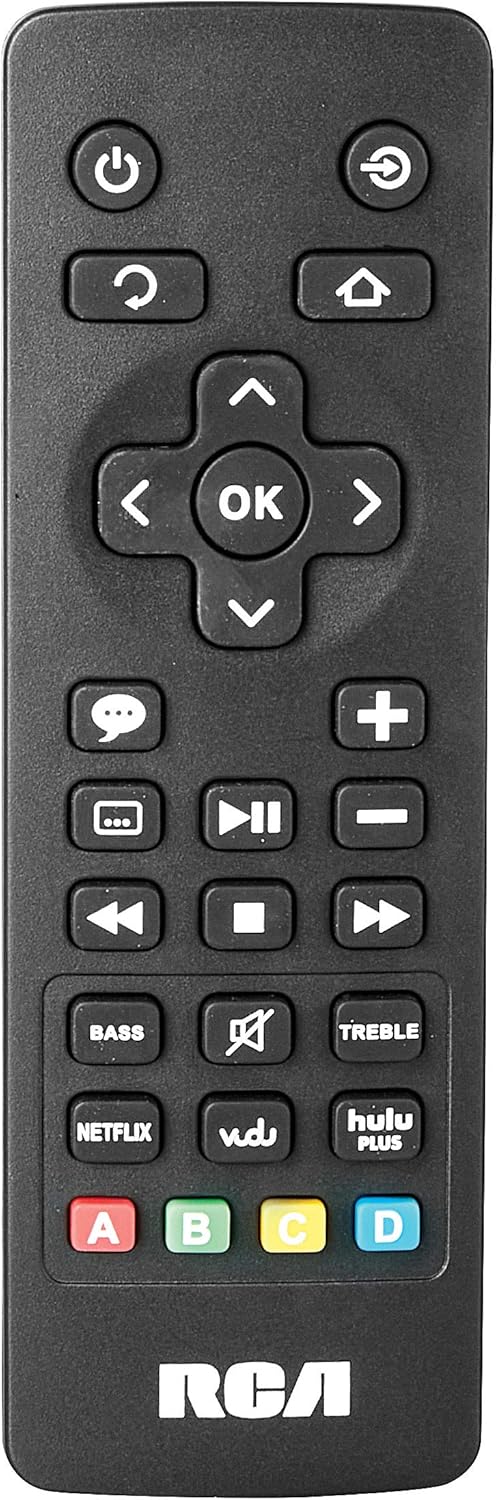
Image: The remote control for the RCA RTS736W soundbar, featuring dedicated buttons for power, volume, input selection, navigation, and direct access to streaming services like Netflix, Vudu, and Hulu Plus.
Dedicated buttons for services like Netflix, Vudu, and Hulu Plus may be available on the remote for direct access.
5. Addasiadau Sain
Defnyddiwch y BAS a TREBL buttons on the remote control to fine-tune the audio output to your preference.
Cynnal a chadw
- Glanhau: Disconnect the soundbar from the power outlet before cleaning. Use a soft, dry cloth to wipe the exterior surfaces. Do not use liquid cleaners or abrasive materials.
- Awyru: Ensure that the ventilation openings on the soundbar are not blocked. Proper airflow prevents overheating.
- Storio: If storing the soundbar for an extended period, disconnect it from power and store it in a cool, dry place away from direct sunlight and extreme temperatures.
Datrys problemau
Dim Pwer
- Check if the power adapter is securely connected to the soundbar and a working wall outlet.
- Ensure the power outlet is active by testing it with another device.
Dim Sain
- Verify that the correct input source is selected on the soundbar.
- Check all audio cable connections between the soundbar and your audio source (TV, etc.).
- Ensure the volume on both the soundbar and the connected audio source is turned up and not muted.
- If using HDMI, confirm that your TV's audio output settings are configured to send audio to the soundbar.
Streaming Issues (Buffering, Freezing)
- Check your Wi-Fi network connection. Ensure the signal strength is adequate.
- Restart your home router and modem.
- Restart the soundbar by unplugging it from the power outlet for a few minutes, then plugging it back in.
- Ensure your internet service is active and performing correctly.
Rheolaeth Anghysbell Ddim yn Gweithio
- Amnewid y batris yn y teclyn rheoli o bell.
- Ensure there are no obstructions between the remote control and the soundbar's sensor.
- Pwyntiwch y teclyn anghysbell yn uniongyrchol at y bar sain.
Manylebau
| Rhif Model | RTS736W |
| Math o Siaradwr | Bar sain |
| Sianeli | 3.0 (Left/Center/Right) |
| Cysylltedd | HDMI, RCA, Wi-Fi |
| Technoleg Di-wifr | Wi-Fi |
| Allbwn HDMI | 1080p |
| Mewnbynnau Sain | 2x Analog Audio-in (RCA), 1x Side Line-in (3.5mm) |
| Maint Siaradwr | 30 modfedd |
| Uchafswm Pŵer Allbwn | 150 Wat |
| rhwystriant | 8 Ohms |
| Ffynhonnell Pwer | Trydan Corded |
| Dimensiynau Cynnyrch (L x W x H) | 33.5 x 6.5 x 5.5 modfedd |
| Pwysau Eitem | 5.55 pwys |
| Gwneuthurwr | Alco Electronics Ltd. |
Gwybodaeth Gwarant
Specific warranty details for the RCA RTS736W Soundbar are typically provided with the product packaging or can be found on the official RCA websafle. Cadwch eich prawf prynu ar gyfer hawliadau gwarant.
For warranty service, contact RCA customer support with your model number and purchase date.
Cefnogaeth i Gwsmeriaid
For further assistance, technical support, or service inquiries, please refer to the contact information provided in your product's original documentation or visit the official RCA support websafle.
Adnoddau Ar-lein: Ewch i Siop RCA ar Amazon
Ask a question about this manual
Ask about setup, troubleshooting, compatibility, parts, safety, or missing instructions. Manuals+ will review the question and use this page’s manual context to help answer it.