
Ffocws IN124
InFocus IN124 Taflunydd CLLD
Llawlyfr Defnyddiwr
1. Rhagymadrodd
This manual provides comprehensive instructions for the setup, operation, and maintenance of your InFocus IN124 DLP Projector. Please read this manual thoroughly before using the projector to ensure proper functionality and to maximize its lifespan.
The InFocus IN124 is designed to deliver clear and bright projections, suitable for various environments including home cinema and business presentations. Its compact design and robust features make it a versatile display solution.
2. Cydrannau Cynnyrch
Upon unboxing your InFocus IN124 DLP Projector, please verify that all the following components are included:
- InFocus IN124 DLP Projector Unit
- Rheolaeth Anghysbell
- Cebl Pŵer
- VGA Cable (may vary by region/package)
- User Manual (this document, typically on CD or downloadable)
If any items are missing or damaged, please contact InFocus customer support immediately.
3. Gosod
3.1 Lleoliad Corfforol
Position the projector on a stable, flat surface or mount it securely to a ceiling. Ensure adequate ventilation around the unit to prevent overheating. Maintain a clear path between the projector lens and the projection surface (screen or wall).
3.2 Cysylltu Dyfeisiau
The InFocus IN124 supports various input sources. Connect your source device (e.g., laptop, DVD player, gaming console) to the projector using the appropriate cable.
- HDMI: For high-definition digital video and audio. Connect an HDMI cable from your source device to the HDMI port on the projector.
- VGA: For analog video input, commonly used with computers. Connect a VGA cable from your computer's VGA output to the VGA input on the projector.
- Fideo Cyfansawdd: For standard definition video. Connect a composite video cable (yellow RCA) to the corresponding port.
- Sain Mewn/Allan: Connect external audio devices if needed.
3.3 Pweru Ymlaen
Ar ôl cysylltu'r holl geblau angenrheidiol:
- Cysylltwch y cebl pŵer â'r taflunydd ac yna ag allfa bŵer.
- Press the power button on the projector's control panel or the remote control. The power indicator light will change, and the projector lamp bydd goleuo.
- Allow a few moments for the projector to warm up and display the image.
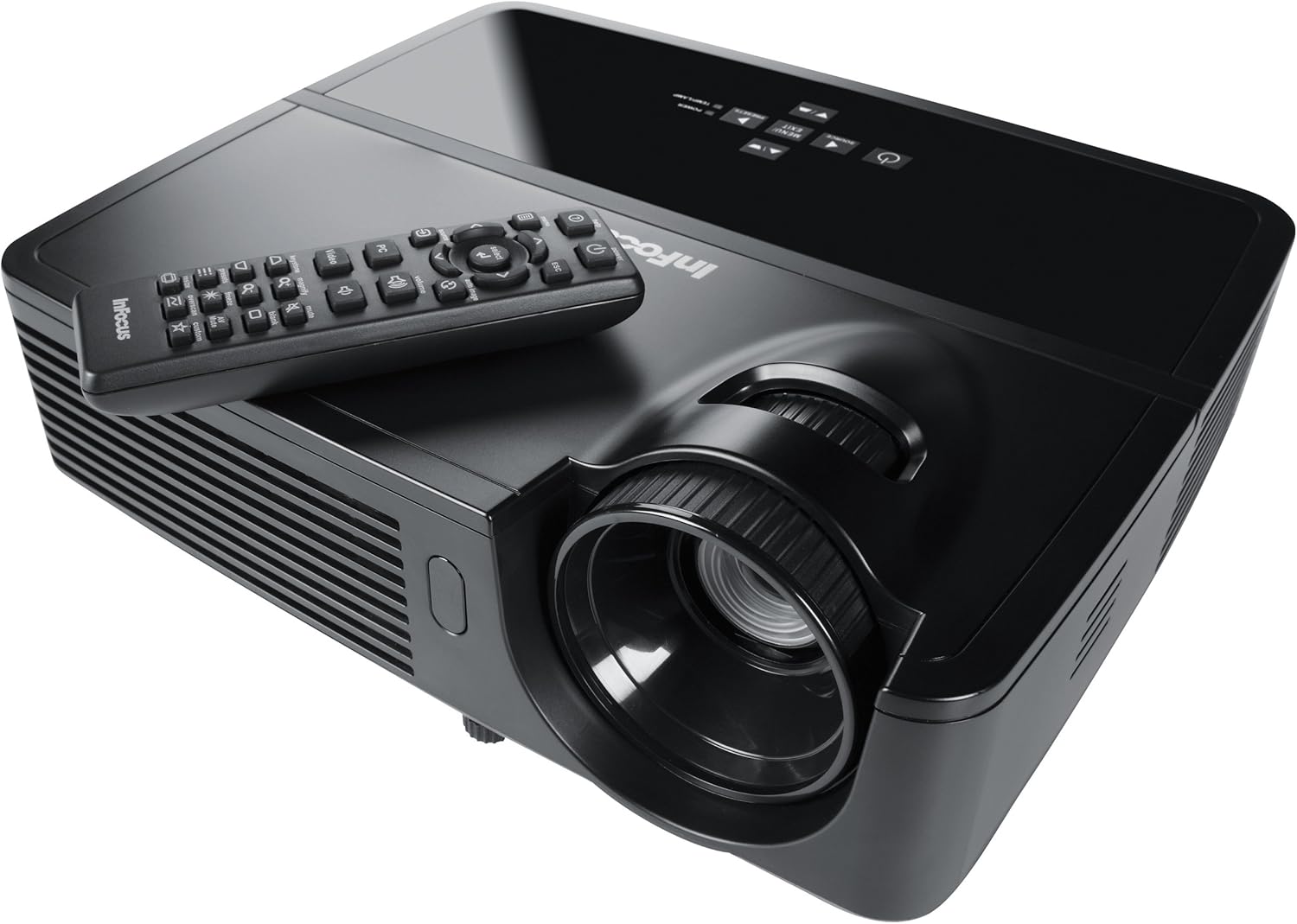
Figure 1: InFocus IN124 DLP Projector with its remote control. The image shows the top-down view of the black projector unit, highlighting the lens, ventilation grilles, and the control panel. The remote control is placed on top of the projector.
4. Gweithredu'r Taflunydd
4.1 Rheolaeth Sylfaenol
The projector can be operated using the control panel on the unit or the included remote control.
- Botwm Pŵer: Yn troi'r taflunydd ymlaen neu i ffwrdd.
- Botwm Ffynhonnell: Cycles through available input sources (HDMI, VGA, Video).
- Botwm Dewislen: Yn cyrchu'r ddewislen arddangos ar y sgrin (OSD) ar gyfer addasiadau gosodiadau.
- Botymau saeth: Llywio drwy opsiynau'r ddewislen ac addasu gwerthoedd.
- Enter/Select Button: Yn cadarnhau dewisiadau yn y ddewislen.
- Botymau Cyfrol: Yn addasu'r lefel allbwn sain.
- Cywiriad Keystone: Adjusts the image shape to correct trapezoidal distortion.
- Modrwy Ffocws: Manually adjust the lens to sharpen the image.
4.2 Llywio Dewislen a Gosodiadau
Press the "Menu" button to open the On-Screen Display (OSD). Use the arrow keys to navigate through categories such as "Picture," "Display," "Setup," and "Advanced." Press "Enter" to select a category or option. Adjust settings like brightness, contrast, color temperature, aspect ratio, and resolution to optimize your viewing profiad.
4.3 Ymarferoldeb 3D
The InFocus IN124 is 3D-ready. To experience 3D content, you will need compatible 3D source material, a 3D-capable player, and active DLP Link 3D glasses (sold separately). Refer to your 3D source device's manual for specific setup instructions.
5. cynnal
Mae cynnal a chadw rheolaidd yn sicrhau perfformiad gorau posibl ac yn ymestyn oes eich taflunydd.
5.1 Glanhau'r Lens
Use a soft, lint-free cloth specifically designed for optical lenses. Gently wipe the lens surface to remove dust or smudges. Avoid using abrasive cleaners or excessive force, which can scratch the lens.
5.2 Glanhau Hidlwyr Aer
The projector has air filters to prevent dust from entering the internal components. Locate the filter cover (refer to the diagram in the full manual if available) and remove it. Clean the filter using a small brush or a vacuum cleaner with a brush attachment. Replace the filter securely.
5.3 Lamp Amnewid
Y taflunydd lamp oes gyfyngedig. Pan fydd y lamp os yw'r golau dangosydd yn goleuo neu os yw'r ddelwedd yn pylu, mae'n bryd newid y lamp. Always allow the projector to cool down completely before attempting lamp replacement. Consult the full service manual or a qualified technician for detailed lamp replacement procedures specific to the IN124 model.
6. Datrys Problemau
This section addresses common issues you might encounter with your projector.
| Problem | Achos Posibl | Ateb |
|---|---|---|
| Dim delwedd yn cael ei harddangos | Incorrect input source selected; Loose cable connection; Projector not powered on. | Press the "Source" button to cycle inputs; Check all cable connections; Ensure projector is powered on and lamp yn goleuo. |
| Mae'r ddelwedd yn aneglur | Out of focus; Incorrect resolution setting. | Adjust the focus ring on the lens; Adjust the resolution setting in the OSD menu or on your source device. |
| Mae'r ddelwedd yn drapesoidaidd | Nid yw'r taflunydd yn berpendicwlar i'r sgrin. | Use the keystone correction feature (digital or manual) to square the image. Reposition the projector if possible. |
| Dim sain | Volume too low; Incorrect audio input selected; Muted. | Increase volume; Check audio cable connections; Ensure projector or source device is not muted. |
| Mae'r taflunydd yn gorboethi ac yn diffodd | Blocked ventilation; Dirty air filter. | Ensure clear space around vents; Clean air filter as per maintenance section. |
For issues not listed here, please refer to the comprehensive online support resources or contact InFocus customer service.
7. manylebau
Below are the key technical specifications for the InFocus IN124 DLP Projector:
| Nodwedd | Manylyn |
|---|---|
| Rhif Model | IN124 |
| Technoleg Arddangos | CLLD |
| Datrysiad Brodorol | 1280x720 (HD) |
| Disgleirdeb | Hyd at 3200 Lumens |
| Cymhareb Cyferbyniad | 3000:1 |
| Cysylltedd | HDMI, VGA, Fideo Cyfansawdd |
| Nodweddion Arbennig | 3D yn barod |
| Dimensiynau Cynnyrch (L x W x H) | 12.99 x 12.99 x 5.9 modfedd |
| Pwysau Eitem | 4.78 pwys (2.17 kg) |
| Cyflenwad Pŵer | 100-240 Volts at 50-60 Hz |
| Defnydd a Argymhellir | Sinema Gartref |
8. Gwarant a Chefnogaeth
InFocus provides a limited warranty for the IN124 DLP Projector. For detailed warranty terms and conditions, please refer to the warranty card included with your product or visit the official InFocus websafle. Cadwch eich derbynneb prynu fel prawf o brynu ar gyfer hawliadau gwarant.
For technical support, troubleshooting assistance beyond this manual, or service requests, please contact InFocus customer support through their official website or the contact information provided in your product documentation. Online resources, including FAQs and driver downloads, may also be available.
Ask a question about this manual
Ask about setup, troubleshooting, compatibility, parts, safety, or missing instructions. Manuals+ will review the question and use this page’s manual context to help answer it.