
Ffocws IN126
Llawlyfr Defnyddiwr Taflunydd InFocus IN126 DLP
Model: IN126 | Brand: InFocus
1. Cynnyrch Drosview
The InFocus IN126 is a DLP projector designed for various projection needs, offering high brightness and a clear image. This manual provides essential information for the proper setup, operation, and maintenance of your projector.
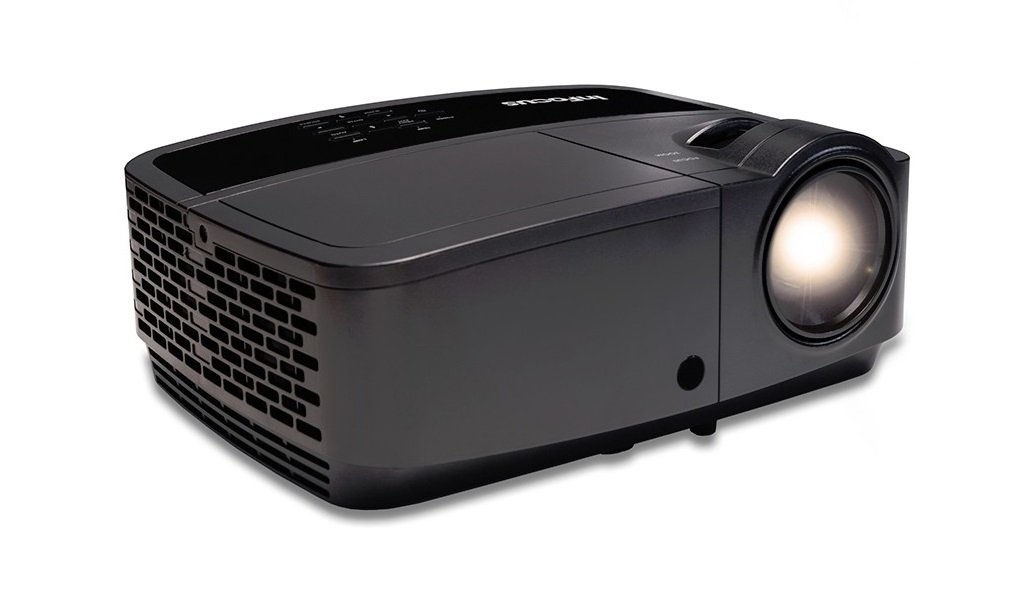
Delwedd 1.1: Blaen view of the InFocus IN126 DLP Projector.
Nodweddion Allweddol:
- High brightness of up to 3200 lumens for clear images in various lighting conditions.
- High 3000:1 contrast ratio for sharp detail.
- Compact and portable design, weighing approximately 4.8 lbs. (2.17 kg).
- 3D-Ready capability for immersive viewing profiadau.
- HDMI connectivity for versatile input options.
2. Gosod a Gosod
2.1 Dadbacio
Carefully remove the projector and all accessories from the packaging. Verify that all components are present according to the packing list.
2.2 Lleoliad y Taflunydd
Place the projector on a stable, flat surface or mount it securely. Ensure adequate ventilation around the projector to prevent overheating. Position the projector at an appropriate distance from the screen to achieve the desired image size.
2.3 Cysylltu Dyfeisiau
Connect your video source (e.g., laptop, gaming console) to the projector using an HDMI cable. Ensure the cable is securely plugged into both the source device and the projector's HDMI input port.

Image 2.1: An InFocus projector set up for a business presentation, demonstrating typical usage.
2.4 Pweru Ymlaen/Diffodd
- I Bweru Ymlaen: Connect the power cord to the projector and a power outlet. Press the power button on the projector or remote control. The power indicator light will illuminate.
- I Bweru i ffwrdd: Press the power button twice. The projector will enter a cooling cycle before completely shutting down. Do not unplug the projector during the cooling cycle.
2.5 Addasu Delwedd
- Ffocws: Rotate the focus ring on the lens until the image is sharp and clear.
- Cywiriad Keystone: Use the keystone adjustment feature (usually found in the projector's menu or via dedicated buttons) to correct trapezoidal image distortion if the projector is not perfectly perpendicular to the screen.
3. Gweithredu'r Taflunydd
3.1 Dewis Ffynhonnell Mewnbwn
Press the 'Source' or 'Input' button on the remote control or projector control panel to cycle through available input sources (e.g., HDMI, VGA). Select the input corresponding to your connected device.
3.2 Llywio Dewislen
Use the arrow buttons on the remote or control panel to navigate the on-screen display (OSD) menu. Press 'Enter' or 'OK' to confirm selections and 'Menu' or 'Exit' to go back or close the menu.
3.3 Addasiadau Llun
Within the OSD menu, you can adjust various picture settings:
- Disgleirdeb: Yn addasu goleuni neu dywyllwch cyffredinol y ddelwedd.
- Cyferbyniad: Controls the difference between the lightest and darkest parts of the image.
- Lliw: Yn addasu dwyster y lliwiau.
- Cymhareb Agwedd: Selects the display format (e.g., 4:3, 16:9).
3.4 Gosodiadau Sain
If your projector has built-in speakers or is connected to an external audio system, you can adjust the volume and other audio settings through the OSD menu.
3.5 3D Operation
The IN126 projector is 3D-Ready. To view 3D content, you will need compatible 3D glasses, a 3D-enabled source device, and 3D content. Refer to your 3D glasses and source device manuals for specific instructions on enabling 3D mode.
4. cynnal
4.1 Glanhau'r Lens
Defnyddiwch frethyn meddal, di-flwff sydd wedi'i gynllunio'n benodol ar gyfer lensys optegol i sychu lens y taflunydd yn ysgafn. Osgowch ddefnyddio glanhawyr sgraffiniol neu ormod o rym, a all grafu'r lens.
4.2 Cleaning the Projector Casing
Wipe the projector's exterior casing gyda meddal, damp brethyn. Peidiwch â defnyddio cemegau neu doddyddion llym.
4.3 Cynnal a Chadw Hidlydd Aer
Regularly check and clean the air filter to ensure proper airflow and prevent overheating. Refer to the full product manual for instructions on locating and cleaning or replacing the air filter.
4.4 Lamp Amnewid
Y taflunydd lamp has an estimated operating life of up to 20,000 hours. When the lamp reaches the end of its life, a warning message may appear, or the image brightness may significantly decrease. Refer to the full product manual for detailed instructions on safe lamp replacement. Always use genuine InFocus replacement lamps.
5. Datrys Problemau
This section addresses common issues you might encounter with your InFocus IN126 projector.
5.1 Dim Delwedd ar y Sgrin
- Ensure the projector is powered on and the power indicator light is solid.
- Check all cable connections (HDMI, power) are secure.
- Gwiriwch fod y ffynhonnell fewnbwn gywir wedi'i dewis ar y taflunydd.
- Confirm the source device (laptop, etc.) is powered on and outputting a signal.
5.2 Image is Distorted or Blurry
- Addaswch y cylch ffocws ar y lens.
- Use keystone correction to fix trapezoidal distortion.
- Ensure the projector is placed on a stable surface and is not vibrating.
- Check the resolution settings of your source device; ensure it is compatible with the projector's native resolution (1280 x 720).
5.3 Dim Sain
- Increase the volume on both the projector and the source device.
- Os ydych chi'n defnyddio siaradwyr allanol, gwnewch yn siŵr eu bod nhw wedi'u cysylltu'n iawn ac wedi'u pweru ymlaen.
- Check audio settings in the projector's OSD menu.
5.4 Gorboethi'r Taflunydd
- Ensure there is sufficient space around the projector for ventilation.
- Clean the air filter to remove any dust buildup.
- Peidiwch â rhwystro'r agoriadau awyru.
6. manylebau
The following table outlines the key technical specifications for the InFocus IN126 DLP Projector:
| Nodwedd | Manyleb |
|---|---|
| Brand | Ffocws |
| Enw Model | IN126 DLP |
| Math Arddangos | CLLD |
| Datrysiad Brodorol | 1280 x 720 |
| Cydraniad Arddangos Uchaf | 1920 x 1080 |
| Disgleirdeb | 3200 lumens (ANSI) |
| Cymhareb Cyferbyniad | 3000:1 |
| Bywyd Gweithredu Ffynhonnell Ysgafn | 20000 Awr |
| Lamp Wattage | 230 Wat |
| Technoleg Cysylltedd | HDMI |
| Nodwedd Arbennig | 3D-Barod |
| Ffactor Ffurf | Cludadwy |
| Math Mowntio | Mynydd Pen bwrdd |
| Pwysau Eitem | 4.85 pwys (2.2 kg) |
| Ardystiad Profi Allanol | UL, c-UL, FCC, CE |
7. Gwybodaeth Gwarant
The InFocus IN126 DLP Projector comes with a limited manufacturer's warranty. For specific details regarding warranty coverage, duration, and terms, please refer to the warranty card included with your product or visit the official InFocus websafle. Cadwch eich prawf prynu ar gyfer hawliadau gwarant.
8. Cefnogaeth i Gwsmeriaid
For further assistance, technical support, or to inquire about replacement parts, please visit the official InFocus support website or contact their customer service department. Contact information can typically be found on the InFocus website or in the documentation included with your projector.
Ask a question about this manual
Ask about setup, troubleshooting, compatibility, parts, safety, or missing instructions. Manuals+ will review the question and use this page’s manual context to help answer it.