
innovative Technology ITHW-858B
Clustffonau Di-wifr gyda Throsglwyddydd
Model: ITHW-858B | Brand: innovative Technology
Rhagymadrodd
The innovative Technology ITHW-858B Wireless Headphones with Transmitter provide a clear and enhanced audio experience. Designed for versatility, these headphones can be used with various audio sources such as televisions, MP3 players, computers, and tablets. Enjoy audio freedom without the constraints of wires, allowing for personal listening without disturbing others.
This manual provides detailed instructions for setting up, operating, maintaining, and troubleshooting your wireless headphone system.
Cynnyrch Drosview
Cydrannau
- Wireless Headphones (Over-Ear)
- Trosglwyddydd Di-wifr
- Bonus Earbuds with Carry Case
- Audio Adapters (for RCA jacks and 3.5mm headphone jacks)
Nodweddion
- Adjustable Headband for comfortable fit.
- Integrated Volume Control on headphones.
- Blue LED-lit Transmitter for power indication.
- Wireless FM technology for extended range (up to 30 meters / 98 feet).
- Ability to connect earbuds directly to the headset.

Figure 1: The complete ITHW-858B Wireless Headphone system, including the over-ear headphones, the wireless transmitter, and the bonus earbuds.
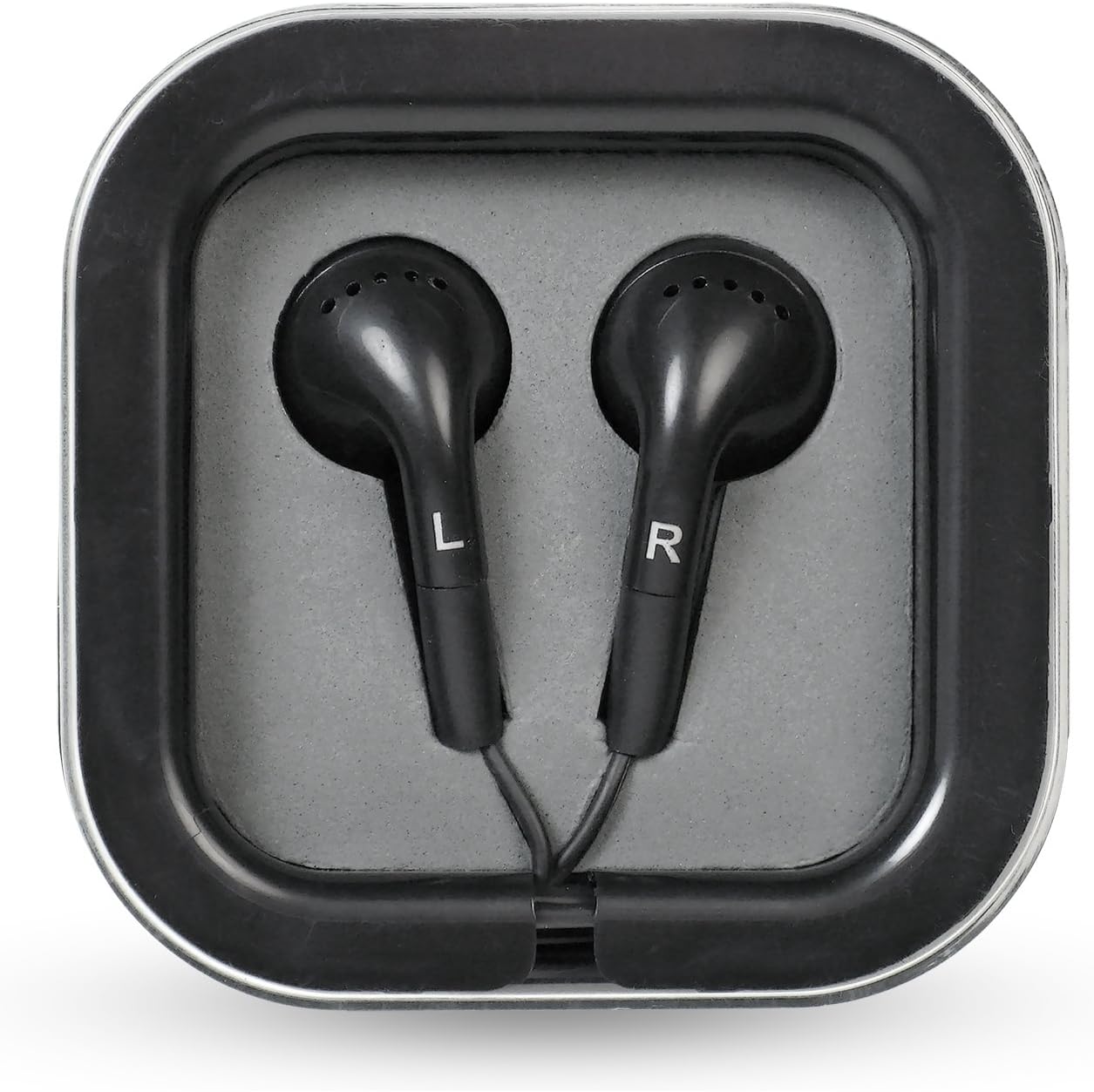
Ffigur 2: Caewr view of the bonus earbuds, marked for left (L) and right (R) ears, provided with a compact carry case.
Gosod
1. Gosod Batri
The headphones and transmitter require AAA batteries (not included).
- Clustffonau: Locate the battery compartment on one of the earcups. Insert 2 AAA batteries, ensuring correct polarity (+/-).
- Trosglwyddydd: Locate the battery compartment on the underside of the transmitter. Insert 3 AAA batteries, ensuring correct polarity (+/-).
- Alternatively, the transmitter can be powered using a 120V AC adapter (not included, but typically supplied with refurbished units or purchased separately).
2. Cysylltu'r Trosglwyddydd
Connect the transmitter to your audio source (TV, MP3 player, computer, tablet) using the appropriate audio cables and adapters.
- For TVs/Audio Receivers: Use the provided RCA adapters to connect the transmitter to the red and white audio output jacks of your device. Ensure you are connecting to an allbwn sain, not an input. For cable/satellite boxes, connecting directly to the box's audio output may provide better results than connecting to the TV.
- For MP3 Players/Computers/Tablets: Use the 3.5mm headphone jack adapter to connect the transmitter to the headphone output of your device.
- Once connected, ensure the transmitter is powered on. The blue LED on the transmitter will illuminate.
Gweithrediad
1. Pweru Ymlaen a Pharu
- Ensure the transmitter is connected to an audio source and powered on.
- Turn on the wireless headphones using the power switch, usually located on one of the earcups.
- Press the "Scan" button on the headphones. The headphones will automatically search for and connect to the transmitter's signal.
- Once connected, audio from your source will be transmitted to the headphones.
2. Rheoli Cyfrol
Adjust the listening volume using the volume control dial or buttons located on the headphones. It is recommended to start with a low volume and gradually increase it to a comfortable level.
3. Signal Range and Quality
The headphones operate using FM wireless technology, providing a range of up to approximately 30 meters (98 feet) from the transmitter. Signal quality may vary depending on obstacles, walls, and interference from other electronic devices.
- If you experience static or signal loss, try repositioning the transmitter or pressing the "Scan" button on the headphones again.
- Moving the transmitter to different locations within the room can sometimes improve signal clarity and reduce background hum.
4. Using Bonus Earbuds
The headphones feature an "audio in" jack, allowing you to plug in the included bonus earbuds. This feature can be used to share audio with another person or if you prefer using earbuds instead of the over-ear headphones.
Cynnal a chadw
- Glanhau: Wipe the headphones and transmitter with a soft, dry cloth. Do not use liquid cleaners or abrasive materials.
- Storio: When not in use for extended periods, remove batteries from both the headphones and the transmitter to prevent leakage. Store the system in a cool, dry place away from direct sunlight and extreme temperatures.
- Trin: Handle the headphones with care, especially the headband and earcup joints, as these areas can be susceptible to damage if dropped or mishandled.
Datrys problemau
| Problem | Achos Posibl | Ateb |
|---|---|---|
| Dim sain o'r clustffonau. |
|
|
| Ansawdd sain statig neu wael. |
|
|
| Headphones or transmitter not turning on. |
|
|
Manylebau
| Nodwedd | Manylyn |
|---|---|
| Enw Model | ITHW-858B |
| Technoleg Cysylltedd | Wireless (FM) |
| Cydrannau wedi'u Cynnwys | Headphones, Earbuds, Transmitter |
| Ystod Oedran (Disgrifiad) | Oedolyn |
| Deunydd | Plastig |
| Defnyddiau a Argymhellir | General use, Travel |
| Dyfeisiau Cydnaws | PC, Tablets, Television |
| Math o Reoli | Rheoli Cyfaint |
| Pwysau Eitem | 1.3 pwys (tua 0.59 kg) |
| Amrediad Amrediad | 20 Hz - 20,000 Hz |
| Di-wifr Range | Hyd at 30 metr (98 troedfedd) |
| Power Source (Headphones) | 2 x Batri AAA (heb eu cynnwys) |
| Power Source (Transmitter) | 3 x AAA Batteries (not included) or 120V AC Adapter |
| Dimensiynau Cynnyrch | 8.2 x 12.6 x 3.9 modfedd (tua 20.8 x 32 x 9.9 cm) |
| UPC | 180904000396 |
Gwarant a Chefnogaeth
For warranty information or technical support, please refer to the documentation included with your product packaging or contact innovative Technology customer service directly. Keep your purchase receipt for warranty claims.
For further assistance, you may visit the official innovative Technology websafle neu cysylltwch â'u sianeli cymorth.