
Rhagymadrodd
The GIGABYTE GM-M7600 is a wireless precision optical mouse designed for comfortable and reliable use. This manual provides instructions for setting up, operating, maintaining, and troubleshooting your device.
Cynnwys Pecyn
Gwiriwch gynnwys y pecyn i sicrhau bod yr holl eitemau yn bresennol:
- GIGABYTE GM-M7600 Wireless Optical Mouse
- Portable Nano USB Receiver
- 2 x Batris AAA
Gosod
1. Gosod Batris
The GM-M7600 mouse requires two AAA batteries for operation. The batteries are included in the package.
- Lleolwch glawr adran y batri ar ochr isaf y llygoden.
- Llithrwch neu codwch y clawr yn ysgafn i agor yr adran.
- Insert the two AAA batteries, ensuring the positive (+) and negative (-) terminals align correctly with the markings inside the compartment.
- Caewch y clawr adran batri yn ddiogel.
2. Cysylltu'r Derbynnydd USB
The mouse connects to your computer via a portable Nano USB receiver.
- Locate the Nano USB receiver. It may be stored inside the mouse's battery compartment or packaged separately.
- Plug the Nano USB receiver into an available USB port on your computer (Laptop or Personal Computer).
- Your operating system (e.g., Windows XP, Linux) should automatically detect and install the necessary drivers. This process may take a few moments.
- Unwaith y bydd y gyrwyr wedi'u gosod, mae'r llygoden yn barod i'w defnyddio.
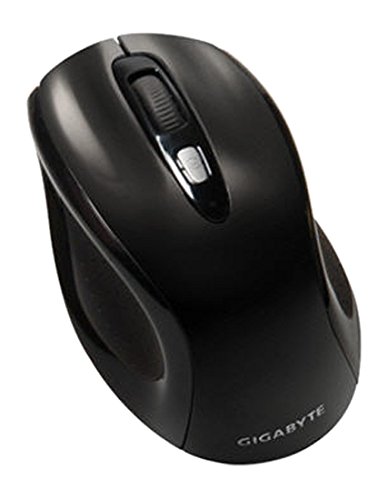
Ffigur 1: GIGABYTE GM-M7600 Wireless Optical Mouse. This image displays the ergonomic design of the mouse, highlighting its form factor and the location of its buttons. The Nano USB receiver is typically stored within the mouse or connected to a computer's USB port.
Cyfarwyddiadau Gweithredu
1. Pweru Ymlaen / I ffwrdd
The mouse typically has a power switch on its underside. Slide the switch to the 'ON' position to activate the mouse. Slide it to 'OFF' when not in use to conserve battery life.
2. Addasu DPI (Sensitifrwydd)
The GM-M7600 features an adjustable DPI switch, allowing you to change the mouse sensitivity between 800 DPI and 1600 DPI. This switch is usually located near the scroll wheel. Press the DPI button to toggle between the two sensitivity settings.
3. Swyddogaethau Sylfaenol y Llygoden
- Cliciwch ar y chwith: Botwm cynradd ar gyfer dewis eitemau, agor files, a rhyngweithio â meddalwedd.
- Cliciwch ar y dde: Botwm eilaidd ar gyfer cyrchu dewislenni cyd-destun ac opsiynau ychwanegol.
- Olwyn Sgroliwch: Wedi'i ddefnyddio ar gyfer sgrolio trwy ddogfennau a web pages. It can also function as a middle click button.
Cynnal a chadw
1. Glanhau
Er mwyn cynnal perfformiad ac ymddangosiad gorau posibl:
- Disconnect the mouse from your computer and turn off the power switch.
- Defnyddiwch frethyn meddal, di-lint ychydig dampwedi'i olchi â dŵr neu doddiant glanhau ysgafn i sychu wyneb y llygoden.
- Osgowch ddefnyddio cemegau llym, glanhawyr sgraffiniol, neu chwistrellu hylifau'n uniongyrchol ar y llygoden.
- Clean the optical sensor area on the underside of the mouse with a dry cotton swab to remove any dust or debris.
2. Amnewid Batri
When the mouse performance degrades or it stops responding, it may be time to replace the batteries.
- Turn off the mouse using the power switch.
- Open the battery compartment as described in the 'Installing Batteries' section.
- Tynnwch yr hen fatris AAA.
- Insert two new AAA batteries, observing the correct polarity (+/-).
- Close the battery compartment and turn the mouse back on.
Datrys problemau
If you encounter issues with your GIGABYTE GM-M7600 mouse, try the following solutions:
- Llygoden ddim yn ymateb:
- Sicrhewch fod y llygoden wedi'i phweru ymlaen.
- Gwiriwch a yw'r batris wedi'u gosod yn gywir a bod digon o wefr arnynt. Amnewidiwch nhw os oes angen.
- Ensure the Nano USB receiver is securely plugged into a working USB port on your computer. Try a different USB port.
- Ailgychwyn eich cyfrifiadur.
- Symudiad cyrchwr afreolaidd:
- Glanhewch y synhwyrydd optegol ar ochr isaf y llygoden.
- Gwnewch yn siŵr eich bod chi'n defnyddio'r llygoden ar arwyneb addas. Osgowch arwynebau sy'n adlewyrchol iawn neu'n dryloyw.
- Check for any wireless interference. Move the mouse closer to the receiver or away from other wireless devices.
- DPI switch not working:
- Gwnewch yn siŵr bod y llygoden wedi'i throi ymlaen ac wedi'i chysylltu.
- Pwyswch y botwm DPI yn gadarn.
Manylebau
| Enw Model | GM-M7600 |
| Brand | GIGABYTE |
| Technoleg Cysylltedd | 2.4GHz Radio Frequency Wireless |
| Canfod Symudiadau | Optegol |
| DPI addasadwy | 800/1600 DPI |
| Nifer y Botymau | 3 (Chwith, Dde, Olwyn Sgrolio/Clic Canol) |
| Ffynhonnell Pwer | 2 x Batris AAA (wedi'u cynnwys) |
| Math Derbynnydd | Portable Nano USB Receiver |
| Dyfeisiau Cydnaws | Gliniadur, Cyfrifiadur Personol |
| Cymorth System Weithredu | Linux, Windows XP |
| Deunydd Amgaead | Plastic with Rubberized Finish |
| Lliw | Du |
Gwarant a Chefnogaeth
For warranty information and technical support, please refer to the warranty card included with your product or visit the official GIGABYTE websafle. Cadwch eich derbynneb prynu ar gyfer hawliadau gwarant.