
Sony WM-FX101
Sony Walkman WM-FX101 User Manual
FM/AM Radio Cassette Tape Player with Anti-Rolling Mechanism and AVLS
1. Rhagymadrodd
This manual provides detailed instructions for the operation and maintenance of your Sony Walkman WM-FX101 FM/AM Radio Cassette Tape Player. Designed for portable audio enjoyment, this unit features an Anti-Rolling Mechanism for stable tape playback and AVLS (Automatic Volume Limiter System) for hearing protection.
Please read this manual thoroughly before using your Walkman to ensure proper function and longevity of the device.
2. Cynnyrch Drosview

Ffigur 1: Blaen view of the Sony Walkman WM-FX101. This image displays the main face of the unit, including the cassette compartment, the FM/AM radio dial, and the "WALKMAN FM/AM AVLS WM-FX101" branding.
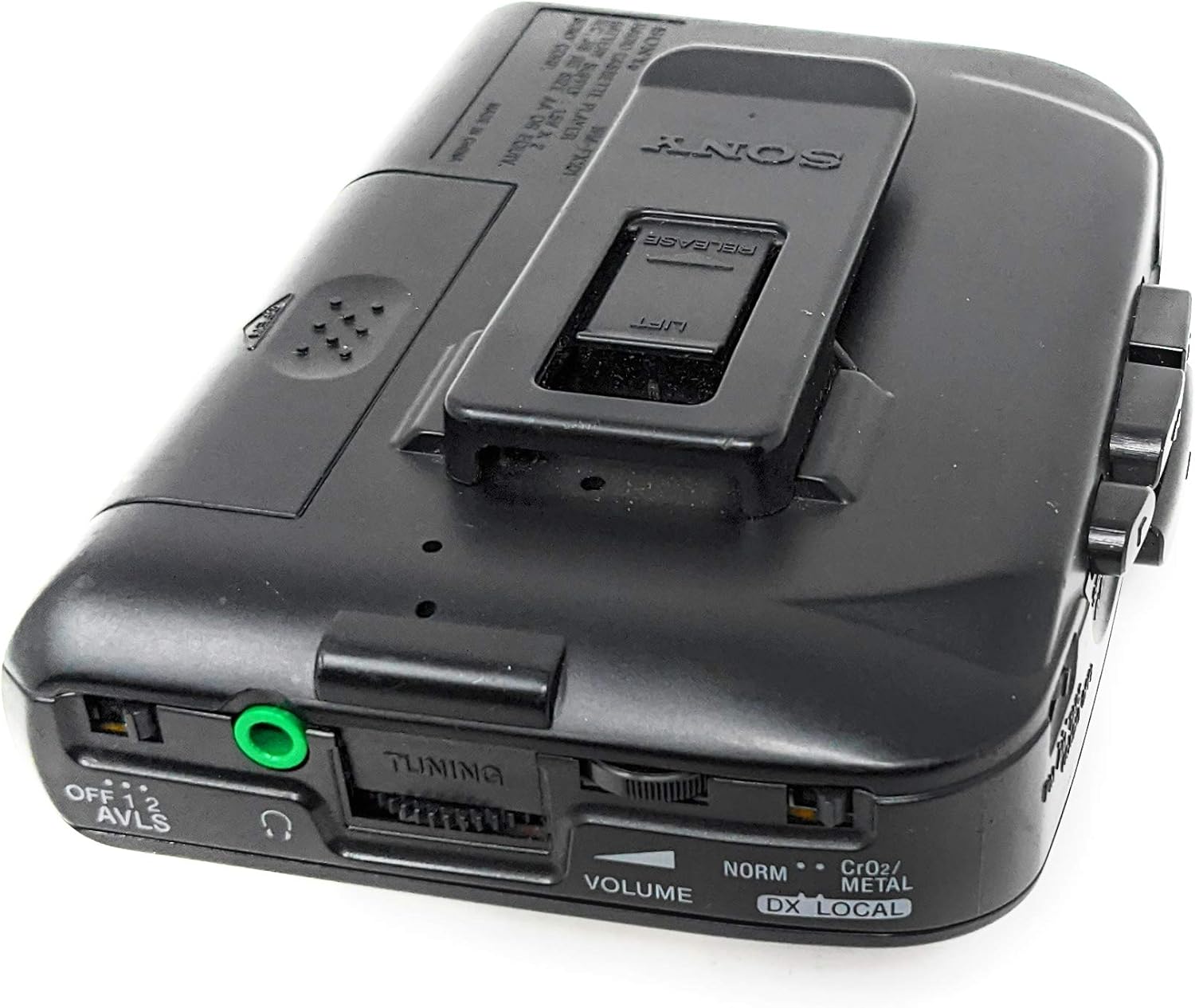
Ffigur 2: Ochr a chefn view of the Sony Walkman WM-FX101. This perspective highlights the side controls such as volume, tuning, AVLS switch, headphone jack, and the rear belt clip.
3. Gosod
3.1 Gosod Batri
The WM-FX101 requires two (2) AA batteries for operation. Ensure correct polarity when inserting the batteries.
- Lleolwch yr adran batri ar gefn yr uned.
- Slide the battery compartment cover in the direction indicated by the arrow to open.
- Insert two AA batteries, matching the (+) and (-) terminals as shown inside the compartment.
- Caewch y clawr adran batri yn ddiogel.
Nodyn: Tynnwch y batris os na fydd yr uned yn cael ei defnyddio am gyfnod hir er mwyn atal gollyngiadau a difrod.
3.2 Cysylltu Clustffonau
Connect your stereo headphones to the headphone jack (🎧) located on the side of the unit. Ensure the plug is fully inserted.
4. Cyfarwyddiadau Gweithredu
4.1 Cassette Tape Playback
- Open the cassette compartment door by sliding the "RELEASE" button/latch.
- Insert a cassette tape with the open edge facing upwards and the side to be played facing you.
- Close the cassette compartment door firmly until it clicks.
- Gwasgwch y CHWARAE botwm i ddechrau chwarae.
- Addaswch y CYFROL rheolaeth i'ch lefel gwrando ddymunol.
- I atal chwarae, pwyswch y AROS/GOLLWNG botwm.
- Defnyddiwch y REW (Rewind) and FF (Fast Forward) buttons to navigate the tape.
Tape Type Selector (NORM / CrO2 / METAL)
The WM-FX101 features a tape type selector. Set this switch to match the type of cassette tape you are playing for optimal sound quality:
- NORM: For Normal (Type I) tapes.
- CrO2 / METAL: For Chrome (Type II) or Metal (Type IV) tapes.
4.2 FM/AM Radio Operation
- Llithrwch y switsh swyddogaeth i FM or AM.
- Cylchdroi y DYNIO deialwch i ddewis yr orsaf radio rydych chi ei eisiau.
- Addaswch y CYFROL rheolaeth.
- For FM reception, extend the headphone cord as it acts as the antenna. For AM reception, rotate the unit horizontally for best reception.
DX / LOCAL Switch
This switch adjusts the radio sensitivity:
- DX: For distant stations or weak signals.
- LLEOL: For strong local stations to prevent distortion.
4.3 AVLS (Automatic Volume Limiter System)
The AVLS switch helps protect your hearing by limiting the maximum volume output. There are typically two settings:
- I FFWRDD: AVLS is disabled, allowing full volume range.
- ON (1 or 2): AVLS is enabled, limiting the volume to a safe level. Setting '2' usually provides a lower maximum volume than '1'.
It is recommended to use AVLS, especially when listening for extended periods or in noisy environments.
5. Cynnal a Chadw a Gofal
- Glanhau'r Uned: Sychwch y tu allan gyda lliain meddal, sych. Peidiwch â defnyddio glanhawyr sgraffiniol na thoddyddion.
- Cleaning the Tape Head: Periodically clean the tape head, pinch roller, and capstan with a cotton swab lightly dampened with isopropyl alcohol. This helps maintain sound quality and prevents tape damage.
- Amnewid Batri: Replace batteries when the sound becomes weak or distorted, or when the unit stops functioning. Always replace both batteries at the same time.
- Storio: Storiwch yr uned mewn lle oer, sych i ffwrdd o olau haul uniongyrchol, tymereddau eithafol, a lleithder uchel.
6. Datrys Problemau
| Problem | Achos Posibl | Ateb |
|---|---|---|
| Dim pŵer / Nid yw'r uned yn troi ymlaen. |
|
|
| Poor sound quality / Distortion during playback. |
|
|
| Poor radio reception / Static. |
|
|
| Tape speed is too slow or inconsistent. |
|
|
7. manylebau
- Model: Sony Walkman WM-FX101
- Dimensiynau (tua): 8 x 6 x 4 modfedd (W x H x D)
- Pwysau (tua): 1 pound (excluding batteries)
- Ffynhonnell Pwer: 2 x Batris AA
- Amleddau Radio: FM, AC
- Nodweddion: Anti-Rolling Mechanism, AVLS (Automatic Volume Limiter System)
- Gwneuthurwr: Sony Corp.
- Ar Gael Cyntaf: Medi 8, 2010
8. Gwarant a Chefnogaeth
This product is covered by Sony's standard limited warranty. For specific warranty terms, conditions, and duration, please refer to the warranty card included with your purchase or visit the official Sony support websafle.
For technical support, service, or inquiries regarding your Sony Walkman WM-FX101, please contact Sony customer service or visit their official support channels. Keep your proof of purchase for warranty claims.
Official Sony Support: https://www.sony.com/electronics/support