
1. Cynnyrch Drosview
The Silverstone Air Penetrator AP181 is a high-performance air channeling case fan designed to provide focused airflow for efficient cooling within computer systems. This 180mm fan operates at speeds of 700 or 1200 RPM, delivering substantial airflow while maintaining a manageable noise level.
Nodweddion Allweddol:
- Llif Aer: Up to 100.27 CFM for effective cooling.
- Lefel Sŵn: Operates at a maximum of 30 decibels.
- Air Channeling Design: Industry-leading design for focused and directed airflow.
- Wide Fan Blades: Engineered to reduce air resistance and optimize performance.
- Integrated Grille: Air channeling grille doubles as a fan guard, reducing overall size.
- Defnydd Pŵer Isel: Gweithrediad ynni-effeithlon.
Fideo: SilverStone Air Penetrator Fans Introduction. This video provides an overview of the Air Penetrator series, highlighting its unique air channeling technology and performance benefits.
2. Cynnwys Pecyn
Gwiriwch fod yr holl gydrannau yn bresennol yn eich pecyn:
- 1x Silverstone Air Penetrator AP181 Case Fan
3. Manylebau Cynnyrch
| Manyleb | Gwerth |
|---|---|
| Dimensiynau Cynnyrch | 7.09"H x 1.26"L x 7.09"U (180mm x 32mm x 180mm) |
| Brand | SilverStone |
| Math Cysylltydd Pwer | 3-Pin (with speed switch) |
| Cyftage | 12 folt |
| Wattage | 3.7 wat |
| Dull Oeri | Awyr |
| Dyfeisiau Cydnaws | Penbwrdd |
| Lefel Sŵn | 30 Desibel (Uchafswm) |
| Deunydd | Plastic, Lead (internal components) |
| Cyflymder Cylchdro Uchaf | 1200 RPM |
| Cynhwysedd Llif Aer | 100.27 Cubic Feet Per Minute (Max) |
| Pwysau Eitem | 1 Bunt |
| UPC | 844761006846 |
4. Gosod
Proper installation is crucial for optimal performance and longevity of your fan. Ensure your computer is powered off and unplugged before beginning installation.
4.1 Identify Mounting Location
Locate an available 180mm fan mounting position within your computer case. Common locations include front intake, bottom intake, or top exhaust, depending on your case design.
4.2 Mount the Fan
- Position the fan in the desired mounting location, ensuring the airflow direction is correct (typically intake for front/bottom, exhaust for top/rear).
- Secure the fan using appropriate fan screws (not included with this specific model, typically provided with the case or purchased separately). Tighten screws evenly to prevent warping.

Delwedd: Blaen view of the Silverstone Air Penetrator AP181 case fan. This image shows the front side of the fan with its unique blade design and air channeling grille.
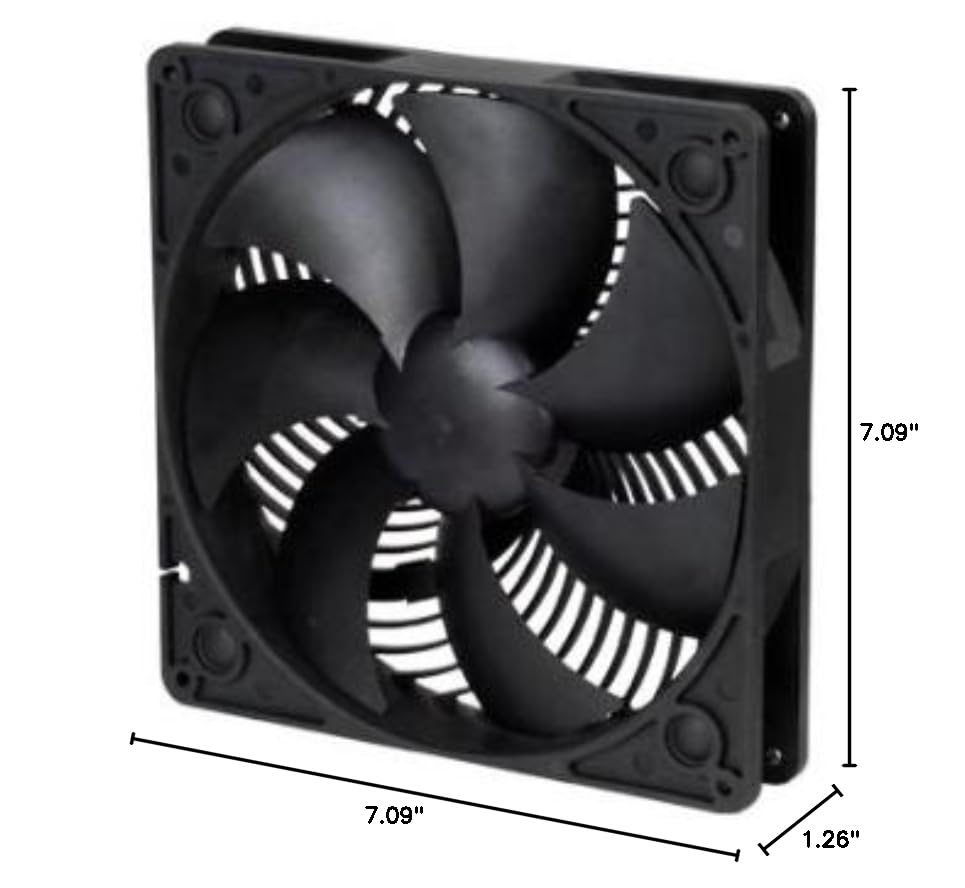
Delwedd: Dimensions of the Silverstone Air Penetrator AP181 case fan. This image illustrates the fan's dimensions (7.09"L x 1.26"W x 7.09"H) for compatibility checks.
4.3 Connect Power and Speed Control
- Connect the fan's 3-pin power connector to an available 3-pin fan header on your motherboard or a fan controller.
- Connect the separate speed switch cable to the fan. This switch allows you to manually select between the 700 RPM and 1200 RPM settings.

Delwedd: Yn ol view of the Silverstone Air Penetrator AP181 case fan. This image displays the rear of the fan, including the 3-pin power connector and the connection point for the speed switch.

Delwedd: Close-up of the fan speed switch. This image details the physical switch used to adjust the fan's rotational speed.
Fideo: SilverStone AP Series Fans. This video provides a general overview of the Air Penetrator series, including various models and their features, which can be helpful for understanding the product line.
5. Gweithrediad
Once installed and powered on, the fan will begin to operate. The AP181 features a manual speed switch to adjust performance based on your cooling needs.
5.1 Addasu Cyflymder y Ffan
- Use the included speed switch to toggle between the two available speeds: 700 RPM (for quieter operation) and 1200 RPM (for maximum airflow).
- Select the speed that best balances cooling performance and noise level for your system's current workload.
5.2 Cyfeiriad Llif Aer
The Air Penetrator fan is designed to create a focused column of air. Ensure the fan is oriented correctly to either draw cool air into the case (intake) or expel hot air out of the case (exhaust) as intended for your system's airflow strategy.

Delwedd: Close-up of the Air Penetrator fan's air channeling grille. This image highlights the unique grille design that helps focus the airflow.
6. cynnal
Regular maintenance helps ensure your fan operates efficiently and extends its lifespan.
6.1 Glanhau
- Amlder: Clean your fan every 3-6 months, or more frequently if your environment is dusty.
- Gweithdrefn:
- Diffoddwch eich cyfrifiadur a'i ddatgysylltu o'r soced wal.
- Carefully remove the fan from its mounting position if necessary for thorough cleaning.
- Use compressed air to blow dust off the fan blades and frame. Hold the fan blades to prevent them from spinning rapidly during cleaning, which can damage the bearing.
- For stubborn dirt, gently wipe the blades with a soft, damp cloth. Ensure the fan is completely dry before reinstallation or powering on.
7. Datrys Problemau
Os byddwch chi'n dod ar draws problemau gyda'ch ffan, cyfeiriwch at y camau datrys problemau cyffredin canlynol:
7.1 Ffan Ddim yn Troelli
- Gwiriwch y cysylltiad pŵer: Ensure the 3-pin power connector is securely plugged into the motherboard or fan controller.
- Check Fan Header: Try connecting the fan to a different fan header on your motherboard to rule out a faulty header.
- Gosodiadau BIOS/UEFI: Verify that the fan header is enabled and configured correctly in your system's BIOS/UEFI settings.
7.2 Sŵn Gormodol
- Gwirio am rwystrau: Ensure no cables or other components are touching the fan blades.
- Clean Fan: Dust buildup can cause increased noise. Refer to the Maintenance section for cleaning instructions.
- Cyflymder Fan: If operating at 1200 RPM, switch to 700 RPM using the speed switch to reduce noise.
- Mowntio: Gwnewch yn siŵr bod y ffan wedi'i osod yn ddiogel ac nad yw'n dirgrynu yn erbyn y cas.
7.3 Insufficient Airflow
- Check Fan Speed: Ensure the fan is set to 1200 RPM for maximum airflow using the speed switch.
- Cyfeiriad llif aer: Verify the fan is oriented correctly for its intended purpose (intake or exhaust).
- Rhwystrau clir: Ensure there are no blockages in front of or behind the fan that could impede airflow.
8. Gwarant a Chefnogaeth
This Silverstone Air Penetrator AP181 Case Fan comes with a Gwarant 1 mlynedd o'r dyddiad prynu.
For technical support, warranty claims, or further inquiries, please visit the official SilverStone websafle neu cysylltwch â'u hadran gwasanaeth cwsmeriaid. Cadwch eich prawf prynu i ddilysu'r warant.
SilverStone Official Websafle: www.silverstonetek.com

