
1. Rhagymadrodd
Thank you for choosing the SHARP KC850U Air Purifier and Humidifier. This appliance is designed to improve indoor air quality and maintain optimal humidity levels in medium-sized rooms. It combines a multi-stage filtration system with Plasmacluster Ion Technology to effectively reduce airborne particles, odors, and maintain a comfortable environment.
Please read this manual thoroughly before operating the unit to ensure safe and efficient use. Keep this manual for future reference.
2. Gwybodaeth Diogelwch
To reduce the risk of electric shock, fire, or injury, always follow basic safety precautions when using electrical appliances:
- Peidiwch â gweithredu'r uned gyda chortyn neu blwg wedi'i ddifrodi.
- Peidiwch â gosod yr uned ger ffynonellau gwres nac yng ngolau haul uniongyrchol.
- Sicrhewch fod yr uned yn cael ei gosod ar arwyneb sefydlog, gwastad.
- Peidiwch â rhwystro mewnfeydd ac allfeydd aer.
- Datgysylltwch y plwg o'r uned cyn glanhau neu wneud unrhyw waith cynnal a chadw.
- Peidiwch â throchi’r uned mewn dŵr neu hylifau eraill.
- Cadwch allan o gyrraedd plant ac anifeiliaid anwes.
- Use only genuine SHARP replacement parts and filters.
3. Cynnyrch Drosview
The SHARP KC850U integrates air purification and humidification functions into a single unit. Key components include the air intake, air outlet, control panel, dust and humidity sensors, and water tank.

Ffigur 3.1: Blaen view of the SHARP KC850U Air Purifier and Humidifier, showing the control panel and display.
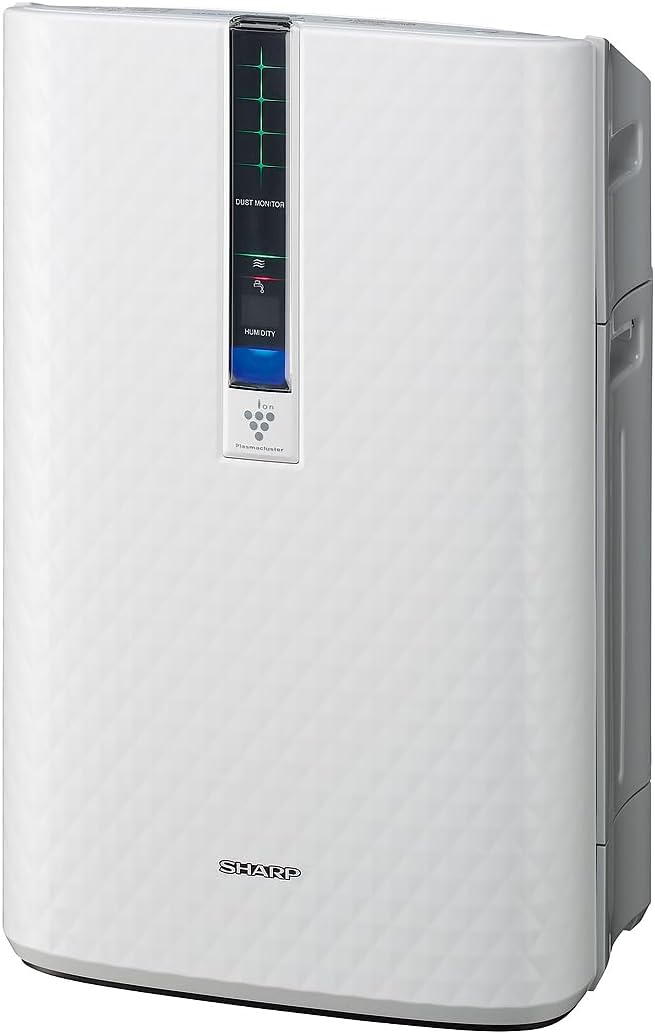
Ffigur 3.2: Ochr view of the SHARP KC850U, illustrating its compact design.
Panel Rheoli ac Arddangos
The unit features an intuitive control panel and a display that provides real-time information on air quality and humidity levels.

Ffigur 3.3: Brig view of the control panel, showing buttons for power, fan speed, modes, and light control.
- Botwm Pŵer: Yn troi'r uned ymlaen neu i ffwrdd.
- Botwm Cyflymder Fan: Cycles through Max, Med, and Low fan speeds.
- Botwm Modd: Selects operating modes including Auto, Pollen, and Quick Clean.
- Botwm Goleuadau: Adjusts the brightness of the display lights (Bright, Dim, Off).
- Dust Monitor: Visual indicator of air impurity levels (e.g., green for clean, red for high impurity).
- Arddangosfa Lleithder: Shows the current relative humidity percentage.
4. Gosod
4.1 Dadbacio
- Tynnwch yr uned o'i becynnu yn ofalus.
- Tynnwch yr holl ddeunyddiau amddiffynnol a bagiau plastig.
- Ensure all filters are properly installed before first use. Refer to the Maintenance section for filter installation details.
4.2 Lleoliad
For optimal performance, place the air purifier in a location where air can circulate freely. Avoid placing it directly against a wall or furniture that might obstruct air intake or output.
- Recommended for use in bedrooms, living rooms, studies, or exercise rooms.
- Ensure at least 12 inches (30 cm) of clear space around the unit.
- Rhowch ar arwyneb cadarn, gwastad.
4.3 Filling the Water Tank (for Humidification)
If you intend to use the humidification function, fill the water tank:
- Remove the water tank from the side of the unit.
- Open the tank cap and fill with clean tap water.
- Caewch y cap yn ddiogel ac ail-osodwch y tanc dŵr yn yr uned.
5. Cyfarwyddiadau Gweithredu
5.1 Pŵer Ymlaen/Diffodd
Gwasgwch y Grym botwm i droi'r uned ymlaen neu i ffwrdd.
5.2 Dewis Cyflymder y Ffan
Gwasgwch y Cyflymder Fan button repeatedly to cycle through the available fan speeds:
- Uchafswm: Highest air purification and humidification.
- Med: Moderate operation.
- Isel: Quiet operation, suitable for sleeping (as quiet as 23 dBA).
5.3 Dewis Modd
Gwasgwch y Modd button repeatedly to select an operating mode:
- Modd Auto: The unit automatically adjusts fan speed and humidification based on sensor readings for air quality and humidity.
- Modd Paill: Wedi'i optimeiddio ar gyfer cael gwared ar paill.
- Modd Glân Cyflym: Releases high-density Plasmacluster ions for rapid air purification.
5.4 Plasmacluster Ion Technology
The Plasmacluster Ion Technology actively disperses positive and negative ions into the air to help reduce microscopic pollutants. This function operates automatically with the unit. A slight clicking sound may be audible during operation, which is normal.
5.5 Rheoli Golau Arddangos
Gwasgwch y Goleuadau button to adjust the brightness of the display indicators:
- Llachar: Full illumination.
- Dim: Reduced illumination.
- Wedi diffodd: Display lights are off, suitable for dark rooms.

Ffigur 5.1: Display showing 'Lo' for low humidity and green dust monitor indicators.

Ffigur 5.2: Display showing 'Hi' for high humidity and red dust monitor indicators, indicating higher impurity levels.
6. cynnal
Regular maintenance ensures optimal performance and extends the lifespan of your SHARP KC850U. Always unplug the unit before cleaning or replacing filters.
6.1 Filter System Overview
The KC850U utilizes a triple filtration system:
- Cyn-hidlydd Golchadwy: Traps large airborne particles like dust and pet dander.
- Activated Carbon Deodorizing Filter: Helps reduce common household odors.
- Hidlydd HEPA Gwir: Captures 99.97% of particles 0.3 microns and larger.
- Hidlydd Lleithio: Used for the humidification function.

Ffigur 6.1: Diagram showing the air purification process through the humidifying filter, True HEPA filter, carbon filter, and pre-filter.
6.2 Glanhau ac Amnewid Hidlau
- Cyn-Hidlo: Clean regularly by vacuuming or washing with water. Allow to dry completely before reinstallation.
- Activated Carbon Deodorizing Filter: May be washed. Refer to the filter's specific instructions for cleaning frequency and method. Replace as needed, typically every 2-5 years depending on usage and environment.
- Hidlydd HEPA Gwir: This filter is not washable. Replace typically every 2-5 years, depending on usage and environment. The unit will indicate when replacement is due.
- Hidlydd Lleithio: Clean regularly to prevent mineral buildup. Replace as needed, typically every 2-5 years depending on water quality and usage.
Actual filter life may vary significantly based on air quality, usage frequency, and environmental conditions.
6.3 Glanhau Cyffredinol
- Sychwch y tu allan i'r uned gyda meddal, damp brethyn.
- Clean the dust and humidity sensors periodically to ensure accurate readings.
- Clean the water tank and humidifying tray regularly to prevent mold or bacteria growth.
7. Datrys Problemau
If you encounter issues with your SHARP KC850U, refer to the following common problems and solutions:
| Problem | Achos Posibl | Ateb |
|---|---|---|
| Nid yw'r uned yn troi ymlaen. | Power cord not properly plugged in; no power at outlet. | Check power connection; test outlet with another device. |
| Air purification/humidification is ineffective. | Filters are dirty or clogged; water tank is empty (for humidification). | Clean or replace filters as per Maintenance section; refill water tank. |
| Unusual noise (e.g., clicking). | Normal operation of Plasmacluster Ion generator; foreign object in fan. | A slight clicking is normal. If noise is excessive, unplug and check for obstructions. |
| Odor persists or unit emits strange smell. | Carbon filter saturated; new unit odor; mold in water tank. | Replace carbon filter; new unit odor will dissipate; clean water tank and humidifying filter. |
| Humidity level not increasing. | Water tank empty; humidifying filter dirty or damaged. | Refill water tank; clean or replace humidifying filter. |
If the problem persists after attempting these solutions, please contact SHARP customer support.
8. manylebau
| Nodwedd | Manyleb |
|---|---|
| Rhif Model | KC850U |
| Brand | miniog |
| Lliw | Gwyn |
| Dimensiynau Cynnyrch (D x W x H) | 10.5" x 14.87" x 23.11" |
| Pwysau Eitem | 20.5 pwys |
| Arwynebedd Llawr Argymhelliedig | 254 Square Feet (4.8 air changes/hour) |
| Lefel Sŵn | 23 dBA (Quiet Sleep setting) to 36 dB (typical) |
| Maint Cadw Gronynnau | 0.3 Micrometer (HEPA filter) |
| Math o Reolwr | Rheoli Botwm |
| Wattage | 50 wat |
| CADR (Smoke / Dust / Pollen) | 164/164/174 |
| Ardystiadau | ENERGY STAR Rated, AHAM Verifide Tested, CARB Certified |

Ffigur 8.1: Dimensions of the SHARP KC850U unit.

Ffigur 8.2: Room coverage diagram, showing 254 sq. ft. for 4.8 air changes per hour.
9. Gwarant a Chefnogaeth
9.1 Gwybodaeth Gwarant
The SHARP KC850U Air Purifier and Humidifier comes with a Gwarant cyfyngedig 1 mlynedd. Please retain your proof of purchase for warranty claims. For detailed terms and conditions, refer to the warranty card included with your product or visit the official SHARP websafle.
9.2 Cefnogaeth i Gwsmeriaid
For technical assistance, troubleshooting beyond this manual, or to inquire about replacement parts and filters, please contact SHARP customer support. Contact information can typically be found on the SHARP official websafle neu ar becynnu'r cynnyrch.