
1. Rhagymadrodd
Diolch am brynuasing the Karcher KA 350 Compact Stereo System. This versatile audio system combines modern design with a wide range of playback options, including a 3-disc CD changer, dual cassette deck, turntable, USB port, SD card reader, and an integrated radio. This manual provides essential information for safe operation, setup, and maintenance of your device. Please read it thoroughly before use and retain it for future reference.
2. Cyfarwyddiadau Diogelwch Pwysig
- Ffynhonnell Pwer: Sicrhewch y cyflenwad pŵer cyftagmae e yn cyfateb i'r label sgôr ar yr uned.
- Awyru: Peidiwch â rhwystro unrhyw agoriadau awyru. Gadewch ddigon o le o amgylch yr uned ar gyfer llif aer priodol.
- Dŵr a lleithder: Do not expose the unit to rain, moisture, dripping, or splashing. Do not place objects filled with liquids, such as vases, on the apparatus.
- Gwres: Cadwch yr uned i ffwrdd o ffynonellau gwres fel rheiddiaduron, cofrestri gwres, stofiau, neu offer arall (gan gynnwys amplifyddion) sy'n cynhyrchu gwres.
- Glanhau: Datgysylltwch yr uned o'r soced wal cyn glanhau. Defnyddiwch frethyn meddal, sych yn unig.
- Gwasanaethu: Peidiwch â cheisio gwasanaethu'r cynnyrch hwn eich hun. Cyfeiriwch yr holl wasanaethu at bersonél gwasanaeth cymwys.
- Plant: Keep the unit and its accessories out of reach of children.
- Diogelwch laser: This product uses a laser. Use of controls or adjustments or performance of procedures other than those specified herein may result in hazardous radiation exposure.
3. Cynnwys Pecyn
Gwiriwch fod yr holl eitemau yn bresennol ac mewn cyflwr da:
- Karcher KA 350 Compact Stereo System (Main Unit)
- Rheolaeth Anghysbell
- Llawlyfr Cyfarwyddiadau
- Stereo Speakers (2 units)
- Cebl Pŵer
- Antena FM (math gwifren)
4. Cynnyrch Drosview
4.1 Rheolaethau Panel Blaen
The front panel provides access to all primary functions and controls for the KA 350 system.

Ffigur 4.1: Rheolyddion y Panel Blaen
- ON/STANDBY Button: Pweru'r uned ymlaen neu i ffwrdd.
- Botwm SWYDDOGAETH: Selects between CD, Tuner (Radio), Phono (Turntable), Tape (Cassette), and USB/SD modes.
- Knob CYFROL: Yn addasu lefel y gyfrol meistr.
- Rheolyddion CD: Play/Pause, Stop, Skip/Search (Forward/Backward), Open/Close CD tray.
- Cassette Deck Controls: Play, Record, Fast Forward, Rewind, Stop/Eject for Deck 1 and Deck 2.
- USB/SD Controls: Play/Pause, Stop, Skip/Search (Forward/Backward).
- Rheolaethau tiwniwr: Band selection (AM/FM), Tuning Up/Down, Memory presets.
- Arddangos: Shows current mode, track information, radio frequency, and time.
4.2 Cysylltiadau Panel Cefn
The rear panel houses all necessary input and output connections for the system.
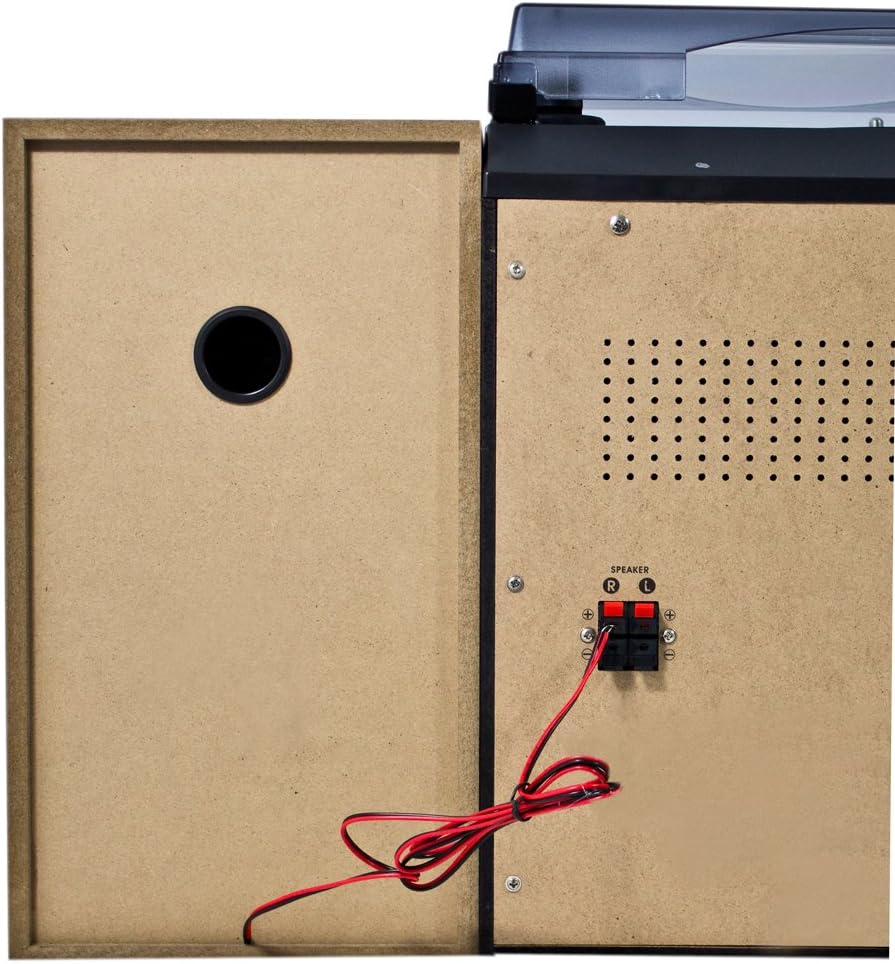
Ffigur 4.2: Cysylltiadau Panel Cefn
- Speaker Terminals (R/L): Connect the included stereo speakers. Ensure correct polarity (+ to + and - to -).
- Mewnbwn Pwer AC: Cysylltwch y cebl pŵer yma.
- Terfynell Antena FM: Connect the supplied FM wire antenna for radio reception.
4.3 Prif Gydrannau

Figure 4.3: Karcher KA 350 Main Components
- Trofwrdd: Located on top, for playing vinyl records.
- 3-Disc CD Changer: Front-loading tray for multiple CDs.
- Dual Cassette Deck: Dau adran casét ar gyfer chwarae a recordio.
- Porth USB: Ar gyfer cysylltu gyriannau fflach USB.
- Slot Cerdyn SD: Ar gyfer mewnosod cardiau cof SD.
- Siaradwyr Stereo: Two external speakers for audio output.
5. Gosod
5.1 Dadbacio a Lleoli
- Tynnwch yr holl gydrannau o'r pecyn yn ofalus.
- Rhowch y prif uned ar arwyneb sefydlog, gwastad.
- Position the speakers on either side of the main unit, ensuring they are at an equal distance for optimal stereo sound.
- Sicrhewch fod awyru digonol o amgylch yr uned.
5.2 Cysylltu'r Siaradwyr
Connect the supplied speakers to the speaker terminals on the rear of the main unit.

Figure 5.1: Speaker Unit
- Identify the speaker wires. Each wire typically has two strands, one marked for positive (+) and one for negative (-).
- Connect the positive (+) terminal of the left speaker to the 'L+' terminal on the main unit's rear panel.
- Connect the negative (-) terminal of the left speaker to the 'L-' terminal on the main unit's rear panel.
- Repeat the process for the right speaker, connecting it to the 'R+' and 'R-' terminals.
- Ensure all connections are secure to prevent sound distortion or damage.
5.3 Cysylltu'r Antena FM
For optimal radio reception, connect the supplied FM wire antenna.
- Insert the FM antenna plug into the FM antenna jack on the rear panel.
- Extend the wire antenna fully and position it for the best possible reception. You may need to experiment with its placement.
5.4 Cysylltiad Pwer
- Plug the AC power cable into the AC power input on the rear of the main unit.
- Plygiwch ben arall y cebl pŵer i mewn i soced wal safonol.
6. Cyfarwyddiadau Gweithredu
6.1 Pŵer Ymlaen/Diffodd
Gwasgwch y AR / SAFON botwm ar y panel blaen neu'r teclyn rheoli o bell i droi'r uned ymlaen neu i ffwrdd.
6.2 Dewis Modd
Gwasgwch y SWYDDOGAETH button repeatedly to cycle through the available modes: CD, Tuner (Radio), Phono (Turntable), Tape (Cassette), and USB/SD.
6.3 Gweithrediad y Chwaraewr CD

Figure 6.1: CD Changer Tray
- Gwasgwch y SWYDDOGAETH botwm i ddewis modd CD.
- Gwasgwch y AGOR/CAU botwm i agor yr hambwrdd CD.
- Rhowch hyd at dri CD ar y hambyrddau disgiau, ochr y label i fyny.
- Gwasgwch y AGOR/CAU botwm eto i gau'r hambwrdd.
- Gwasgwch y CHWARAE/SEIBIANT botwm i ddechrau chwarae.
- Defnyddiwch y SKIP / CHWILIO buttons to navigate between tracks or fast forward/rewind.
6.4 Gweithrediad y Chwaraewr Casetiau/Recordydd
- Gwasgwch y SWYDDOGAETH button to select TAPE mode.
- Gwasgwch y AROS/GOLLWNG button on either Deck 1 or Deck 2 to open the cassette compartment.
- Mewnosodwch dâp casét a chau'r adran.
- Gwasgwch y CHWARAE botwm i ddechrau chwarae.
- To record, insert a blank tape into Deck 2 (for recording from Deck 1 or other sources) or Deck 1 (for recording from external sources if applicable). Press the COFNOD botwm.
6.5 Turntable Operation
- Gwasgwch y SWYDDOGAETH button to select PHONO mode.
- Agorwch y clawr llwch.
- Rhowch record finyl ar y plât.
- Dewiswch y cyflymder priodol (33, 45, neu 78 RPM) gan ddefnyddio'r switsh dewis cyflymder.
- Carefully lift the tone arm and place the stylus onto the desired groove of the record.
- At the end of the record, manually return the tone arm to its rest.
6.6 Chwarae USB/SD
- Gwasgwch y SWYDDOGAETH botwm i ddewis modd USB/SD.
- Mewnosodwch yriant fflach USB i'r porthladd USB neu gerdyn SD i'r slot cerdyn SD.
- Bydd yr uned yn canfod ac yn dechrau chwarae sain gydnaws yn awtomatig files (MP3, WMA, AAC).
- Defnyddiwch y CHWARAE/SEIBIANT a SKIP / CHWILIO botymau i reoli chwarae.
6.7 Gweithrediad Radio
- Gwasgwch y SWYDDOGAETH button to select TUNER mode.
- Gwasgwch y BAND button to select between FM and AM bands.
- Defnyddiwch y DYNIO botymau i diwnio i orsaf â llaw neu pwyswch a daliwch i sganio'n awtomatig.
- I gadw gorsaf, pwyswch y COF botwm, yna defnyddiwch y SKIP / CHWILIO botymau i ddewis rhif rhagosodedig, a phwyswch COF eto i gadarnhau.
6.8 Rheoli o Bell
The included remote control allows convenient operation of all functions from a distance. Ensure batteries are correctly inserted.
7. cynnal
7.1 Glanhau'r Uned
- Tynnwch y plwg bob amser o'r uned o'r allfa bŵer cyn glanhau.
- Defnyddiwch frethyn meddal, sych i sychu'r arwynebau allanol.
- Peidiwch â defnyddio glanhawyr sgraffiniol, cwyrau na thoddyddion gan y gallant niweidio'r gorffeniad.
7.2 Turntable Stylus Care
- Handle the stylus with extreme care. Only touch the tone arm, not the stylus itself.
- Clean the stylus periodically with a soft brush, brushing from back to front.
- Replace the stylus when it shows signs of wear (e.g., distorted sound, skipping).
7.3 Cassette Deck Care
- Regularly clean the tape heads, capstan, and pinch roller with a cotton swab lightly dampyn cynnwys alcohol isopropyl.
- Demagnetize the tape heads periodically to maintain sound quality.
8. Datrys Problemau
| Problem | Achos Posibl | Ateb |
|---|---|---|
| Dim pŵer | Cebl pŵer heb ei gysylltu; Allfa bŵer heb ei gweithredu | Gwiriwch gysylltiad y cebl pŵer; Rhowch gynnig ar soced gwahanol |
| Dim sain | Volume too low; Speakers not connected correctly; Incorrect function mode selected | Increase volume; Check speaker connections and polarity; Select correct function mode |
| CD yn sgipio neu ddim yn chwarae | CD is dirty or scratched; CD inserted incorrectly | Clean or replace CD; Insert CD label side up |
| Derbyniad radio gwael | Antenna not connected or poorly positioned; Weak signal | Connect and adjust FM antenna; Try repositioning the unit |
| Cyflymder y trofwrdd yn anghywir | Cyflymder anghywir wedi'i ddewis | Adjust the speed selector switch (33/45/78 RPM) |
| Problemau chwarae USB/SD | Anghydnaws file format; USB/SD card not inserted correctly; Corrupted files | Sicrhau files are MP3, WMA, or AAC; Reinsert USB/SD card; Try a different USB/SD card |
9. manylebau
| Nodwedd | Manyleb |
|---|---|
| Brand | Karcher |
| Rhif Model | KA 350 |
| Technoleg Cysylltedd | FM/MW Tuner, USB, SD |
| Lliw | Du |
| Math o Siaradwr | Stereo (2 speakers included) |
| Dimensiynau Eitem (L x W x H) | 70.5 x 41 x 37.3 cm |
| Ffynhonnell Pwer | Trydan Corded |
| Dyfeisiau Cydnaws | Ffôn clyfar, Tabled, Chwaraewr MP3, Cyfrifiadur Personol |
| Pwysau Eitem | 10.8 Cilogram |
| Allbwn Pwer (RMS) | 2 x 5 W (Total 50 W) |
| Supported Media Standards | MP3, CD, Cassette, USB, SD |
| Fformatau Sain â Chymorth | CD-DA, MP3, WMA, AAC |
| Cymorth Bluetooth | Nac ydw |
| Nifer y Siaradwyr | 2 |
| Modd Allbwn Sain | Stereo |
| Ffurfweddiad Sain Amgylch | 2.0 |
| Cydrannau wedi'u Cynnwys | Compact system, Remote control, Instruction manual |
10. Gwarant a Chefnogaeth
For warranty information and technical support, please refer to the warranty card included with your product or visit the official Karcher websafle. Cadwch eich prawf prynu ar gyfer unrhyw hawliadau gwarant.
Gwneuthurwr: Karcher