
Rhagymadrodd
This manual provides detailed instructions for the proper use and maintenance of your Royal DM2070 Electronic Organizer. Please read this manual thoroughly before operating the device to ensure safe and efficient use. Keep this manual for future reference.
Gwybodaeth Diogelwch
- Peidiwch ag amlygu'r ddyfais i dymheredd eithafol, golau haul uniongyrchol, na lleithder uchel.
- Osgoi gollwng y ddyfais neu ei darostwng i effeithiau cryf.
- Peidiwch â cheisio dadosod na thrwsio'r ddyfais eich hun. Cyfeiriwch yr holl waith cynnal a chadw at bersonél cymwys.
- Cadwch y ddyfais i ffwrdd o ddŵr a hylifau eraill.
- Defnyddiwch y math o fatri penodedig yn unig ar gyfer ei amnewid.
Cynnwys Pecyn
Gwiriwch fod yr holl eitemau yn bresennol yn eich pecyn:
- Royal DM2070 Electronic Organizer
- Stylus (if applicable)
- Canllaw Cychwyn Cyflym
- Cerdyn Gwarant
Gosod
1. Gosod Batri
The Royal DM2070 requires batteries for operation. Follow these steps to install them:
- Lleolwch glawr adran y batri ar gefn y ddyfais.
- Llithrwch neu codwch y clawr i agor yr adran.
- Insert the required batteries, ensuring correct polarity (+ and -) as indicated inside the compartment.
- Amnewid y clawr adran batri yn ddiogel.
2. Troi Ymlaen a Gosodiadau Cychwynnol
After installing batteries, power on your device and configure basic settings:
- Pwyswch a dal y GRYM botwm nes bod y sgrin yn goleuo.
- The device may prompt you to set the date and time. Use the navigation buttons or stylus to enter the correct information.
- Confirm your settings to complete the initial setup.
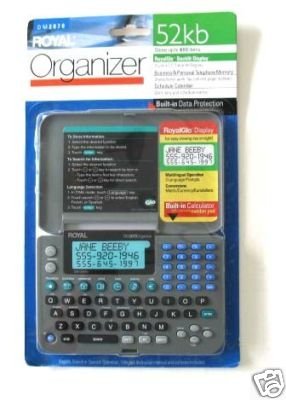
Image: Royal DM2070 Electronic Organizer. This image displays the device's front view, highlighting its screen and keypad, essential for navigation and data entry.
Cyfarwyddiadau Gweithredu
1. Mordwyo
The DM2070 features a keypad and potentially a stylus for navigation. Use the arrow keys to move between menu options and press ENWCH or a designated selection button to confirm.
2. Entering Data
To enter information such as contacts, appointments, or notes:
- Navigate to the desired application (e.g., 'Contacts', 'Calendar', 'Notes').
- Select 'New Entry' or a similar option.
- Use the alphanumeric keypad to input text. Some models may offer an on-screen keyboard via stylus.
- Save your entry before exiting the application.
3. Defnyddio Cymwysiadau
The DM2070 includes various applications:
- Calendr: View daily, weekly, or monthly schedules. Add and edit appointments.
- Cysylltiadau: Store names, phone numbers, addresses, and email information.
- Nodiadau: Create and manage text notes or memos.
- Cyfrifiannell: Perform basic arithmetic calculations.
- Trawsnewidydd arian cyfred: Convert between different currencies (requires manual update of exchange rates on some models).
Cynnal a chadw
1. Glanhau'r Dyfais
To keep your DM2070 in optimal condition:
- Sychwch y sgrin a casing gyda lliain meddal, sych, heb lint.
- Ar gyfer marciau ystyfnig, ychydig yn dampgolchwch y brethyn gyda dŵr; osgoi cemegau llym neu lanhawyr sgraffiniol.
- Ensure no moisture enters openings.
2. Gofal Batri
- Amnewidiwch y batris ar unwaith pan fydd y dangosydd batri isel yn ymddangos.
- Tynnwch y batris os na fydd y ddyfais yn cael ei defnyddio am gyfnod hir er mwyn atal gollyngiadau.
Datrys problemau
If you encounter issues with your Royal DM2070, refer to the following common solutions:
| Problem | Achos Posibl | Ateb |
|---|---|---|
| Nid yw'r ddyfais yn pweru ymlaen. | Batris marw neu wedi'u gosod yn anghywir. | Amnewidiwch y batris gyda rhai newydd, gan sicrhau'r polaredd cywir. |
| Mae'r sgrin yn wag neu wedi rhewi. | Glitch meddalwedd neu fatri isel. | Try a soft reset (refer to Quick Start Guide for specific button combination) or replace batteries. |
| Data loss. | Battery depletion or improper shutdown. | Ensure batteries are fresh. Always save data before powering off. |
| Bysellfwrdd yn anymatebol. | Dust/debris under keys or internal issue. | Clean keypad gently. If problem persists, contact support. |
Manylebau
Key technical specifications for the Royal DM2070 Electronic Organizer:
| Nodwedd | Manylyn |
|---|---|
| Brand | BRENHINOL |
| Rhif Model | DM2070 |
| Deunydd Clawr | Lledr |
| Fformat | Trefnydd |
| Pwysau Eitem | 181 g |
| Dimensiynau Eitem (LxWxH) | 24.4 x 14.5 x 1 centimetr |
| Cynulleidfa Darged | Oedolyn |
Gwarant a Chefnogaeth
The Royal DM2070 Electronic Organizer comes with a standard manufacturer's warranty. Please refer to the warranty card included in your package for specific terms and conditions. For technical support, service, or inquiries, please contact Royal customer service through the contact information provided on the warranty card or the official Royal websafle.