
KLH KL-300i
KLH AUDIO KL-300i Nostalgia 5-n-1 System
Model: KL-300i
Rhagymadrodd
Diolch am brynuasing the KLH AUDIO KL-300i Nostalgia 5-n-1 System. This integrated audio system combines classic and modern audio playback capabilities, including a turntable, CD player, cassette player, AM/FM radio, and an iPod dock. This manual provides essential information for setting up, operating, and maintaining your system to ensure optimal performance and longevity.
Gwybodaeth Diogelwch
Please read all safety instructions carefully before operating this product. Keep this manual for future reference.
- Ffynhonnell Pwer: Cysylltwch yr uned ag allfa bŵer AC o'r cyfaint penodedig yn unig.tage.
- Awyru: Sicrhewch awyru digonol. Peidiwch â rhwystro agoriadau awyru.
- Dŵr a lleithder: Peidiwch ag amlygu'r uned i law na lleithder. Peidiwch â gosod gwrthrychau sy'n llawn hylifau, fel fasys, ar yr uned.
- Gwres: Peidiwch â gosod yr uned ger ffynonellau gwres fel rheiddiaduron, cofrestri gwres, stofiau, neu offer arall (gan gynnwys amplifyddion) sy'n cynhyrchu gwres.
- Glanhau: Datgysylltwch yr uned o'r soced wal cyn glanhau. Defnyddiwch frethyn sych yn unig.
- Gwasanaethu: Peidiwch â cheisio gwasanaethu'r cynnyrch hwn eich hun. Cyfeiriwch yr holl wasanaethu at bersonél gwasanaeth cymwys.
Cynnwys Pecyn
Gwiriwch fod yr holl eitemau a restrir isod wedi'u cynnwys yn y pecyn:
- KLH AUDIO KL-300i Main Unit
- Rheolaeth Anghysbell
- Cebl Mewnbwn Ategol
- AM/FM Antenna Wire
- Llawlyfr Cyfarwyddiadau (y ddogfen hon)
Cynnyrch Drosview
Familiarize yourself with the various components and controls of your KLH AUDIO KL-300i system.
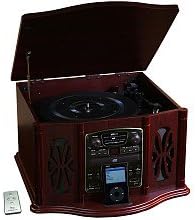
This image displays the KLH AUDIO KL-300i Nostalgia 5-n-1 System. The unit features a dark wood finish. The top lid is open, revealing a turntable. Below the turntable, the front panel includes controls for the CD player, AM/FM radio tuner, and an iPod dock. A small remote control is visible to the left of the main unit.
Rheolaethau Panel Blaen:
- Botwm Pŵer: Yn troi'r uned ymlaen neu i ffwrdd.
- Dewisydd Swyddogaeth: Switches between Phono, CD, Radio, iPod, and Aux modes.
- Knob Cyfrol: Yn addasu lefel y gyfrol meistr.
- CD Player Controls: Play/Pause, Stop, Skip Forward/Backward.
- Tiwniwr Radio: AM/FM band selector, Tuning knob.
- iPod Dock: Connector for iPod devices.
- Aux-In Jack: Mewnbwn 3.5mm ar gyfer dyfeisiau sain allanol.
- Jack Clustffon: Allbwn 3.5mm ar gyfer gwrando preifat.
Panel Uchaf:
- Trofwrdd: For playing vinyl records.
- Caead: Protects the turntable when not in use.
Panel Ochr:
- Dec Casét: For playing audio cassette tapes.
Gosod
Follow these steps for initial setup of your audio system.
- Lleoliad: Place the unit on a stable, flat surface away from direct sunlight, heat sources, and excessive dust or moisture. Ensure there is adequate space around the unit for ventilation.
- Cysylltu Antena: For optimal AM/FM radio reception, connect the supplied antenna wire to the antenna terminal on the rear of the unit. Extend the wire fully for better reception.
- Cysylltiad Pwer: Plygiwch y llinyn pŵer AC i mewn i allfa wal safonol.
- Pŵer Cychwynnol Ar: Press the Power button on the front panel to turn on the unit.
Cyfarwyddiadau Gweithredu
Gweithrediad Cyffredinol:
- Pŵer ymlaen / i ffwrdd: Pwyswch y botwm Power i droi'r uned ymlaen neu i ffwrdd.
- Dewis Swyddogaeth: Use the Function Selector knob or buttons to choose your desired audio source (Phono, CD, Radio, iPod, Aux).
- Addasiad Cyfaint: Rotate the Volume knob to increase or decrease the sound level.
Gweithredu Trofwrdd:
- Lift the lid of the unit.
- Rhowch record finyl ar y plât trofwrdd.
- Select the appropriate speed (33 1/3, 45, or 78 RPM) using the speed selector switch. For 45 RPM records, place the included adapter on the spindle if needed.
- Gently lift the tonearm and position the stylus over the desired starting groove of the record.
- Lower the tonearm slowly onto the record. Playback will begin automatically.
- To stop playback, gently lift the tonearm and return it to its rest.
Gweithrediad Chwaraewr CD:
- Press the Function Selector to CD mode.
- Press the Eject button to open the CD tray.
- Rhowch CD gyda'r ochr label yn wynebu i fyny yn yr hambwrdd.
- Press the Eject button again to close the tray. The CD will begin playing automatically or display the track count.
- Use the Play/Pause, Stop, and Skip buttons to control playback.
Cassette Player Operation:
- Insert a cassette tape into the cassette slot on the side of the unit.
- Pwyswch y botwm Chwarae i ddechrau chwarae.
- Use the Fast Forward (FF) button to advance the tape quickly.
- To stop playback, press the Stop/Eject button. Pressing it halfway will eject the tape.
Gweithrediad Radio AM/FM:
- Press the Function Selector to Radio mode.
- Select either AM or FM band using the band selector switch.
- Rotate the Tuning knob to search for radio stations.
- Adjust the antenna wire for best reception.
iPod Dock Operation:
- Press the Function Selector to iPod mode.
- Carefully place your compatible iPod device onto the iPod dock connector.
- Use your iPod's controls to select and play music. Audio will be routed through the KLH AUDIO system's speakers.
Aux-In Operation:
- Press the Function Selector to Aux mode.
- Connect an external audio device (e.g., MP3 player, smartphone) to the Aux-In jack on the front panel using the supplied 3.5mm auxiliary cable.
- Play audio from your external device. The sound will be played through the KLH AUDIO system's speakers.
Defnydd Rheolaeth Anghysbell:
The remote control primarily operates the CD player functions (Play, Pause, Stop, Skip). Note that the remote cannot turn the unit on or off.
Cynnal a chadw
Proper care will ensure the longevity of your system.
- Glanhau'r Uned: Sychwch du allan yr uned gyda lliain meddal, sych. Peidiwch â defnyddio glanhawyr sgraffiniol, cwyrau na thoddyddion.
- Gofal Stylus: Handle the turntable stylus with extreme care. Clean the stylus periodically with a soft brush, brushing from back to front.
- Gofal CD/Casét: Keep CDs and cassette tapes clean and free of dust. Store them in their cases when not in use.
Datrys problemau
If you experience issues with your system, refer to the following common problems and solutions.
| Problem | Achos Posibl | Ateb |
|---|---|---|
| Dim Pwer | Cebl pŵer heb ei blygio i mewn yn ddiogel. | Check power cord connection to unit and wall outlet. |
| Dim Sain | Cyfaint yn rhy isel; Swyddogaeth anghywir wedi'i dewis; Clustffonau wedi'u cysylltu. | Increase volume; Select correct function; Disconnect headphones. |
| Trofwrdd ddim yn nyddu | Unit not powered on; Belt dislodged. | Ensure unit is on; Contact service if belt issue suspected. |
| Derbyniad Radio Gwael | Antena heb ei hymestyn na'i lleoli'n gywir. | Extend and adjust the antenna wire for better signal. |
| CD ddim yn chwarae | CD inserted incorrectly; CD is scratched or dirty. | Ensure CD is label-side up; Clean or replace CD. |
Manylebau
| Nodwedd | Manyleb |
|---|---|
| Ffynhonnell Pwer | AC 120V ~ 60Hz |
| Dimensiynau (W x D x H) | Approx. 17" x 17" x 10.5" (43.2 cm x 43.2 cm x 26.7 cm) |
| Cyflymder Trofwrdd | 33 1/3, 45, 78 RPM |
| Ystod Amledd Radio | AM: 530-1710 kHz, FM: 88-108 MHz |
| Cydnawsedd CD | CD, CD-R / RW |
| Doc iPod | Compatible with older generation iPods (30-pin connector) |
Gwarant a Chefnogaeth
This product is covered by a limited manufacturer's warranty. For specific warranty terms and conditions, please refer to the warranty card included with your purchase or contact KLH customer support. If you require technical assistance or have questions not covered in this manual, please contact KLH customer service through their official websafle neu'r wybodaeth gyswllt a ddarparwyd gyda'ch cynnyrch.
Ask a question about this manual
Ask about setup, troubleshooting, compatibility, parts, safety, or missing instructions. Manuals+ will review the question and use this page’s manual context to help answer it.