
1. Rhagymadrodd
The Definitive Technology Subamp 600 is a high-powered amplifier designed specifically for use with Definitive Technology IWSub in-wall subwoofers. This amplifier features two discrete high-power amplifier channels within a single housing, making it suitable for driving one or two IWSubs in various audio setups, including whole-house distributed audio or dedicated home theater systems. It is engineered to provide optimal power and simplify the integration of in-wall subwoofers into your audio environment.
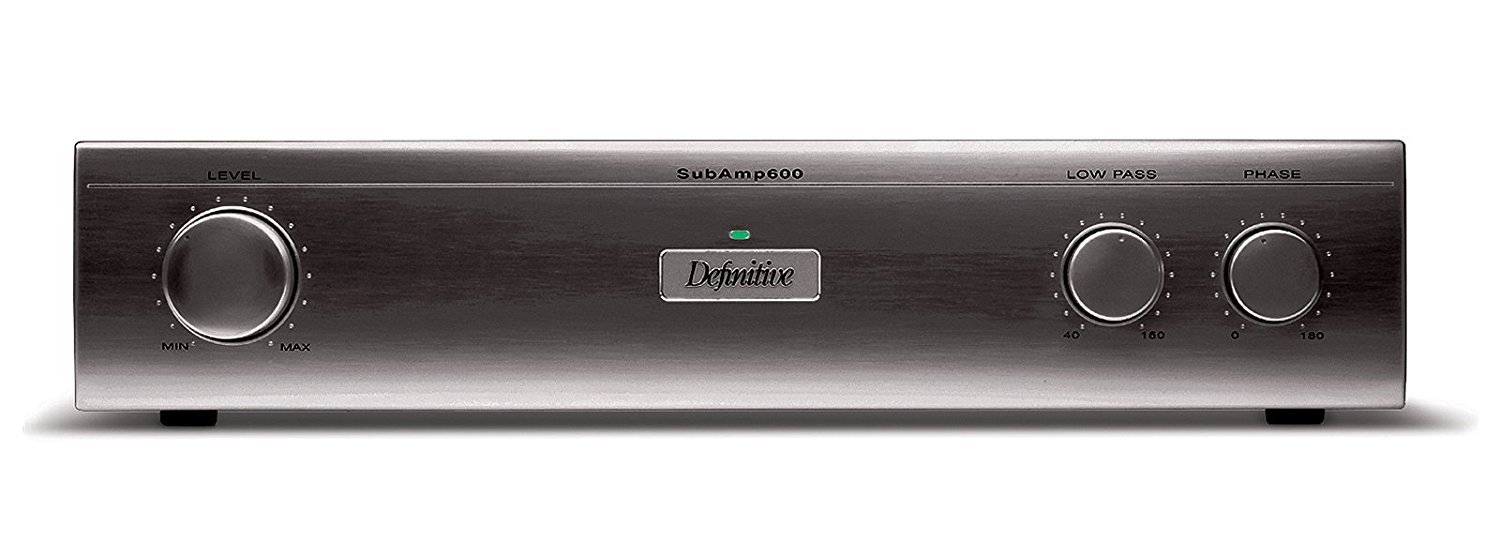
Ffigur 1: Blaen view of the Definitive Technology Subamp 600 120V Amplifer. Mae'r ddelwedd hon yn dangos y amplifier's front panel, typically black, with various controls and indicators for operation.
2. Gwybodaeth Diogelwch
Darllenwch yr holl gyfarwyddiadau diogelwch a gweithredu cyn defnyddio'r cynnyrch hwn. Cadwch y cyfarwyddiadau hyn i gyfeirio atynt yn y dyfodol.
- Ffynhonnell Pwer: Cysylltwch y amplifier only to a 120V AC power source as indicated on the unit.
- Awyru: Sicrhewch awyru priodol. Peidiwch â rhwystro unrhyw agoriadau awyru. Gosodwch yn unol â chyfarwyddiadau'r gwneuthurwr.
- Dŵr a lleithder: Peidiwch â gadael i'r teclyn hwn gael ei amlygu i law na lleithder. Peidiwch â gosod gwrthrychau sy'n llawn hylifau, fel fasys, ar y teclyn.
- Gwres: Peidiwch â gosod yn agos at unrhyw ffynonellau gwres fel rheiddiaduron, cofrestrau gwres, stofiau, neu gyfarpar arall (gan gynnwys amplifyddion) sy'n cynhyrchu gwres.
- Gwasanaethu: Peidiwch â cheisio gwasanaethu'r cynnyrch hwn eich hun. Cyfeiriwch yr holl wasanaethu at bersonél gwasanaeth cymwys.
- Glanhau: Datgysylltwch y cynnyrch hwn o'r soced wal cyn ei lanhau. Defnyddiwch frethyn sych i'w lanhau.
- Ceblau: Amddiffynnwch y llinyn pŵer rhag cael ei gerdded ymlaen neu ei binsio, yn enwedig wrth blygiau, cynwysyddion cyfleustra, a'r pwynt lle maent yn gadael y cyfarpar.
3. Cynnwys Pecyn
Carefully unpack your Definitive Technology Subamp 600. Ensure all items listed below are present and in good condition. If any items are missing or damaged, contact your dealer immediately.
- Definitive Technology IW Sub Amp 600 Ampllewywr
- Cord Pŵer
- Llawlyfr Cyfarwyddiadau (y ddogfen hon)
4. Gosod a Gosod
4.1 Lleoliad
The Subamp 600 is designed to fit conveniently in standard audio equipment racks. Ensure adequate space around the unit for proper ventilation, especially at the rear where connections are made and heat may dissipate.
4.2 Connecting to IWSub In-Wall Subwoofers
The Subamp 600 features two discrete high-power amplifier channels, allowing it to drive one or two Definitive Technology IWSub in-wall subwoofers. The speaker posts are conveniently located on the rear panel for easy access and secure connections.
- Pwer i ffwrdd: Ensure the Subamp 600 and all connected audio components are powered off before making any connections.
- Speaker Wire Preparation: Strip approximately 1/2 inch (12mm) of insulation from the ends of your high-quality speaker wires. Twist the bare strands tightly.
- Connect to IWSub: Connect the positive (+) terminal of the Subamp 600's speaker output to the positive (+) terminal of your IWSub. Connect the negative (-) terminal of the Subamp 600's speaker output to the negative (-) terminal of your IWSub. Repeat for a second IWSub if applicable, using the second ampsianel lififier.
- Cysylltiad Mewnbwn: Connect the audio input from your receiver or pre-amplifier to the appropriate input jacks on the Subamp 600. Use high-quality RCA cables for optimal signal transfer.
4.3 Cysylltiad Pwer
Once all audio connections are made, connect the supplied power cord to the AC inlet on the rear of the Subamp 600, and then plug the other end into a grounded 120V AC wall outlet.
5. Cyfarwyddiadau Gweithredu
5.1 Pweru Ymlaen/Diffodd
The Subamp 600 features an automatic signal sensing power-on function. When an audio signal is detected from your source component, the amplifier will automatically power on. When no signal is detected for a period, it will enter a standby mode.
- Gweithrediad Awtomatig: Simply ensure the amplifier is plugged in and your source component is playing audio.
- Manual Power: A power switch may be present on the front or rear panel for manual control. Refer to the specific unit for its location.
5.2 Addasu Gosodiadau
The Subamp 600 typically includes controls for adjusting volume (gain), crossover frequency, and phase. These controls allow you to integrate the subwoofer seamlessly with your main speakers and room acoustics.
- Volume/Gain: Adjust this to match the output level of your main speakers. Start low and gradually increase.
- Croesiad: This control determines the highest frequency the subwoofer will reproduce. Set it to blend smoothly with your main speakers' low-frequency cutoff.
- Cyfnod: Adjust the phase (0° or 180°) to ensure the subwoofer's output is in phase with your main speakers, preventing cancellation at the crossover point.
6. cynnal
Proper care and maintenance will ensure the longevity and optimal performance of your Subamp 600.
- Glanhau: Use a soft, dry cloth to clean the exterior surfaces of the amplifier. Do not use liquid cleaners, aerosols, or abrasive cloths, as these may damage the finish.
- Awyru: Periodically check that the ventilation openings are clear of dust and debris. Blocked vents can lead to overheating.
- Cysylltiadau: Occasionally check all cable connections to ensure they are secure. Loose connections can degrade audio quality.
7. Datrys Problemau
If you experience issues with your Subamp 600, cyfeiriwch at y problemau a'r atebion cyffredin canlynol:
| Problem | Achos Posibl | Ateb |
|---|---|---|
| Dim sain o'r is-woofer |
|
|
| Ansawdd sain ystumiedig neu wael |
|
|
| Ampllewywr yn gorboethi |
|
|
8. manylebau
| Nodwedd | Manylyn |
|---|---|
| Enw Model | Isamp 600 |
| Dynodydd Model | UCYC |
| Brand | Technoleg Diffiniol |
| Output Power (1 Channel) | 275 Wat |
| Output Power (2 Channels) | 230 Wat y sianel |
| Nifer y Sianeli | 2 |
| Cyftage | 120 folt |
| Dimensiynau Eitem (L x W x H) | 9.63 x 17.06 x 3.69 modfedd |
| Pwysau Eitem | 25 Bunt |
| Math Mowntio | Designed for equipment rack placement (Note: "Wall Mount" is listed in some specifications, but product description indicates rack placement.) |
| UPC | 093207018589 |
9. Gwybodaeth Gwarant
This Definitive Technology Subamp 600 amplifier is covered by a manufacturer's warranty. For specific details regarding the warranty period, coverage, and terms, please refer to the warranty card included with your product or visit the official Definitive Technology websafle. Cadwch eich prawf prynu ar gyfer hawliadau gwarant.
10. Cefnogaeth i Gwsmeriaid
If you have any questions, require technical assistance, or need to report a problem that cannot be resolved using the troubleshooting guide, please contact Definitive Technology customer support.
For the most up-to-date contact information, please visit the official Definitive Technology websafle: