
1. Rhagymadrodd
The Behringer Minimix Mix800 is an ultra-compact karaoke machine designed for studio and stage applications. It features a revolutionary Voice Canceller, an integrated digital echo/reverb processor, two independent microphone channels, and a dedicated 2-band EQ for vocal enhancement.
2. Cyfarwyddiadau Diogelwch
- Cyflenwad Pŵer: Defnyddiwch yr addasydd pŵer penodedig yn unig. Cyfaint anghywirtage gall niweidio'r uned a gwagio'r warant.
- Lleithder: Do not expose the unit to rain or moisture. Avoid placing liquids near the device.
- Awyru: Sicrhewch awyru digonol. Peidiwch â rhwystro agoriadau awyru.
- Gwasanaethu: Peidiwch â cheisio cynnal a chadw'r uned eich hun. Cyfeiriwch yr holl waith cynnal a chadw at bersonél cymwys.
- Glanhau: Glanhewch â lliain sych yn unig.
3. Rheolaethau a Chysylltwyr
3.1 Panel Blaen

Ffigur 1: Panel Blaen Drosoddview of the Minimix Mix800
- MIC LEVEL 1 & 2: Rotary controls to adjust the input level for Microphone Input 1 and 2.
- Dangosyddion CLIP: Red LEDs that illuminate when the input signal is too high, indicating potential clipping. Reduce the MIC LEVEL if these light up.
- MIC INPUT 1 & 2: 1/4-inch TS jack inputs for connecting microphones.
- EQ HIGH: Adjusts the high-frequency content of the microphone signals.
- EQ ISEL: Adjusts the low-frequency content of the microphone signals.
- LEFEL FX: Controls the amount of echo/reverb effect applied to the microphone signals.
- ECHO/REVERB Button: Activates or deactivates the integrated digital effects processor.
- 24 BIT Indicator: Lights up when the 24-bit digital effects processor is active.
- VOICE CANCELLER Button: Activates or deactivates the voice canceller function.
- IN/OUT Indicator: Lights up when the main output is active.
- LEFEL ALLBWN: Rotary control to adjust the overall output volume of the Mix800.
- CLIP Meter: LED meter displaying the output signal level. Aim for levels around 0 dB for optimal performance without clipping.
- Botwm POWER: Yn troi'r uned ymlaen neu i ffwrdd.
3.2 Panel Cefn
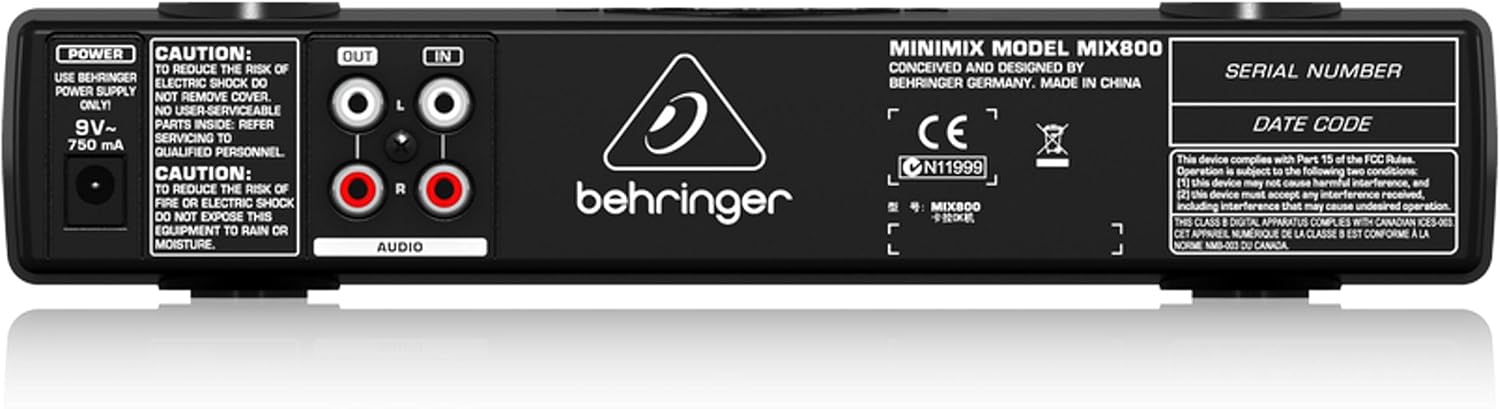
Ffigur 2: Panel Cefn Drosoddview of the Minimix Mix800
- Mewnbwn POWER: Connection for the external 9V~ 750mA power adapter.
- SAIN ALLAN (L/R): RCA outputs for connecting the Mix800 to an amplifier, powered speakers, or a recording device.
- AUDIO IN (L/R): RCA inputs for connecting an external audio source, such as a CD player, media player, or computer.
4. Gosod
Follow these steps to set up your Behringer Minimix Mix800:
- Cysylltu Ffynhonnell Sain: Connect your external audio source (e.g., CD player, computer, smartphone) to the AUDIO IN (L/R) RCA inputs on the rear panel using appropriate RCA cables.
- Allbwn Cysylltu: Cysylltwch y SAIN ALLAN (L/R) RCA outputs on the rear panel to your amplifier, powered speakers, or sound system using RCA cables.
- Connect Microphones: Plygiwch eich meicroffonau i mewn i'r Mewnbwn MIC 1 a Mewnbwn MIC 2 1/4-inch jacks on the front panel.
- Pwer Cysylltu: Connect the supplied 9V~ 750mA power adapter to the GRYM input on the rear panel, then plug the adapter into a suitable power outlet.
- Pŵer Ymlaen: Gwasgwch y GRYM button on the front panel to turn on the Mix800.
5. Cyfarwyddiadau Gweithredu
Once set up, you can begin using your Minimix Mix800:
- Adjust Microphone Levels: Speak into your microphones and slowly turn up the MIC LEVEL 1 a MIC LEVEL 2 controls. Adjust until the sound is clear and loud, but ensure the CLIP indicators do not light up consistently. Occasional flashes are acceptable.
- Adjust EQ: Defnyddiwch y EQ HIGH a EQ ISEL controls to shape the tone of your vocals. Increase EQ HIGH for brighter vocals, and EQ LOW for more warmth or bass.
- Cymhwyso Effeithiau: Gwasgwch y ECHO/REVERB button to activate the digital effects. Adjust the LEFEL FX knob to control the amount of echo or reverb added to your vocals.
- Use Voice Canceller: Gwasgwch y CANSER LLAIS button to attempt to remove vocals from the incoming stereo audio source. Note that the effectiveness of this feature can vary depending on the original audio track.
- Set Output Level: Addaswch y LEFEL ALLBWN knob to control the overall volume sent to your sound system. Monitor the CLIP Meter to prevent distortion.
6. cynnal
- Glanhau: Disconnect the power before cleaning. Use a soft, dry cloth to wipe the exterior of the unit. Do not use liquid cleaners or solvents.
- Storio: Pan nad yw'n cael ei ddefnyddio am gyfnodau hir, storiwch yr uned mewn amgylchedd sych, di-lwch.
- Gofal Cebl: Ensure all cables are free from kinks or damage. Avoid pulling cables forcefully from their connectors.
7. Datrys Problemau
| Problem | Achos Posibl | Ateb |
|---|---|---|
| Dim allbwn sain | Power off; incorrect connections; output level too low; amplifier i ffwrdd. | Check power, all cable connections (input/output), increase OUTPUT LEVEL, ensure ampLiifier ar. |
| Meicroffon ddim yn gweithio | Mic level too low; faulty microphone/cable; mic not fully inserted. | Increase MIC LEVEL, test with another microphone/cable, ensure mic cable is fully inserted and making proper contact. |
| Sain gwyrgam | Input/output levels too high (clipping). | Reduce MIC LEVEL or OUTPUT LEVEL until CLIP indicators/meter no longer show consistent clipping. |
| Voice Canceller ineffective | Original audio track not suitable for voice cancellation. | The effectiveness varies greatly with the source material. This is a characteristic of the technology. |
8. manylebau
| Nodwedd | Manylyn |
|---|---|
| Enw Model | MINIMIX MIX800 |
| Dimensiynau Eitem (L x W x H) | 9.55" x 4.72" x 1.89" |
| Pwysau Eitem | 1.3 pwys |
| Mewnbynnau meicroffon | 2 x 1/4" TS Jacks |
| Mewnbynnau Sain | RCA (L/R) |
| Allbynnau Sain | RCA (L/R) |
| Effeithiau | Digital Echo/Reverb (24-bit) |
| Cydraddoli | 2-band (High, Low) |
| Cyflenwad Pŵer | 9V~ 750mA (external adapter) |
9. Fideo Cynnyrch Swyddogol
Video 1: Manufacturer's overview of the Behringer Minimix Mix800, demonstrating its features and capabilities.
10. Gwarant a Chefnogaeth
For detailed warranty information, please refer to the official Behringer websafle: http://www.music-group.com/warranty.aspx. For technical support or service inquiries, please contact Behringer customer service.