
1. Rhagymadrodd
Diolch am brynuasing the GPX CDP6806DT Personal CD Player. This manual provides important safety instructions, operational guidelines, and maintenance procedures to ensure optimal performance and longevity of your device. Please read this manual thoroughly before using the product and retain it for future reference.
2. Gwybodaeth Diogelwch
Cyfarwyddiadau Diogelwch Pwysig
- Peidiwch â gwneud yr uned yn agored i ddŵr neu leithder.
- Osgowch osod yr uned ger ffynonellau gwres fel rheiddiaduron, cofrestri gwres, stofiau, neu offer arall (gan gynnwys amplifyddion) sy'n cynhyrchu gwres.
- Peidiwch â cheisio dadosod na newid yr uned. Cyfeiriwch yr holl waith cynnal a chadw at bersonél gwasanaeth cymwys.
- Use only the specified batteries (2 x AA batteries). Ensure correct polarity when inserting batteries.
- Tynnwch batris os na fydd yr uned yn cael ei defnyddio am gyfnod estynedig.
- Osgowch wrando ar lefelau cyfaint uchel am gyfnodau hir er mwyn atal niwed i'r clyw.
- Glanhewch yr uned gyda lliain sych yn unig.
3. Cynnwys Pecyn
Carefully unpack your GPX CDP6806DT Personal CD Player and ensure all items are present:
- GPX CDP6806DT Personal CD Player
- Llawlyfr Defnyddiwr (y ddogfen hon)
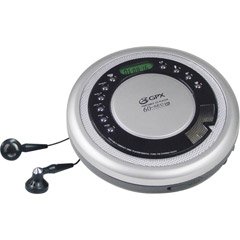
Figure 1: GPX CDP6806DT Personal CD Player. This image illustrates the compact design and general appearance of the device.
4. Rheolyddion a Nodweddion
Familiarize yourself with the controls and features of your GPX CDP6806DT for optimal use.
- Arddangosfa LCD: 6-digit display for track number, time, and FM frequency.
- PLAY/PAUSE (►/−): Press to start or pause CD playback.
- STOPIO (■): Press to stop CD playback.
- SKIP/SEARCH (◀◀/▶▶): Press to skip tracks. Hold to search within a track.
- CYFROL (+/-): Yn addasu'r lefel allbwn sain.
- MODE/PROG: Selects playback mode (Repeat, Random) or programs CD tracks.
- FM TUNER (ON/OFF/BAND): Switches to FM radio mode, turns FM on/off, or changes FM band.
- PRESET (+/-): Navigates saved FM radio presets.
- Adran CD: Area for inserting audio CDs.
- Adran Batri: Located on the bottom, holds 2 AA batteries.
- Jack clustffon (3.5mm): Connects headphones for private listening.
Figure 2: GPX CDP6806DT Controls Layout. This image provides a visual reference for the location of various buttons and ports on the device.
5. Gosod
5.1 Gosod Batri
The GPX CDP6806DT requires two (2) AA batteries (not included) for portable operation.
- Lleolwch yr adran batri ar waelod yr uned.
- Sleidiwch y gorchudd compartment batri ar agor.
- Insert two AA batteries, ensuring the correct polarity (+ and -) as indicated inside the compartment.
- Caewch y clawr adran batri yn ddiogel.
5.2 Cysylltu Clustffonau
For private listening, connect your 3.5mm stereo headphones (not included) to the headphone jack located on the side of the unit.
6. Cyfarwyddiadau Gweithredu
6.1 Chwarae CD
The unit supports CD and CD-R/RW disc formats.
- Open the CD compartment lid by gently pressing the OPEN button (if present, or lifting the lid).
- Rhowch CD gyda'r ochr label yn wynebu i fyny ar y werthyd ganol.
- Close the CD compartment lid firmly until it clicks.
- Gwasgwch y PLAY/PAUSE (►/−) button to begin playback. The track number and elapsed time will appear on the LCD display.
- I oedi chwarae, pwyswch PLAY/PAUSE (►/−). Pwyswch eto i ailddechrau.
- I atal chwarae, pwyswch y STOPIO (■) botwm.
- I neidio i'r trac nesaf, pwyswch SKIP/SEARCH (▶▶).
- To go back to the beginning of the current track, press SKIP/SEARCH (◀◀) once. Press twice to go to the previous track.
- To search rapidly forward or backward within a track, hold down SKIP/SEARCH (▶▶) or (◀◀) yn y drefn honno.
- Addaswch y gyfrol gan ddefnyddio'r CYFROL (+/-) rheolyddion.
Gweithrediad Radio 6.2 FM
The unit features a digital FM tuner with station presets.
- Llithro'r TUNER FM switch to the ON position or press the BAND botwm i fynd i mewn i'r modd FM.
- Gwasgwch y SKIP/SEARCH (▶▶) or (◀◀) botymau i diwnio â llaw i'r amledd a ddymunir.
- To auto-scan and save stations, hold down the PLAY/PAUSE (►/−) button (or refer to specific instructions for auto-scan if available on the device).
- To recall saved presets, use the PRESET (+/-) botymau.
6.3 CD Programming (24-Track)
You can program up to 24 tracks to play in a specific order.
- With the CD stopped, press the MODE/PROG button. "PROG" will flash on the display.
- Defnyddiwch y SKIP/SEARCH (▶▶) or (◀◀) buttons to select the first track you wish to program.
- Gwasgwch MODE/PROG again to confirm the selection. The display will show the program number and the next available program slot.
- Repeat steps 2 and 3 to add up to 24 tracks to your program.
- After programming all desired tracks, press PLAY/PAUSE (►/−) i ddechrau chwarae wedi'i raglennu.
- To clear the program, press the STOPIO (■) botwm ddwywaith.
6.4 Anti-Skip Protection (ASP)
The GPX CDP6806DT features a 60-second Anti-Skip Protection system. This system buffers audio data to minimize interruptions caused by minor shocks or vibrations during CD playback. The ASP activates automatically when a CD is playing.
7. cynnal
7.1 Glanhau'r Uned
- Sychwch du allan yr uned gyda lliain meddal, sych.
- Peidiwch â defnyddio glanhawyr sgraffiniol, cwyrau na thoddyddion.
- If the CD lens needs cleaning, use a specialized CD lens cleaner disc or a soft, lint-free cloth designed for optical lenses.
7.2 Gofal Batri
- Tynnwch y batris os na chaiff yr uned ei defnyddio am gyfnod hir er mwyn atal gollyngiadau.
- Peidiwch â chymysgu batris hen a newydd, na gwahanol fathau o fatris.
- Gwaredwch fatris ail-law yn gyfrifol yn unol â rheoliadau lleol.
8. Datrys Problemau
If you experience issues with your GPX CDP6806DT, please consult the following table for common problems and solutions.
| Problem | Achos / Ateb Posibl |
|---|---|
| Nid yw'r uned yn pweru ymlaen. | Check if batteries are inserted correctly with proper polarity. Ensure batteries are fresh and not depleted. |
| Dim sain o'r clustffonau. | Ensure headphones are fully plugged into the headphone jack. Increase the volume level. Test with another pair of headphones. |
| CD skips or playback is interrupted. | Ensure the CD is clean and free of scratches or smudges. Clean the CD with a soft, lint-free cloth. Ensure the unit is on a stable surface or held steadily during use. |
| CD does not play. | Ensure the CD is inserted correctly with the label side up. Close the CD compartment lid completely. Check if the CD is a supported format (CD, CD-R/RW). |
| Mae derbyniad radio FM yn wael. | Extend the headphone cable as it acts as the antenna. Try moving to a different location. |
9. manylebau
- Brand: GPX
- Model: CDP6806DT
- Fformatau Disgiau â Chymorth: CD, CD-R / RW
- Diogelu Gwrth-Sip: 60 eiliad
- Arddangos: LCD 6-digid
- Radio: Digital FM Tuner with Presets
- CD Programming: 24-trac
- Ffynhonnell Pwer: 2 x Batri AA (heb eu cynnwys)
- Cysylltedd: Jac Clustffonau 3.5mm (Cynorthwyol)
10. Gwarant a Chefnogaeth
For detailed warranty information, please refer to the warranty card included with your original product packaging. For technical support, service inquiries, or to purchase replacement parts, please visit the official GPX websafle neu cysylltwch â'u hadran gwasanaeth cwsmeriaid gan ddefnyddio'r wybodaeth gyswllt a ddarperir yn nogfennaeth eich cynnyrch.
Cadwch eich prawf prynu ar gyfer hawliadau gwarant.