
Denon AVR-550SDS
Denon AVR-550SD-S AV Surround Receiver User Manual
Model: AVR-550SD-S | Brand: Denon
1. Rhagymadrodd
This manual provides detailed instructions for the safe and efficient operation of your Denon AVR-550SD-S AV Surround Receiver. Please read this manual thoroughly before using the unit and keep it for future reference. The Denon AVR-550SD-S is designed to deliver high-quality audio and video performance for your home entertainment system, supporting various audio formats and connectivity options.
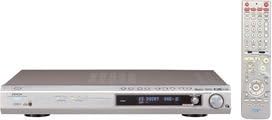
Figure 1.1: The Denon AVR-550SD-S AV Surround Receiver (silver unit) and its accompanying remote control (right).
2. Gwybodaeth Diogelwch
Dilynwch y rhagofalon diogelwch canlynol bob amser i atal sioc drydanol, tân, neu ddifrod i'r uned:
- Ffynhonnell Pwer: Connect the unit only to an AC outlet of the specified voltage.
- Awyru: Ensure adequate ventilation. Do not block ventilation openings. Maintain at least 10 cm (4 inches) of clear space around the unit.
- Dŵr a lleithder: Peidiwch ag amlygu'r uned i law na lleithder. Peidiwch â gosod gwrthrychau sy'n llawn hylifau, fel fasys, ar yr uned.
- Gwres: Osgowch osod yr uned ger ffynonellau gwres fel rheiddiaduron, cofrestri gwres, stofiau, neu offer arall (gan gynnwys amplifiers) that produce heat. The top panel can become quite warm during operation.
- Glanhau: Datgysylltwch yr uned o'r soced wal cyn glanhau. Defnyddiwch frethyn sych i'w lanhau.
- Gwasanaethu: Peidiwch â cheisio gwasanaethu'r cynnyrch hwn eich hun. Cyfeiriwch yr holl wasanaethu at bersonél gwasanaeth cymwys.
3. Cynnwys Pecyn
Wrth agor y pecyn, gwnewch yn siŵr bod yr holl eitemau canlynol yn bresennol:
- Denon AVR-550SD-S AV Surround Receiver
- Uned Rheoli o Bell
- Cord Pŵer
- Llawlyfr Defnyddiwr (y ddogfen hon)
- Batteries for Remote Control (if included)
Os oes unrhyw eitemau ar goll neu wedi'u difrodi, cysylltwch â'ch deliwr ar unwaith.
4. Gosod
4.1. Connecting Your Speakers
The AVR-550SD-S supports 6.1 channel surround sound. Connect your speakers to the corresponding terminals on the rear panel. Ensure correct polarity (+ to + and - to -) for optimal sound quality.
- Siaradwyr Blaen (Chwith/Dde): Connect your main left and right speakers.
- Siaradwr y Ganolfan: Cysylltwch siaradwr eich sianel ganolog am ddeialog glir.
- Siaradwyr Amgylchynol (Chwith/Dde): Connect your left and right surround speakers.
- Surround Back Speaker: Connect your surround back speaker for 6.1 channel audio.
- Subwoofer: Connect an active subwoofer to the SUBWOOFER PRE OUT terminal.
4.2. Connecting Audio/Video Components
The receiver offers various input options for your audio and video sources:
- Mewnbynnau Sain Digidol:
- Optical (x2): For devices like CD players, game consoles, or TVs with optical digital output.
- Coaxial (x1): For devices with coaxial digital output.
- Mewnbynnau Sain Analog: RCA stereo inputs for devices like CD players, tape decks, or older game consoles.
- Mewnbwn Fideo:
- Composite Video: Standard definition video input.
- S-Video: Higher quality standard definition video input.
- Component Video (D-terminal): For higher definition video signals (Y, Pb, Pr).
- HDMI: Note that this model does not feature HDMI inputs/outputs.
Connect the audio and video outputs from your source devices (e.g., DVD player, game console, cable box) to the corresponding inputs on the AVR-550SD-S. Then, connect the video output from the receiver to your TV or projector.
4.3. Cyfluniad Cychwynnol
After connecting all components, power on the receiver and your display device. Use the on-screen display (if available) or the front panel controls to perform initial setup, including:
- Gosodiad Siaradwr: Configure speaker size (small/large), distance, and level for each channel to optimize surround sound.
- Input Assignment: Assign specific audio/video inputs to the corresponding source selectors (e.g., DVD, CD, TV).
- Dewis Modd Sain: Choose default sound modes for different input types.
5. Cyfarwyddiadau Gweithredu
5.1. Gweithrediad Sylfaenol
- Pŵer ymlaen / i ffwrdd: Gwasgwch y GRYM botwm ar y panel blaen neu'r teclyn rheoli o bell.
- Dewis Mewnbwn: Defnyddiwch y DETHOLWR INPUT knob on the front panel or the dedicated input buttons on the remote (e.g., DVD, CD, TV) to switch between connected sources.
- Rheoli cyfaint: Addaswch y gyfrol meistr gan ddefnyddio'r botwm mawr CYFROL y botwm ar y panel blaen neu'r CYFROL +/- botymau ar y teclyn anghysbell.
- Tewi swyddogaeth: Gwasgwch y MUTE button on the remote to temporarily silence the audio. Press again to restore.
5.2. Advanced Features and Sound Modes
The AVR-550SD-S supports various surround sound formats and processing modes to enhance your listening experience:
- Dolby Digital EX: Provides a 6.1 channel experience from Dolby Digital sources by deriving a surround back channel.
- DTS-ES: Similar to Dolby Digital EX, DTS-ES Discrete 6.1 offers a dedicated surround back channel, while DTS-ES Matrix 6.1 derives it.
- DSP Surround Modes: The receiver includes various Digital Signal Processing (DSP) modes to simulate different acoustic environments (e.g., Hall, Stadium, Rock Arena). Use the MODD AMGYLCH buttons on the remote to cycle through these options.
- Rheoli Tôn: Adjust Bass and Treble levels to suit your preference using the tone control knobs or menu options.
6. cynnal
Proper maintenance ensures the longevity and optimal performance of your Denon AVR-550SD-S:
- Glanhau:
- Sychwch yr arwynebau allanol gyda lliain meddal, sych.
- Am staeniau ystyfnig, dampen the cloth with a mild, non-abrasive cleaner and wipe gently, then dry with a clean cloth.
- Do not use volatile liquids such as alcohol, paint thinner, or benzine, as they may damage the finish.
- Awyru: Regularly check that the ventilation openings on the top and sides of the unit are not obstructed by dust or other objects. Proper airflow prevents overheating.
- llinyn pŵer: Periodically inspect the power cord for any signs of damage. If damaged, contact qualified service personnel for replacement.
- Storio: Os ydych chi'n storio'r uned am gyfnod hir, datgysylltwch hi o'r soced bŵer a'i storio mewn lle oer, sych i ffwrdd o olau haul uniongyrchol a thymheredd eithafol.
7. Datrys Problemau
Cyn cysylltu â'r gwasanaeth, gwiriwch y problemau cyffredin canlynol a'u datrysiadau:
| Problem | Achos Posibl | Ateb |
|---|---|---|
| Dim pŵer | Power cord disconnected; Power outage; Unit in standby mode. | Ensure power cord is securely plugged in; Check household circuit breaker; Press the POWER button. |
| Dim sain | Volume too low; Mute function active; Incorrect input selected; Speaker wires disconnected; Incorrect speaker setup. | Increase volume; Deactivate MUTE; Select correct input source; Check speaker connections; Verify speaker setup in menu. |
| Dim llun | Incorrect video input selected on TV; Video cables disconnected; Incorrect input selected on receiver. | Switch TV to correct video input; Check all video cable connections; Select correct input source on receiver. |
| Rheolaeth bell ddim yn gweithio | Batteries depleted or inserted incorrectly; Obstruction between remote and receiver; Remote sensor blocked. | Replace batteries, ensuring correct polarity; Remove any obstructions; Ensure remote sensor on receiver is clear. |
If the problem persists after trying these solutions, please contact Denon customer support or a qualified service technician.
8. manylebau
Key technical specifications for the Denon AVR-550SD-S AV Surround Receiver:
- Rhif Model: AVR-550SDS
- Brand: Denon
- Sianeli: 6.1 Sianel
- Pwer Allbwn Uchaf: 100W x 6 (into 6 ohms, 1kHz, 0.7% THD) - Note: Product specifications list 125W and 600W output, but 100W x 6 is a common configuration for 6.1 channel receivers. Using the more specific feature bullet.
- Supported Surround Formats: DOLBY DIGITAL EX, DTS-ES
- Mewnbynnau Sain Digidol: Optical x 2, Coaxial x 1
- HDMI: Heb ei gefnogi
- Technoleg Cysylltedd: HDMI (Note: While the feature bullets state HDMI is not supported, the detailed feature bullets explicitly state that this model has no HDMI inputs, outputs, or link functionality. Please rely on the detailed feature bullet information for connectivity.)
- Lliw: Arian
- Pwysau Cynnyrch: 4.7 kg
- First Available Date on Amazon.co.jp: Ebrill 19, 2005
Note on HDMI: While "HDMI" is listed under connectivity technology in some specifications, the detailed feature bullets explicitly state that this model has no HDMI inputs, outputs, or link functionality. Please rely on the detailed feature bullet information for connectivity.
9. Gwarant a Chefnogaeth
For warranty information, please refer to the warranty card included with your product or visit the official Denon website. Denon provides customer support for product inquiries, technical assistance, and service requests.
Denon Official Websafle: www.denon.com
Please have your model number (AVR-550SD-S) and serial number ready when contacting support.
Ask a question about this manual
Ask about setup, troubleshooting, compatibility, parts, safety, or missing instructions. Manuals+ will review the question and use this page’s manual context to help answer it.