
EIZO L767-R
NANAO FlexScan L767-R User Manual
Model: L767-R | Brand: EIZO
1. Rhagymadrodd
Diolch am brynuasing the NANAO FlexScan L767-R 19-inch Color LCD Display. This manual provides essential information for setting up, operating, and maintaining your monitor. Please read this manual thoroughly before use to ensure proper and safe operation.
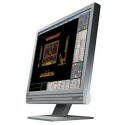
Figure 1: NANAO FlexScan L767-R LCD Monitor. This image shows the monitor from a slight angle, highlighting its slim bezel and adjustable stand.
2. Nodweddion
The FlexScan L767-R is designed for optimal visual performance and user convenience. Key features include:
- Arddangosfa lliw bywiog: Supports approximately 16.77 million full colors for impressive color vibrancy.
- FineContrast Function: Easily adjust brightness and gamma settings to match content (text, images) for optimal viewing.
- Dual Input Support: Equipped with both analog and digital input terminals for versatile connectivity.
- Sain integredig: Features built-in speakers for audio output.
- Stondin ergonomig: The stand allows for a 50mm vertical height adjustment, enhancing user comfort.
- Arwyneb Di-lacharedd: The screen surface is non-glare, reducing reflections and eye strain.
3. Gosod
Follow these steps to set up your FlexScan L767-R monitor:
- Dadbacio'r Monitor: Tynnwch y monitor a'r holl ategolion o'r pecynnu yn ofalus.
- Lleoli'r Monitor: Place the monitor on a stable, flat surface. Ensure adequate ventilation around the monitor.
- Cysylltu Cebl Fideo:
- Canys Cysylltiad Analog: Connect the D-Sub (VGA) cable from your computer's video output to the analog input port on the monitor.
- Canys Cysylltiad Digidol: Connect the DVI cable from your computer's video output to the digital input port on the monitor.
- Connect Audio Cable (Optional): If you wish to use the built-in speakers, connect an audio cable from your computer's audio output to the audio input port on the monitor.
- Cysylltu cebl pŵer: Plug the power cable into the monitor's power input, then plug the other end into a grounded electrical outlet.
- Pŵer Ymlaen: Press the power button on the monitor. Power on your computer. The monitor should display your computer's screen.
4. Gweithredu
This section describes the basic operation of your FlexScan L767-R monitor.
4.1. FineContrast Function
The FineContrast function allows you to quickly switch between different display modes optimized for various content types. Use the dedicated buttons on the monitor's front panel to cycle through modes such as Text, Picture, Movie, and Custom. Each mode adjusts brightness, gamma, and color temperature for the best viewing profiad.
4.2. Stand Adjustment
The monitor stand offers vertical height adjustment. Gently push or pull the monitor panel up or down to adjust its height within the 50mm range. Ensure the monitor is stable after adjustment.
4.3. Dewislen Arddangos Ar-Sgrin (OSD).
Access the OSD menu using the control buttons on the front panel to fine-tune settings such as brightness, contrast, color balance, input selection, and more. Refer to the detailed OSD menu guide in the full manual for comprehensive options.
5. cynnal
Mae cynnal a chadw priodol yn sicrhau hirhoedledd a pherfformiad eich monitor.
- Glanhau'r sgrin: Defnyddiwch frethyn meddal, di-lint ychydig dampened with water or a non-abrasive, monitor-specific cleaning solution. Do not spray liquid directly onto the screen.
- Glanhau'r Casing: Sychwch y monitor casing gyda lliain meddal, sych. Osgowch ddefnyddio glanedyddion neu doddyddion cryf.
- Awyru: Gwnewch yn siŵr nad yw agoriadau awyru'r monitor wedi'u blocio i atal gorboethi.
- Pwer i ffwrdd: Diffoddwch y monitor bob amser a'i ddatgysylltu o'r soced pŵer cyn ei lanhau neu os na fydd yn cael ei ddefnyddio am gyfnod hir.
6. Datrys Problemau
Os byddwch chi'n dod ar draws problemau gyda'ch monitor, cyfeiriwch at y problemau a'r atebion cyffredin canlynol:
- Dim Delwedd ar y Sgrin:
- Gwiriwch a yw'r monitor wedi'i bweru ymlaen.
- Verify that the video cable is securely connected to both the monitor and the computer.
- Ensure the correct input source is selected on the monitor (Analog/Digital).
- Image is Distorted or Blurry:
- For analog connections, perform an auto-adjustment via the OSD menu.
- Check the display resolution settings on your computer. Ensure it matches the monitor's native resolution (1280x1024).
- Dim sain o'r siaradwyr:
- Verify the audio cable is properly connected.
- Gwiriwch y gosodiadau cyfaint ar y monitor a'ch cyfrifiadur.
If the problem persists after trying these solutions, please contact EIZO customer support or refer to the comprehensive troubleshooting guide in the full product manual.
7. manylebau
| Nodwedd | Manyleb |
|---|---|
| Brand | EIZO |
| Model | L767-R |
| Maint Sgrin | 19 modfedd |
| Datrysiad | 1280 x 1024 |
| Disgrifiad o Arwyneb y Sgrin | Di-lacharedd |
| Disgleirdeb | 250 cd/m² |
| Cyfradd Adnewyddu | 60 Hz |
| Technoleg Backlight | CCFL |
| Porthladdoedd Mewnbwn HDMI | 0 |
| Swyddogaeth USB | Dim |
| Siaradwr adeiledig | Oes |
| Swyddogaeth Teledu | Nac ydw |
| 3D Display Support | Heb ei gefnogi |
| Panel Cyffwrdd | Heb ei gefnogi |
| Pwysau Eitem | 10 Cilogram |
| Dimensiynau Pecyn | 56 x 53.5 x 22.5 cm |
8. Gwarant a Chefnogaeth
For detailed warranty information, please refer to the warranty card included with your product or visit the official EIZO websafle. Gall telerau ac amodau'r warant amrywio yn ôl rhanbarth.
For technical support, product inquiries, or service requests, please contact EIZO customer support through their official channels. Keep your product model number (L767-R) and serial number ready when contacting support.
EIZO Official Websafle: www.eizo.com
Ask a question about this manual
Ask about setup, troubleshooting, compatibility, parts, safety, or missing instructions. Manuals+ will review the question and use this page’s manual context to help answer it.