
Weller D550
Weller D550 Dual Heat Professional Soldering Gun User Manual
Brand: Weller | Model: D550
1. Rhagymadrodd a Throsoddview
The Weller D550 Dual Heat Professional Soldering Gun is a heavy-duty tool designed for various soldering applications. It features dual-heat settings, providing either 200 or 260 watts of power, making it suitable for both delicate and robust soldering tasks. Its pistol grip design and fingertip trigger heat selector ensure comfortable and precise operation. The heavy-gauge, high-efficiency, tin-plated copper tip heats rapidly, reaching operating temperature in approximately 6 seconds.
This product is manufactured in Mexico and is built for durability and professional use.

Figure 1: Weller D550 Dual Heat Professional Soldering Gun.
2. Gosod
2.1 Rhagofalon Diogelwch
- Always wear appropriate eye protection when soldering.
- Ensure adequate ventilation in your workspace to avoid inhaling fumes.
- Do not touch the soldering tip or shaft when the gun is hot.
- Place the soldering gun on a heat-resistant surface or a dedicated stand when not in use.
- Cadwch allan o gyrraedd plant.
2.2 Dadbacio ac Archwilio
Carefully remove the soldering gun and any accessories from its packaging. Inspect the unit for any signs of damage during shipping. If any damage is observed, do not use the tool and contact customer support.

Figure 2: Weller D550 Soldering Gun in its packaging.
2.3 Tip Installation
The Weller D550 comes with a pre-installed tin-plated copper tip. If you need to replace or install a new tip:
- Ensure the soldering gun is unplugged and completely cool.
- Loosen the screws holding the tip in place.
- Carefully remove the old tip.
- Insert the new tip, ensuring it is properly seated.
- Tynhau'r sgriwiau'n ddiogel, ond peidiwch â gor-dynhau.

Ffigur 3: Agos view of the soldering tip.
2.4 Cysylltiad Pwer
Connect the power cord to a standard AC electrical outlet. The Weller D550 operates on AC power.

Figure 4: Power plug for the Weller D550.
3. Cyfarwyddiadau Gweithredu
3.1 Powering On and Heat Selection
The Weller D550 features a fingertip trigger for power activation and heat selection. The gun heats up in approximately 6 seconds.
- Gwres Isel (200W): Press the trigger partially to activate the lower heat setting.
- Gwres Uchel (260W): Press the trigger fully to activate the higher heat setting.
- Release the trigger to turn off the heating element.
3.2 Integrated Work Light
The soldering gun is equipped with an integrated LED light that illuminates the work area, providing better visibility for precise soldering tasks.
3.3 Soldering Technique
Ensure the tip is clean and tinned before use. Apply the hot tip to the joint to be soldered, allowing both the component lead and the pad to heat simultaneously. Once heated, apply solder to the joint, not directly to the tip. Allow the solder to flow smoothly and evenly around the joint. Remove the solder and then the soldering gun. Allow the joint to cool undisturbed.
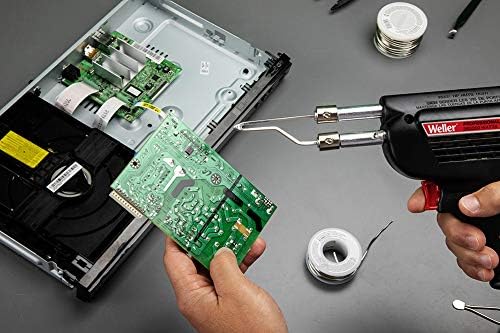
Figure 5: Soldering a circuit board using the Weller D550.
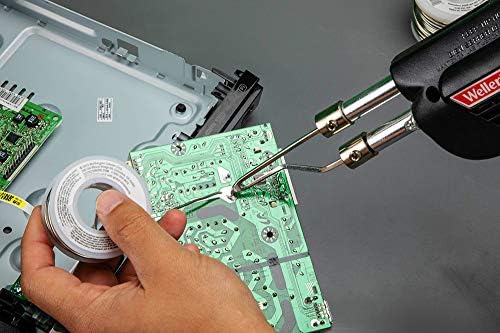
Ffigur 6: Manwl view of the soldering process.
4. cynnal
4.1 Tip Cleaning and Tinning
Regular cleaning and tinning of the soldering tip are crucial for optimal performance and longevity. Wipe the hot tip on a damp sponge or brass wool to remove excess solder and oxidation. Immediately re-tin the clean tip with a small amount of fresh solder to prevent oxidation.
4.2 Gofal Cyffredinol
- Store the soldering gun in a dry, safe place when not in use.
- Avoid dropping the tool, as this can damage internal components or the tip.
- Do not attempt to disassemble the main body of the soldering gun. Refer to qualified service personnel for repairs.
5. Datrys Problemau
| Problem | Achos Posibl | Ateb |
|---|---|---|
| Soldering gun does not heat up. | Not plugged in; faulty outlet; damaged cord; internal fault. | Check power connection; try a different outlet; inspect cord for damage; contact service if cord is damaged or internal fault suspected. |
| Tip not heating sufficiently. | Tip is loose or oxidized; incorrect heat setting. | Ensure tip is securely tightened and clean; select higher heat setting if needed. |
| Solder does not flow well. | Tip is dirty or not tinned; insufficient heat; incorrect solder type. | Clean and re-tin tip; ensure proper heat setting; use appropriate solder for the application. |
6. manylebau
| Nodwedd | Manylyn |
|---|---|
| Brand | Weller |
| Model | D550 |
| Wattage | 200W / 260W (Dual Heat) |
| Ffynhonnell Pwer | AC |
| Pwysau Eitem | 1.36 pwys |
| Hyd yr Eitem | 9.5 modfedd |
| Graddfa Tymheredd Uchaf | 1100 Gradd Fahrenheit |
| Trin Deunydd | Plastig |
| Arddull Pen | Tin-plated copper tip |
| Gwlad Tarddiad | Mecsico |
| UPC | 037103475411 |
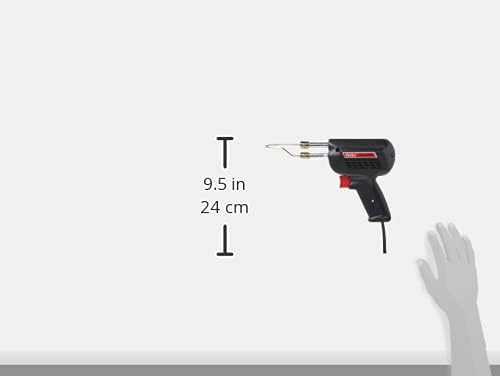
Ffigur 7: Dimensiynau'r cynnyrch.
7. Gwarant a Chefnogaeth
7.1 Gwybodaeth Gwarant
The Weller D550 Dual Heat Professional Soldering Gun comes with a Gwarant 7 Flynedd from the manufacturer, Apex Tool Group. Please retain your proof of purchase for warranty claims.
7.2 Adnoddau Ychwanegol
For further assistance or detailed user guides, please refer to the official Weller website or the provided User Guide PDF:
Ask a question about this manual
Ask about setup, troubleshooting, compatibility, parts, safety, or missing instructions. Manuals+ will review the question and use this page’s manual context to help answer it.